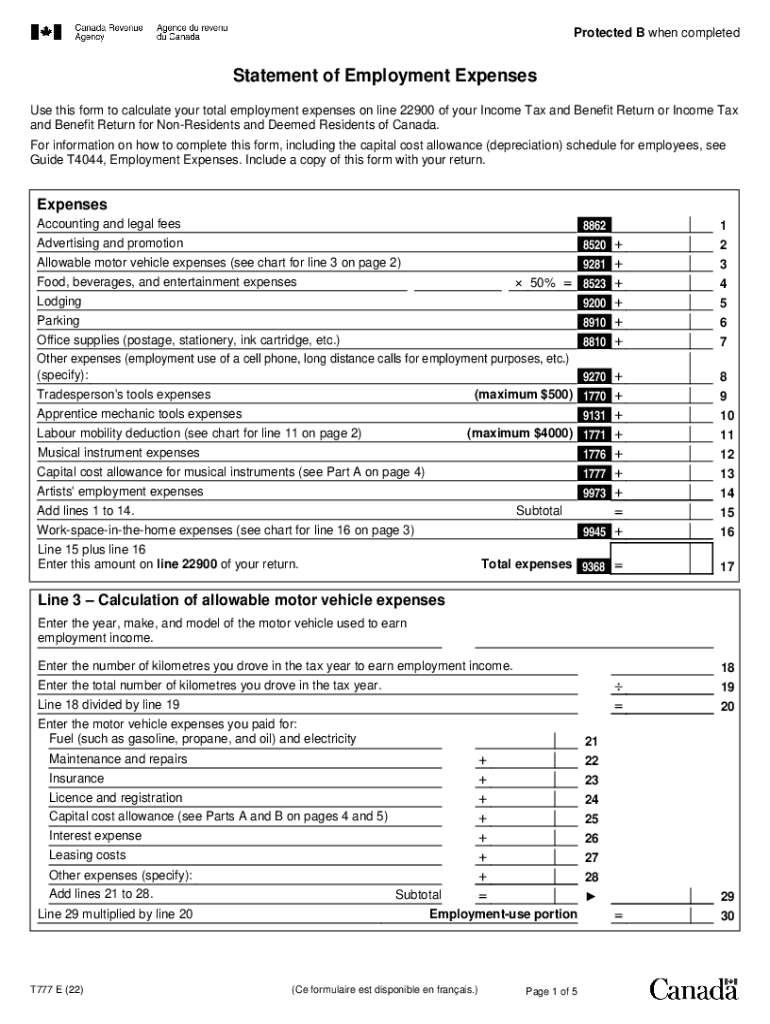
Protected B when completedStatement of Employment Expenses Use this form to calculate your total employment expenses on line 22900 of your Income Tax and Benefit Return or Income Tax and Benefit Return.

Open form follow the instructions

Easily sign the form with your finger

Send filled & signed form or save
How to fill out the Canada T777 E online
The Canada T777 E form is essential for calculating total employment expenses, helping individuals ensure they claim all eligible deductions correctly on their income tax return. This guide will provide step-by-step instructions to assist you in completing the form accurately and efficiently.
Follow the steps to fill out the Canada T777 E form effectively.
- Click the ‘Get Form’ button to access the T777 E form and open it in your preferred editor.
- Begin by entering your personal information at the top of the form, including your name and address. Make sure this information matches the details on your tax return.
- In the 'Expenses' section, list all your incurred employment expenses. Start inputting specific amounts for expenses like accounting and legal fees on the appropriate lines.
- Continue with the 'Allowable motor vehicle expenses' section. Fill in the year, make, and model of your vehicle, and provide details about kilometers driven for work. Allocate the associated expenses carefully, including fuel and maintenance.
- Advance to the 'Labour mobility deduction' section if applicable. Enter your eligible relocation expenses and ensure you read the guidelines carefully to determine eligibility for deductions.
- Complete the 'Work-space-in-the-home expenses' section if you work from home. Calculate your employment-use percentage accurately to determine the deductible amount.
- As you finalize the form, review all entries for accuracy. Ensure that the total allowable deductions calculated reflect the expenses you are claiming.
- Once all sections are completed, you can save changes to your document. Consider downloading, printing, or sharing the form as needed for your records.
Start completing the Canada T777 E form online now to maximize your employment expense claims.
Experience a faster way to fill out and sign forms on the web. Access the most extensive library of templates available.
Related content
201 CANADA DR EAST SYRACUSE NY 13057 A 05 C994 FEDEX GROUND PACKAGE SYSTEM INC ... 5828 E...
by CS Simmons · 1985 · Cited by 2 — nine key steps, which form the operational...
User manual instruction guide for Lone Worker Protection Device S10621 Connexion2 Limited...
Get answers to your most pressing questions about US Legal Forms API.
How do I inform my CRA of leaving Canada?
by phone using our Individual Income Tax Enquiries line at 1-800-959-8281. (The CRA will ask you for your name, address, social insurance number, date of birth, and other information from your tax return or notice of assessment.)...Changing your address social insurance number. new address. date of your move. signature.
What is the Canada employment deduction?
The Canada employment amount allows you to claim work-related expenses such as home computers, uniforms and supplies in the public and private sector.
What is the tax form for working from home in Canada?
You must use Form T777 to claim your home office expenses if you are: claiming other employment expenses on line 22900 (for example, motor vehicle expenses), as well as home (work-space-in-the-home, office supplies and certain phone expenses)
Can you write off a laptop for work Canada?
Computers, cell phones, and other equipment – Commission employee expenses. Go to Home office expenses for employees for more information. If you lease computers, cell phones, fax machines, or other equipment, you can deduct the part of the lease cost that reasonably relates to earning your commission income.
What is Ontario income tax form T777?
T777 is a Statement of Employment Expenses designed mostly for those of us who work from home, as well as certain commission and salaried employees. The main difference is that employers will issue a T2200 form which includes all expenses your contract required you to incur.
Can you write off clothes for work Canada?
You cannot deduct the cost of travel to and from work, or other expenses, such as most tools and clothing. You have to keep records for each year you claim expenses. For more information, see Keeping records.
What is T777 Canada?
T777 Statement of Employment Expenses - Canada.ca.
What is a t77?
If you're a salaried or commission employee, then you'll use a T777 to claim any employment expenses to which you are entitled. If you're a transportation or trucking employee, then you will use a TL2.
Use professional pre-built templates to fill in and sign documents online faster. Get access to thousands of forms.
If you believe that this page should be taken down, please follow our DMCA take down process here.