Get Giftrust Options Form 1 - American Century
How it works
-

Open form follow the instructions
-

Easily sign the form with your finger
-

Send filled & signed form or save
How to fill out the Giftrust Options Form 1 - American Century online
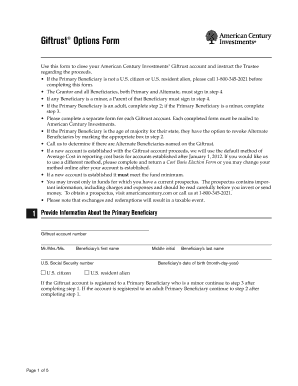
Filling out the Giftrust Options Form 1 - American Century online is a straightforward process that facilitates the closing of your American Century Investments Giftrust account. This guide provides a detailed walkthrough of each section of the form to ensure that users can complete it accurately and efficiently.
Follow the steps to fill out the Giftrust Options Form 1 - American Century
- Press the ‘Get Form’ button to obtain the Giftrust Options Form 1 - American Century and open it in your preferred editing tool. This will allow you to fill out the necessary information directly within the document.
- In the first section, 'Provide Information About the Primary Beneficiary', fill in the following fields: Giftrust account number, title (Mr./Mrs./Ms.), first name, middle initial, last name, U.S. Social Security number, citizenship status (check the appropriate box for U.S. citizen or U.S. resident alien), and the date of birth (month-day-year).
- If the Primary Beneficiary is an adult, proceed to 'Provide Instructions for a Primary Beneficiary Who is an Adult'. Here, select one of the options offered: revoke alternate beneficiaries, remain in the All Cap Growth fund, or choose to exchange shares into another fund. Fill in the name of the new fund if applicable and provide the Primary Beneficiary's address, including city, state, ZIP, and daytime and evening telephone numbers. If the Primary Beneficiary is a minor, proceed to the next step.
- If the Primary Beneficiary is a minor, in 'Provide Instructions for a Primary Beneficiary Who is a Minor', select an option regarding the fund management (e.g., remain in the All Cap Growth fund or exchange shares). Specify the account number if exchanging shares into an existing account and provide the Grantor's or Parent's name, address, state of residence, and telephone numbers.
- For the final step, 'Representations, Indemnity Agreement and Signatures', have the Grantor, Parent (if applicable), Primary Beneficiary, and all Alternate Beneficiaries sign and notarize the document. Ensure that all required fields are completed, including notarization for all signatures. Review the document for accuracy before finalizing it.
- After completing the form, save your changes. You may choose to download, print, or share the completed form as needed.
Complete your Giftrust Options Form 1 - American Century online to close your account today.
When a trust fund matures, it typically means the trust has fulfilled its terms, and the assets are ready to be distributed to the identified beneficiaries. Before settlement, any debts or tax obligations need addressing. Tools like the Giftrust Options Form 1 - American Century can provide essential direction to navigate the maturation of trust funds smoothly.
Industry-leading security and compliance
-
In businnes since 199725+ years providing professional legal documents.
-
Accredited businessGuarantees that a business meets BBB accreditation standards in the US and Canada.
-
Secured by BraintreeValidated Level 1 PCI DSS compliant payment gateway that accepts most major credit and debit card brands from across the globe.