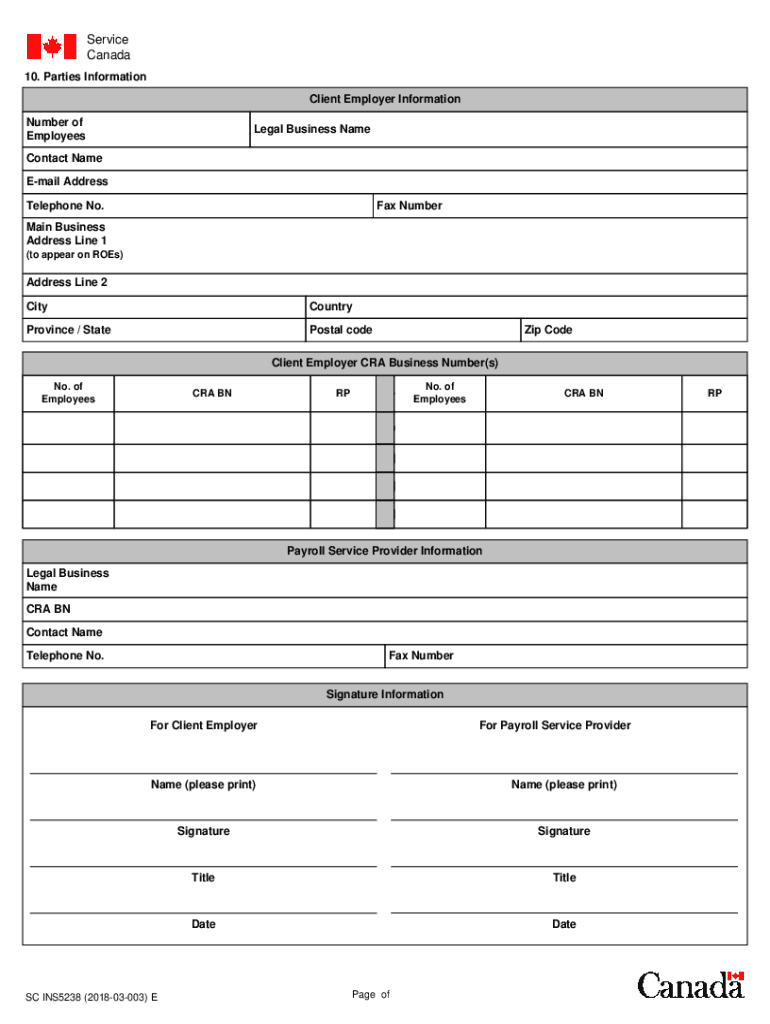
Service Canada Web Client Employer Consent Form (This form is to be used to authorize a Payroll Service Provider to complete and submit Roes with ROE Web on behalf of a Client Employer)1. The Client.

Open form follow the instructions

Easily sign the form with your finger

Send filled & signed form or save
How to fill out the Canada SC INS5238 online
The Canada SC INS5238 form is essential for authorizing a Payroll Service Provider to manage your Records of Employment electronically. This guide will provide clear, step-by-step instructions to help you complete the form online effectively.
Follow the steps to fill out the Canada SC INS5238 form with ease.
- Press the ‘Get Form’ button to access the Canada SC INS5238 form and open it in your preferred browser.
- Begin filling out the Client Employer Information section. Provide the Legal Business Name, Contact Name, E-mail Address, and Telephone Number. Ensure all information is accurate to facilitate communication.
- Input the Main Business Address in the required fields. Include Address Line 1, Address Line 2 (if applicable), City, Province/State, Country, Postal Code, and Zip Code.
- Enter the Client Employer CRA Business Number(s) in the designated area. Ensure that the information is complete and correct.
- Proceed to the Payroll Service Provider Information section. Fill in the Legal Business Name and CRA BN, along with the Contact Name, Telephone Number, and Fax Number.
- In the Signature Information section for both the Client Employer and the Payroll Service Provider, print the Name, provide a Signature, and indicate the Title along with the Date of signing.
- Review the entire form for accuracy, ensuring that no fields are left incomplete and that all information is current.
- Once you have filled out the form completely, save the changes, download a copy for your records, and print the form if necessary for submission.
Complete your Canada SC INS5238 application online today.
Experience a faster way to fill out and sign forms on the web. Access the most extensive library of templates available.
Related content
Get answers to your most pressing questions about US Legal Forms API.
What does ROE mean in simple terms?
While average ratios, as well as those considered “good” and “bad”, can vary substantially from sector to sector, a return on equity ratio of 15% to 20% is usually considered good.
How long does an employer have to issue an ROE in Canada?
For a monthly pay period, the ROE must be issued by whichever date is earlier: 5 calendar days after the end of the pay period that contains the interruption of earnings (April 5, 2022), or. 15 calendar days after the first day of the interruption of earnings (March 16, 2022)
What Is a Good ROE?
Return on equity (ROE) is a measure of a company's financial performance that shows the relationship between a company's profit and the investor's return.
How do I contact Roe Canada?
Toll-free: 1-800-367-5693. TTY: 1-855-881-9874.
How do I get my record of employment in Ontario?
ROEs are always available online and employees can view or print copies using My Service Canada Account. Payroll service providers can now add new clients to their account online and are not required to fax a copy of the Employer Consent Form to Service Canada.
What is ROE?
Return on equity (ROE) is a measure of financial performance calculated by dividing net income by shareholders' equity. Because shareholders' equity is equal to a company's assets minus its debt, ROE is considered the return on net assets.
How Do You Calculate ROE?
Return on equity (ROE) is the measure of a company's net income divided by its shareholders' equity. ROE is a gauge of a corporation's profitability and how efficiently it generates those profits.
What does ROE tell you?
ROE is an important metric for investors to evaluate profitable investment opportunities. Companies with higher ROE attracts more investors as it indicates they are better at retaining profit from shareholders' equity.
Use professional pre-built templates to fill in and sign documents online faster. Get access to thousands of forms.
If you believe that this page should be taken down, please follow our DMCA take down process here.