Loading
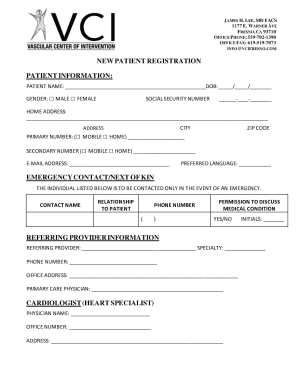
Get Ca Vascular Center Of Intervention New Patient Registration Packet 2021-2025
How it works
-

Open form follow the instructions
-

Easily sign the form with your finger
-

Send filled & signed form or save
How to fill out the CA Vascular Center Of Intervention New Patient Registration Packet online
This guide provides clear and detailed instructions for filling out the CA Vascular Center of Intervention New Patient Registration Packet online. By following these steps, you will efficiently complete the necessary information for your new patient registration.
Follow the steps to complete your registration packet online easily.
- Click ‘Get Form’ button to access the CA Vascular Center of Intervention New Patient Registration Packet. This will enable you to fill out the form online.
- Begin with the Patient Information section. Enter your full name and date of birth (DOB) in the specified fields. Select your gender by marking the appropriate box.
- Provide your social security number in the designated space. Fill in your home address, including city and zip code for accurate identification.
- Indicate your primary and secondary contact numbers by selecting whether they are mobile or home. Include your email address for digital communication.
- Select your preferred language from the options available.
- Complete the Emergency Contact/Next of Kin section by entering the contact name, relationship to you, and their phone number.
- In the Permisson to Discuss Medical Condition section, indicate your preference by marking yes or no and signing with your initials.
- Fill in the Referring Provider information if applicable. Enter the provider's name, specialty, phone number, and address.
- Provide pharmacy information, including the pharmacy name, address, and phone number.
- List all medications you are currently taking, specifying dosage and frequency. If you don’t take any medication, check the appropriate box.
- Document any known allergies, including reactions. Indicate if there are no known allergies.
- Complete the Medical History section by checking any relevant conditions and including the year of diagnosis if applicable.
- In the Surgical and Vascular History sections, check any relevant procedures and include details as necessary.
- Provide information regarding Family History of Vascular Disease by checking the relevant boxes.
- Fill out the Patient Information section, providing details regarding race and ethnicity.
- Complete the Social History section by indicating marital status, number of children, occupation, and substance use if applicable.
- Confirm your vaccination history by indicating if you have received a flu vaccine.
- Address the Advanced Directive and Medical Power of Attorney sections by marking yes or no and providing details if applicable.
- Complete the Release of Medical Records section by signing and dating to authorize the release of your records.
- Review and sign the Permission to Photograph and Financial Policy sections to acknowledge your understanding and acceptance.
- Finally, save any changes made, and share, download, or print the completed registration packet as needed.
Complete your CA Vascular Center of Intervention New Patient Registration Packet online today to ensure a seamless onboarding experience.
Industry-leading security and compliance
US Legal Forms protects your data by complying with industry-specific security standards.
-
In businnes since 199725+ years providing professional legal documents.
-
Accredited businessGuarantees that a business meets BBB accreditation standards in the US and Canada.
-
Secured by BraintreeValidated Level 1 PCI DSS compliant payment gateway that accepts most major credit and debit card brands from across the globe.