Loading
Get Remittance Coupon Template
How it works
-

Open form follow the instructions
-

Easily sign the form with your finger
-

Send filled & signed form or save
How to fill out the Remittance Coupon Template online
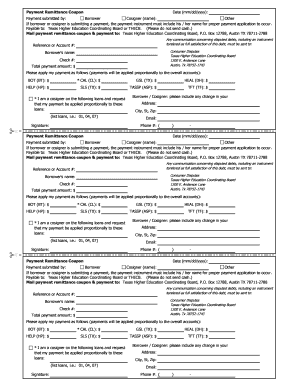
The remittance coupon template is an essential document used for submitting payments related to education loans. This guide provides step-by-step instructions to help you complete the form online accurately and efficiently.
Follow the steps to complete the Remittance Coupon Template online.
- Click ‘Get Form’ button to obtain the form and open it in the editor.
- Enter the date of payment in the format mm/dd/yyyy in the specified field.
- Select the option indicating who is submitting the payment by checking the appropriate box for 'Borrower', 'Cosigner', or 'Other'. If you selected 'Cosigner', please enter their name in the provided field.
- Fill in the 'Payable to' section, ensuring you write 'Texas Higher Education Coordinating Board' or 'THECB'. Remember to note that cash should not be sent.
- Input the reference or account number associated with the loan in the designated field.
- Provide the borrower's name in the field labeled 'Borrower's name'.
- Fill in the 'Check #' field if applicable.
- Enter the total payment amount in the 'Total payment amount' field with a dollar sign.
- Distribute the payment amount among the loan types listed (BOT, CAL, GSL, HEAL, HELP, SLS, TASSP, TFT) by entering the respective dollar amounts.
- If applicable, specify any cosigned loans where you want your payment applied proportionally by listing the loan numbers.
- Sign the form in the 'Signature' section, indicating whether you are the borrower or cosigner, and include any changes to your address.
- Complete the fields for 'Address', 'City, St, Zip', 'Email', and 'Phone #' if necessary.
- Review all entered information for accuracy. Once confirmed, you can save changes, download, print, or share the form as needed.
Complete your remittance coupon online today to ensure your payment is submitted correctly.
Does Word have a coupon template? Yes, however, you have better coupon template options on Template.net.