Loading
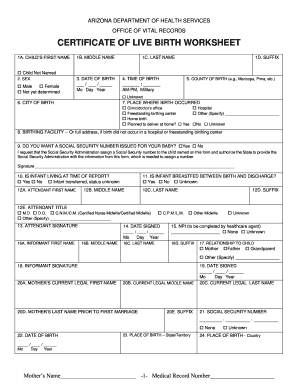
Get Az Certificate Of Live Birth Worksheet
How it works
-

Open form follow the instructions
-

Easily sign the form with your finger
-

Send filled & signed form or save
How to fill out the AZ Certificate of Live Birth Worksheet online
Filling out the Arizona Certificate of Live Birth Worksheet online is a crucial step in officially documenting the birth of a child. This guide provides a clear, step-by-step approach to assist users of all backgrounds in navigating the required fields and ensuring accurate completion of the document.
Follow the steps to successfully complete the AZ Certificate of Live Birth Worksheet online.
- Press the ‘Get Form’ button to obtain the worksheet and access it in the editor.
- In section 1A, enter the child's first name, or check the box indicating 'Child Not Named' if applicable.
- Select the child's sex in section 2 by choosing 'Male,' 'Female,' or 'Not yet determined.'
- Input the date of birth in section 3 using the format Mo/Day/Year.
- For section 4, enter the time of birth, specifying AM or PM (or Military time).
- In section 5, indicate the county of birth. If unknown, select the option provided.
- Input the city of birth in section 6.
- In section 7, choose the place where the birth occurred, such as a clinic, hospital, birthing center, or home.
- Provide the full address of the birthing facility in section 8 if applicable, or indicate if it was a home birth.
- In section 9, indicate if you want a Social Security number issued for your baby by selecting 'Yes' or 'No.'
- Section 10 asks if the infant is living at the time of report; select the appropriate option.
- For sections 12A, 12B, and 12C, fill in the first name, middle name, and last name of the attendant who facilitated the birth.
- In section 12E, select the title of the attendant, such as M.D. or C.N.M./C.M.
- Section 13 requires the attendant's signature, which must be completed after approval.
- In section 16, fill out the informant's name and their relationship to the child in sections 17.
- After completing all required fields, review the worksheet thoroughly for accuracy.
- Users can then save any changes, download the document, print it, or share it as necessary.
Start completing your documents online to ensure a smooth filing process.
A birth certificate includes essential information such as the child's full name, date and place of birth, and parents' names and details. This official document verifies the identity and citizenship of the child. To ensure you have all required information at hand, refer to the AZ Certificate of Live Birth Worksheet, which outlines everything needed for completion.