Loading
Get Hot Sauce Waiver Template
How it works
-

Open form follow the instructions
-

Easily sign the form with your finger
-

Send filled & signed form or save
How to fill out the Hot Sauce Waiver Template online
This guide provides users with clear and detailed instructions on filling out the Hot Sauce Waiver Template online. Whether you are a novice or have some experience with digital documents, this comprehensive approach will help you successfully complete the form.
Follow the steps to complete the Hot Sauce Waiver Template.
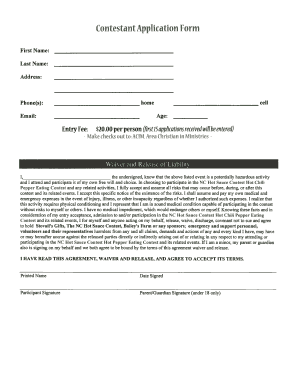
- Click the ‘Get Form’ button to obtain the form and open it in your digital editor.
- Enter your first and last name in the respective fields. This is essential for identifying the participant.
- Provide your address in the designated section. Ensure this information is accurate for contact purposes.
- Indicate your phone numbers by selecting either cell or home. Include the type of number you are providing.
- Enter your age, as this may be a requirement for participation in the contest.
- Fill in your email address. This will be used for communication regarding the event.
- Include the entry fee of $20.00. Make checks payable to ACIM, Area Christian in Ministries as indicated.
- Read the waiver and release of liability carefully. This section outlines the risks associated with the activity.
- Provide your printed name and the date of signing in the fields provided.
- Sign the document in the section labeled 'Participant Signature'. If under 18, a parent or guardian must also sign in the designated area.
- Once all fields are completed, save your changes. You can then download, print, or share the form as needed.
Complete your Hot Sauce Waiver Template online today and secure your participation in the contest!
Essentially, a waiver removes a real or potential liability for the other party in the agreement. For example, in a settlement between two parties, one party might, by means of a waiver, relinquish its right to pursue any further legal action once the settlement is finalized.