Loading
Get Trustmark A112-2506 2019-2026
How it works
-

Open form follow the instructions
-

Easily sign the form with your finger
-

Send filled & signed form or save
How to fill out the Trustmark A112-2506 online
This guide provides a comprehensive and user-friendly approach to completing the Trustmark A112-2506 form online. By following each step, users will be equipped to accurately fill out the necessary information for claims submission.
Follow the steps to successfully complete the Trustmark A112-2506 form
- Click the ‘Get Form’ button to obtain the Trustmark A112-2506 form. This will allow you to access the form in your preferred online format.
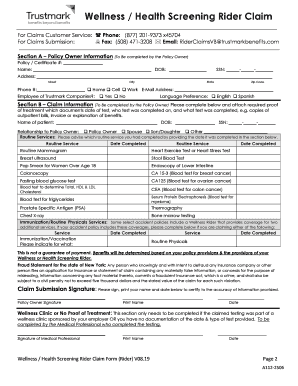
- Begin by completing Section A, which requires information from the policy owner. Provide your policy or certificate number, name, date of birth, Social Security number, address, phone number, email address, and indicate if you are an employee of Trustmark Companies. Make sure to select your language preference.
- Proceed to Section B, where you will enter claim information. Include the name and date of birth of the patient, their Social Security number, and relationship to the policy owner. Indicate the routine services completed by entering the date and type of service in the designated spaces.
- If applicable, fill out the 'Wellness Clinic or No Proof of Treatment' section. This section should be completed by the medical professional who provided the testing. Ensure their signature and date are included.
- Complete the claim submission signature section. The policy owner must sign, print their name, and provide the date to certify that all information is correct.
- If preferred, fill out the optional sections for electronic communication and third-party communication authorization, providing necessary details as applicable.
- Review all completed sections to ensure accuracy and completeness. Incomplete forms may cause delays in processing.
- Once you have reviewed the form, save your changes. You can then download, print, or share the Trustmark A112-2506 form as necessary.
Start filling out the Trustmark A112-2506 form online to submit your claim with confidence.