Terrace, Wellington, 6011, New Zealand (for packages) Contact: +64 4 384 7635 – 0800 286 801 – registration@mcnz.org.nz PLEASE READ THE FOLLOWING, IT CONTAINS IMPORTANT INFORMATION. All referees: Referees are asked to comment on the applicant’s abilities as a medical practitioner and therefore need to be familiar with his or her current professional practice. Sections 1-6 must be completed by all referees. Section 7 will only need to be completed if the applicant is applying f.
Loading

Open form follow the instructions

Easily sign the form with your finger

Send filled & signed form or save
How to fill out the NZ RP6/RP9 online
The NZ RP6/RP9 form is crucial for the application process for medical registration in New Zealand. This guide aims to provide users with clear, step-by-step instructions on completing the form online, ensuring you have the necessary information at your fingertips.
Follow the steps to successfully complete the NZ RP6/RP9 form.
- Press the ‘Get Form’ button to obtain the form and open it in your preferred online editor.
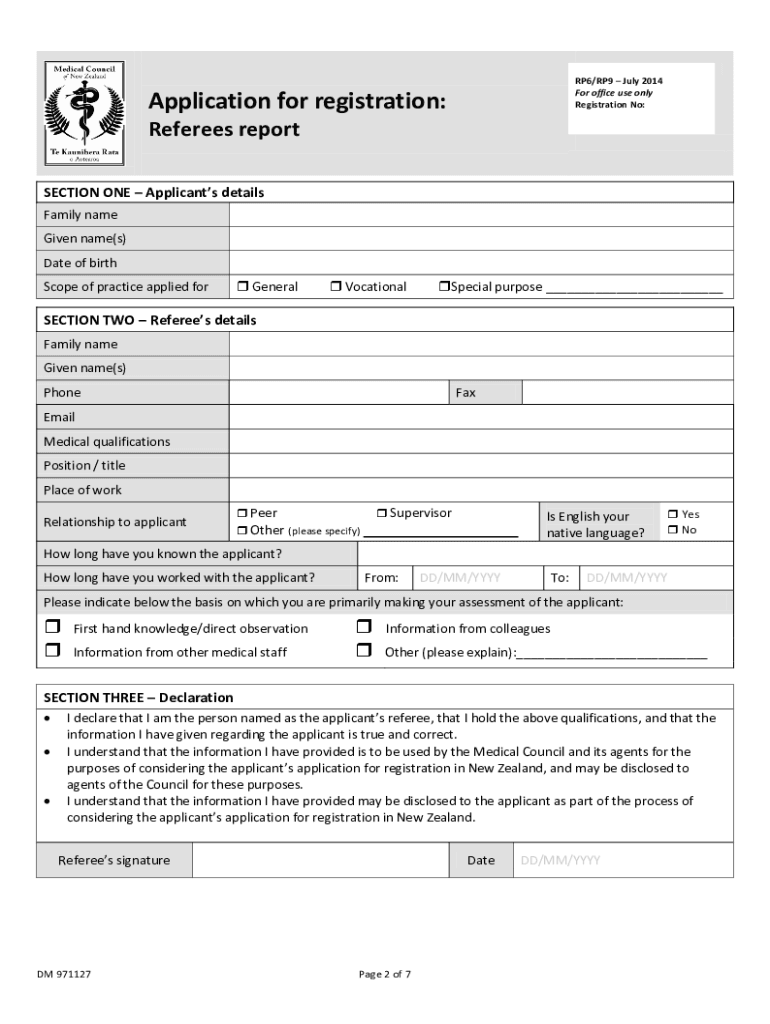
- Begin by completing Section One, which requires the applicant’s details. Fill in your family name, given name(s), date of birth, and select the scope of practice you are applying for, such as General, Vocational, or Special Purpose.
- Move to Section Two to provide the referee's details. Here, the referee will fill in their family name, given name(s), phone number, fax number, email, medical qualifications, current position or title, place of work, and their relationship to the applicant. The referee should also indicate if English is their native language and provide information on how long they have known and worked with the applicant.
- Proceed to Section Three, where the referee must make a declaration. The referee must acknowledge that they are the person named, confirm their qualifications, and that the provided information is true and accurate. This includes signing and dating the declaration.
- In Section Four, the referee will answer various questions evaluating the applicant’s medical knowledge, clinical skills, record-keeping abilities, communication skills, professional attitudes, fitness to practice, and strengths and weaknesses. Each subsection allows space for comments and ratings where applicable.
- If the applicant is seeking registration for a vocational or special purpose locum tenens scope, Section Seven must be completed. This section addresses training, qualifications, competence, and the applicant's ability to work independently.
- After completing all sections, carefully review the entries for accuracy and completeness. Once verified, you can save any changes, download, print, or share the completed form as needed.
Complete your NZ RP6/RP9 registration documents online today!
Experience a faster way to fill out and sign forms on the web. Access the most extensive library of templates available.
Related content
by N Cross · 2022 · Cited by 95 — RP is associated with a high burden of disease. This...
by MJ Nicolo · 2007 · Cited by 298 — RP6. RP7. RP8. RP9. Rad Z. Foram Z. Nanno Z...
Get answers to your most pressing questions about US Legal Forms API.
How easy is it to get residency in New Zealand?
Getting residency in New Zealand can vary in difficulty based on your background and qualifications. Engaging with the NZ RP6/RP9 process helps streamline your application as it focuses on qualifying candidates for residency. By meeting the necessary requirements and understanding the application process, you can enhance your chances significantly.
How to get PGY1 in New Zealand?
To obtain PGY1 in New Zealand, you need to complete your medical degree and register with the Medical Council. Following this, you must apply for internships through the NZ RP6/RP9 pathway. Be prepared to submit various documents, and punctuality in meeting deadlines is key to securing your position.
Can Indian MBBS doctors work in New Zealand?
Yes, Indian MBBS doctors can work in New Zealand, but you must go through the NZ RP6/RP9 process to validate your qualifications. This may involve passing specific exams or obtaining registration from the Medical Council of New Zealand. It's essential to understand the requirements and ensure all documentation is properly submitted.
Is USMLE accepted in New Zealand?
The USMLE is not directly accepted in New Zealand; however, if you have advanced training and qualifications, you might still qualify under the NZ RP6/RP9 pathway. You may need additional credentials or examinations to align your qualifications with New Zealand standards. Always check the latest information from the Medical Council of New Zealand for updates.
Can foreign doctors practice in New Zealand?
Yes, foreign doctors can practice in New Zealand, provided they meet certain requirements. You will need to register with the Medical Council of New Zealand and may have to prove your qualifications align with NZ RP6/RP9 standards. The process is designed to ensure that you can provide quality care to patients in New Zealand.
How do you qualify for medical residency in New Zealand?
To qualify for medical residency in New Zealand, you must complete medical school and obtain a medical degree. Then, you need to apply through the NZ RP6/RP9 process, which requires verification of your qualifications and sometimes additional exams. It's crucial to ensure that you meet the eligibility criteria set by the New Zealand Medical Council.
Can a foreign doctor work in New Zealand?
Yes, foreign doctors can work in New Zealand, provided they fulfill certain requirements, including passing the NZ RP6/RP9 assessments. These assessments evaluate your competencies and ensure that you meet New Zealand's medical standards. After successful completion, you can apply for registration with the Medical Council of New Zealand. This opens numerous opportunities in a healthcare system that values diverse medical backgrounds.
Does New Zealand accept US medical license?
New Zealand does not automatically accept a US medical license, but foreign medical graduates, including those from the US, can apply for licensure through the appropriate pathways. The NZ RP6/RP9 assessments are essential for demonstrating equivalency of medical knowledge and skills. Once you complete this process, you can gain the necessary registration to practice in New Zealand. Therefore, while a US license does not directly translate, pathways exist to facilitate your transition.
How to become a doctor in New Zealand as a foreigner?
Becoming a doctor in New Zealand as a foreigner generally involves meeting specific education and licensing requirements. Foreign medical graduates often need to pass the NZ RP6/RP9 assessments, which evaluate medical knowledge and skills. Once you successfully pass these assessments, you can apply for registration with the Medical Council of New Zealand, enabling you to practice. Utilizing resources like USLegalForms can help you navigate the necessary steps more effectively.
Are doctors in high demand in New Zealand?
Yes, doctors are in high demand in New Zealand, making it an attractive option for medical professionals looking to practice abroad. The demand stems from a growing population and an increasing need for healthcare services, particularly in rural areas. With the NZ RP6/RP9 assessments, the pathways for foreign doctors to enter and contribute to this workforce are clearly defined. This demand presents numerous opportunities for those looking to establish their medical careers.
Use professional pre-built templates to fill in and sign documents online faster. Get access to thousands of forms.
If you believe that this page should be taken down, please follow our DMCA take down process here.
This form is available in several versions. Select the version you need from the drop-down list below.