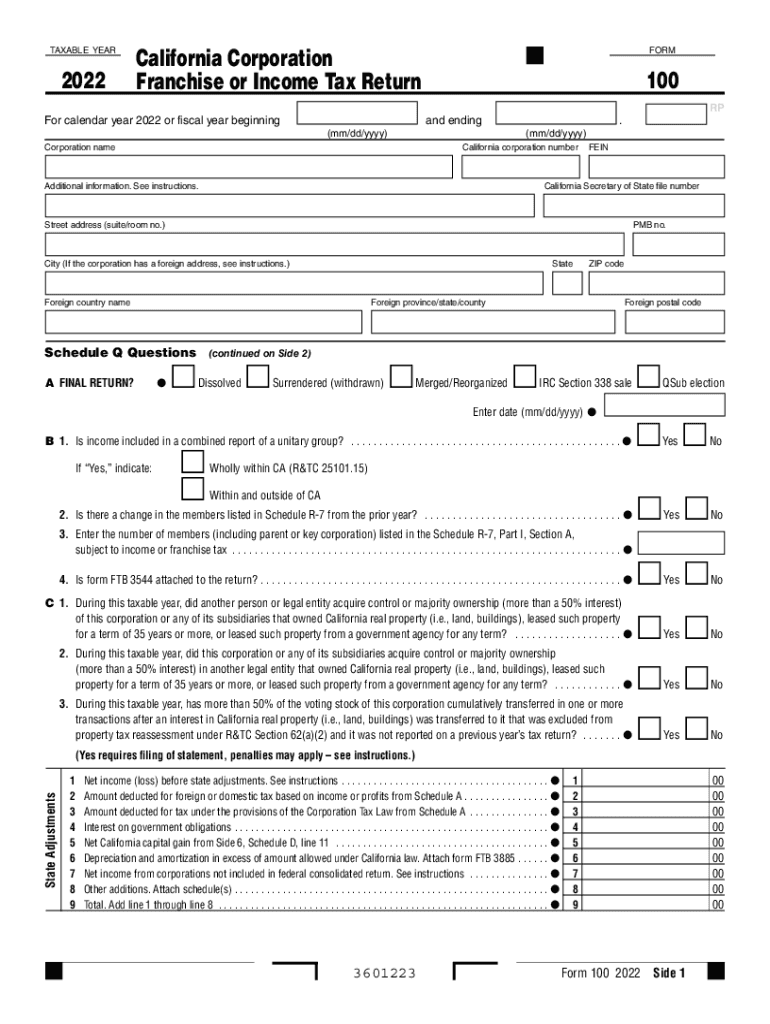
Fornia corporation number Additional information. See instructions. RP . FEIN California Secretary of State file number Street address (suite/room no.) PMB no. City (If the corporation has a foreign address, see instructions.) State Foreign country name Foreign province/state/county Schedule Q Questions A FINAL RETURN? ZIP code Foreign postal code (continued on Side 2) Dissolved Surrendered (withdrawn) Merged/Reorganized IRC Section 338 sale QSub election E.

Open form follow the instructions

Easily sign the form with your finger

Send filled & signed form or save
How to fill out the CA FTB 100 online
This guide provides a comprehensive overview of how to complete the CA FTB 100 online. Whether you are a seasoned user or new to the process, this step-by-step instruction will assist you in accurately filling out your corporation's franchise or income tax return.
Follow the steps to complete the CA FTB 100 online.
- Press the ‘Get Form’ button to obtain the CA FTB 100 and open it in your browser.
- Fill in the taxable year at the top of the form, indicating 2022 or your relevant fiscal year dates.
- Enter the corporation name and California corporation number in the designated fields.
- Provide the Federal Employer Identification Number (FEIN) and California Secretary of State file number.
- Complete the street address, city, state, and ZIP code fields, including any foreign address if applicable.
- Answer the Schedule Q questions, including final return status, income reports, and member changes.
- Detail net income or loss before any state adjustments; ensure all additional income and tax deductions are documented.
- Proceed through tax calculations, including any estimated tax payments made during the year.
- Verify information on income, deductions, and tax credits, ensuring accuracy in all submitted entries.
- Once completed, you can save changes, download, print, or securely share the form.
Get started now to complete your CA FTB 100 online with ease.
Experience a faster way to fill out and sign forms on the web. Access the most extensive library of templates available.
Related content
Form 100 2021 Side 1. 3601213 ... 2021. California Corporation. Franchise or Income Tax...
The FTB addressed the eligibility of the Texas Margin Tax (“TMT”) for the other state...
CA-94D. 588074. 1. 4 #8 2 hole lug 1/4". 406021626 ... 100 *Outdoor 60m SM Cable, LC...
Get answers to your most pressing questions about US Legal Forms API.
What is CA Form 100es?
Use Form 100-ES to figure and pay estimated tax for a corporation. Estimated tax is the amount of tax the corporation expects to owe for the taxable year.
What is CA FTB Form 100?
Minimum Franchise Tax. All corporations subject to the franchise tax, including banks, financial corporations, RICs, REITs, FASITs, corporate general partners of partnerships, and corporate members of LLCs doing business in California, must file Form 100 and pay at least the minimum franchise tax as required by law.
What is the 100S payment in California?
Extension Payment 100S: Original due date is the 15th day of the 3rd month after the close of the taxable year and extended due date is the 15th day of the 9th month after the close of the taxable year. Note: This does not extend the time for payment of tax; the full amount of tax must be paid by the original due date.
Do you have to pay the $800 California LLC fee the first year?
Every LLC that is doing business or organized in California must pay an annual tax of $800. This yearly tax will be due, even if you are not conducting business, until you cancel your LLC. You have until the 15th day of the 4th month from the date you file with the SOS to pay your first-year annual tax.
Who must file Form 100 in California?
All corporations subject to the franchise tax, including banks, financial corporations, RICs, REITs, FASITs, corporate general partners of partnerships, and corporate members of LLCs doing business in California, must file Form 100 and pay at least the minimum franchise tax as required by law.
What is CA Schedule B 100S?
Use Schedule B (100S), S Corporation Depreciation and Amortization, to calculate depreciation and amortization for California tax purposes. For assets placed in service in 1987 and after, S corporations may use the same method for California as was used for federal purposes.
How to avoid California tax underpayment penalty?
If you filed your income tax return or paid your income taxes after the due date, you received a penalty. To avoid penalties in the future, file or pay by the due date.
What is CA FTB Form 100 S?
Form 100S is used if a corporation has elected to be a small business corporation (S corporation). All federal S corporations subject to California laws must file Form 100S and pay the greater of the minimum franchise tax or the 1.5% income or franchise tax. The tax rate for financial S corporations is 3.5%.
Use professional pre-built templates to fill in and sign documents online faster. Get access to thousands of forms.
If you believe that this page should be taken down, please follow our DMCA take down process here.