Loading
Get Direct Shipper Statement Oregon Form
How it works
-

Open form follow the instructions
-

Easily sign the form with your finger
-

Send filled & signed form or save
How to fill out the Direct Shipper Statement Oregon Form online
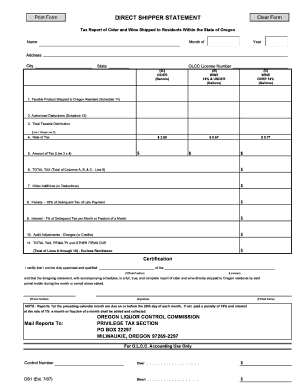
The Direct Shipper Statement Oregon Form is essential for reporting cider and wine distribution to residents within Oregon. This guide will help you navigate the form efficiently while ensuring all necessary information is accurately filled out.
Follow the steps to complete the form online.
- Click 'Get Form' button to obtain the Direct Shipper Statement Oregon Form and open it in the editor.
- Begin by filling in your name, which should be the trade name as it appears on your OLCC license.
- Specify the month and year that the report refers to.
- Enter the physical address of your licensed premise in the address field, including the city and state. Do not use a mailing address.
- Input your OLCC license number in the designated field.
- Complete the columns for cider, wine under 14%, and wine over 14% with the relevant data from your records.
- Calculate the taxable product shipped into Oregon in Line 1 from Schedule 11 and enter the amount.
- Report authorized deductions in Line 2 from Schedule 12.
- Compute the total taxable distribution by subtracting Line 2 from Line 1 and enter this in Line 3.
- Indicate the rate of tax applicable in Line 4, based on the current tax rate.
- Multiply the amount in Line 3 by the tax rate from Line 4 to derive the amount of tax in Line 5.
- Total the amounts in columns A, B, and C, and enter this in Line 6.
- List any other additions or deductions in Line 7 according to your adjustments.
- Include any penalties due for late filings in Line 8.
- Add any interest charges on late reports in Line 9.
- Report any audit adjustments in Line 10 as indicated by your audit report.
- Calculate the total tax, penalty, and other items due in Line 11, which is the sum of Lines 6 to 10, and prepare to enclose remittance.
- Complete the certification section by filling in your official position and the name of the licensee, then provide your phone number.
- Finalize the form with your signature and printed name.
- Once all sections are complete, you can save changes, download, print, or share the completed form as necessary.
Complete your Direct Shipper Statement Oregon Form online to ensure compliance and timely reporting.
The Oregon Form WR is a withholding reconciliation form used to report wages and tax withholdings for Oregon residents. It is typically used to reconcile the amount of tax withheld by employers with the amount you owe. This form is important for those who wish to maintain clear and correct tax records, particularly when dealing with transactions reported on the Direct Shipper Statement Oregon Form.