Loading
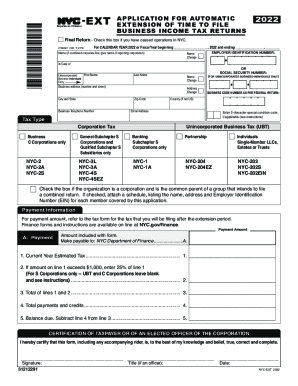
Get Ny Nyc-ext 2022
How it works
-

Open form follow the instructions
-

Easily sign the form with your finger
-

Send filled & signed form or save
How to fill out the NY NYC-EXT online
Filing for an automatic extension of time to submit your business income tax returns can be a straightforward process with the right guidance. This guide provides detailed steps to help you navigate the NY NYC-EXT form effectively.
Follow the steps to complete your NY NYC-EXT application.
- Press the ‘Get Form’ button to access the document and start the filling process.
- Enter the tax year for which you are filing the extension, either for the calendar year 2022 or specify the fiscal year period.
- Fill in your name or the name of the combined corporate filer, including the Employer Identification Number (EIN) or Social Security Number for unincorporated individuals.
- Complete the business address section with the physical location information including the street address, city, state, and zip code.
- Provide your business telephone number and email address for future correspondence.
- Select the appropriate tax type that applies to your business structure, such as C Corporations, Unincorporated Business Tax, or partnerships.
- If applicable, check the box indicating if your organization is a common parent of a group intending to file a combined return and list any required details.
- In the payment information area, accurately calculate the payment amount based on the tax form associated with your extension request.
- Sign the form, certifying that the information is accurate, and include your title if applicable, along with the date of signing.
- Once completed, you can save the changes, download, print, or share the form as needed.
Complete your NY NYC-EXT form online today for a smooth extension process.
Get form
Experience a faster way to fill out and sign forms on the web. Access the most extensive library of templates available.
You can pay directly from your bank account through Online Services. Simply log in to your account, select Payments, bills and notices from the menu in the upper left-hand corner of your screen, select Make a Payment, then Make an extension payment. If you overpaid and are owed a refund, you don't need to do anything.
Get This Form Now!
Use professional pre-built templates to fill in and sign documents online faster. Get access to thousands of forms.