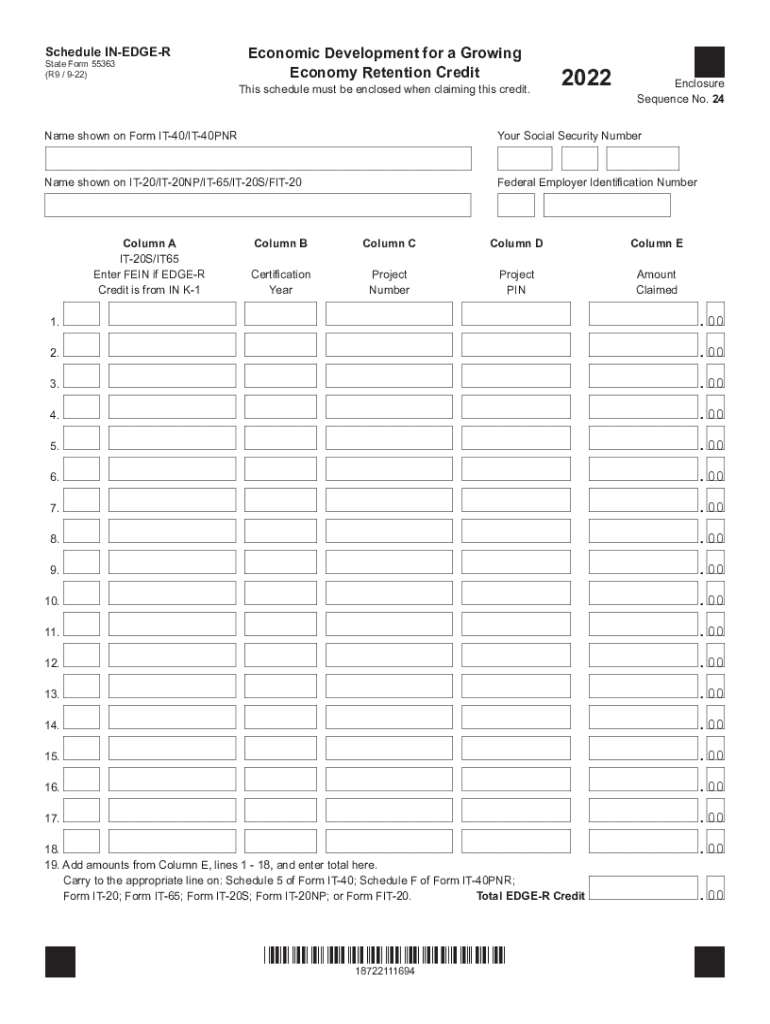
4 Name shown on Form IT-40/IT-40PNR Your Social Security Number Name shown on IT-20/IT-20NP/IT-65/IT-20S/FIT-20 Federal Employer Identification Number Column A IT-20S/IT65 Enter FEIN if EDGE-R Credit is from IN K-1 Column B Column C Column D Column E Certification Year Project Number Project PIN Amount Claimed 1. .00 2. .00 3. .00 4. .00 5. .00 6. .00 7. .00 8. .00 9. .00 10. .00 11. .00 12. .00 13. .00 14. .00 15. .00 16. .00 17. .00 18. 19. Add a.
Loading

Open form follow the instructions

Easily sign the form with your finger

Send filled & signed form or save
How to fill out the IN Schedule IN-EDGE-R online
The IN Schedule IN-EDGE-R is a crucial document for individuals and organizations claiming the Economic Development for a Growing Economy Retention Credit. This guide provides step-by-step instructions to help you complete the form accurately and efficiently.
Follow the steps to successfully complete the IN Schedule IN-EDGE-R
- Press the ‘Get Form’ button to retrieve the form and open it in your digital editor.
- Enter the name displayed on Form IT-40/IT-40PNR.
- Provide your Social Security number or federal employer identification number.
- For the name shown on IT-20/IT-20NP/IT-65/IT-20S/FIT-20, enter the appropriate name.
- In Column A, if you are a shareholder in an S corporation or a partner in a partnership, input the federal employer identification number from your IN K-1. Otherwise, leave this column blank.
- In Column B, write the 4-digit tax year for which the credit has been certified, found in your certification letter from the Indiana Economic Development Corporation (IEDC) or on your IN K-1.
- Column C requires you to enter the project number you received from the IEDC, a 6-digit number available in the certification letter or on your IN K-1.
- For Column D, input the project PIN from the IEDC, which may be a 5 or 8-digit number. If claiming a credit for a year prior to 2014 and you do not have a PIN, leave this column blank.
- In Column E, enter the credit amount you are claiming.
- Add the amounts in Column E, lines 1 through 18, and enter the total on line 19. This figure represents your total EDGE-R credit.
- Ensure to carry this total to the appropriate line on Schedule 5 of Form IT-40, Schedule F of Form IT-40PNR, or the relevant forms as applicable.
- If you have more than 18 lines while filing by paper, attach additional copies of Schedule IN-EDGE-R as necessary, but do not fill out line 19 on the subsequent copies; include the total on the first schedule.
Complete your IN Schedule IN-EDGE-R online today to ensure you claim your Economic Development Retention Credit.
Experience a faster way to fill out and sign forms on the web. Access the most extensive library of templates available.
Related content
Total EDGE-R Credit .00. Enclosure. Sequence No. 24. Schedule IN-EDGE-R. State Form 55363...
by T He · Cited by 105 — It's Hard to Share: Joint Service Placement and. Request...
Owner/Operator Manual. Manuel Du Propriétaire/Utilisateur. Model. 986101 – Edger...
Use professional pre-built templates to fill in and sign documents online faster. Get access to thousands of forms.
If you believe that this page should be taken down, please follow our DMCA take down process here.
This form is available in several versions. Select the version you need from the drop-down list below.