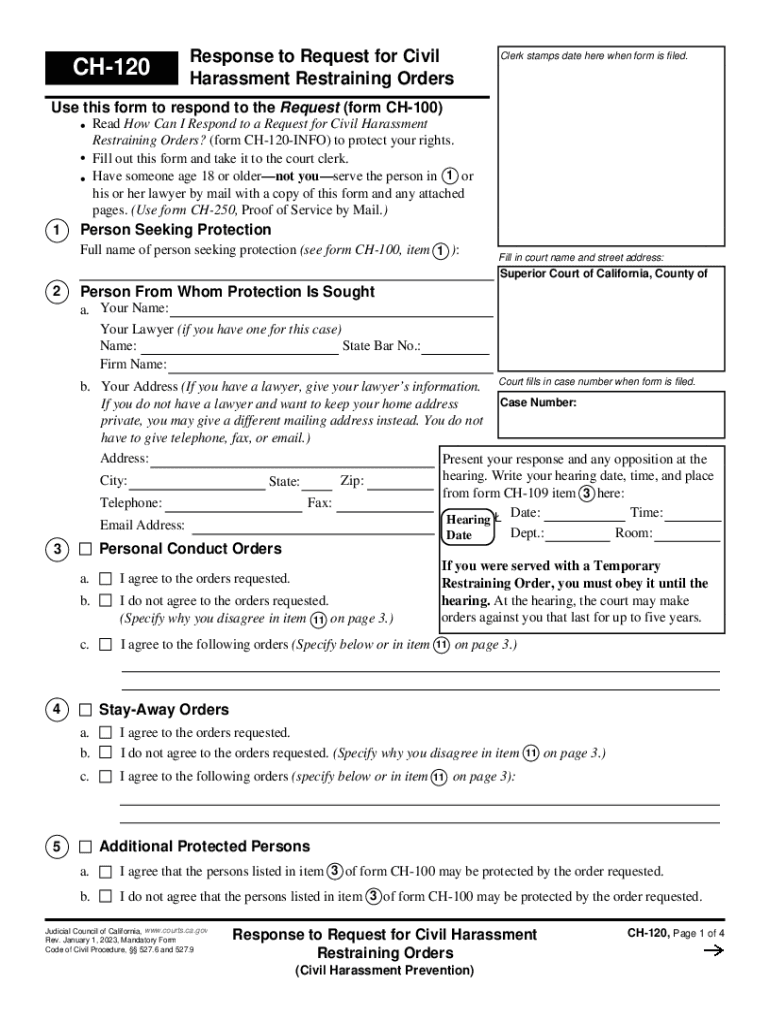
CH-120 Response to Request for Civil Harassment Restraining Orders Clerk stamps date here when form is filed. Use this form to respond to the Request (form CH-100) Read How Can I Respond to a.
Loading

Open form follow the instructions

Easily sign the form with your finger

Send filled & signed form or save
How to fill out the CA CH-120 online
The CA CH-120 form is essential for individuals responding to a request for civil harassment restraining orders in California. This guide provides a step-by-step approach to completing the form online, ensuring clarity and accuracy in protecting your rights.
Follow the steps to complete the CA CH-120 form online.
- Click ‘Get Form’ button to obtain the form and open it in the editor.
- Enter the full name of the person seeking protection in the designated field, referring to form CH-100, item 1.
- Fill in the court name and street address where the form will be filed. This typically includes the Superior Court of California, County of, and the specific address.
- Provide your name and, if applicable, your lawyer's information, including their name, State Bar Number, and firm name. If you do not have a lawyer and wish to keep your home address private, you may enter a different mailing address.
- Record the hearing date, time, and place in the respective fields as per form CH-109 item 3.
- Indicate your agreement or disagreement with the personal conduct orders and provide any specific remarks in item 11, if necessary.
- State your position regarding the stay-away orders, and if applicable, specify any alternate orders you agree to.
- Express your stance on the additional protected persons listed in item 3 of form CH-100.
- Complete the section related to firearms, indicating whether you own any, request an exemption, or have turned in firearms to the authorities.
- Fill out the details concerning the possession and protection of animals, as well as any other orders you wish to agree to.
- Provide reasons for any disagreement with the requested orders, using item 11 for further explanation.
- If applicable, indicate your request not to pay the filing fee, specifying your eligibility for a waiver if needed.
- Request the court to order payment of legal fees or court costs, listing items and amounts.
- Finalize by entering the number of attached pages, signing your name, and confirming that the information provided is true.
- After completing the form, you can save changes, download, or print the form for submission.
Take the next step in your legal journey by filling out the CA CH-120 online today.
Experience a faster way to fill out and sign forms on the web. Access the most extensive library of templates available.
Related content
Response to Request for Civil Harassment Restraining Orders (CH-120). Tell the court and...
CA. Campus Co-op Day Care. (B1). CB. Best Institute. (F4). CE. Centre of Engineering...
Judicial Council of California,. Rev. January 1, 2023. DV-120-INFO, Page 1 of 3. How Can I...
Get answers to your most pressing questions about US Legal Forms API.
Can you get in trouble for being around someone you have a restraining order against?
You can't violate the order that is against the other person. If you call or go to see them because you need to talk about the kids or something else, you are not violating the Order. But if the order says they can't contact you and they do so anyway, then they are violating the order.
What happens if the victim violates a restraining order in California?
Now that you have a restraining order, you may need to enforce it if the restrained person violates the order. Enforce usually means to call the police to report a violation. The restrained person can go to jail or pay a fine if convicted of violating your restraining order.
Does a restraining order show up on a background check in California?
Does A Restraining Order Show Up In A Record Check? Yes, in most situations. Most restraining orders are "CLETS Orders". This means they are entered into the California criminal database, known as CLETS, "California Law Enforcement Telecommunications System", often called a "rap sheet".
What is the burden of proof for a civil harassment restraining order in California?
In addition to the relationship between the parties, one of the distinguishing features of civil harassment restraining orders is the high burden of proof that the petitioner must meet for an order to issue after the hearing. The petitioner must prove all the elements of harassment by clear and convincing evidence.
Is a restraining order a criminal record in California?
Restraining orders are not criminal charges, and they appear on your civil record, not your criminal record. However, you could also be charged with criminal offenses such as domestic violence or assault in conjunction with a restraining order.
What happens if you violate a restraining order twice in California?
California Restraining Order Violation Penalties If convicted of violating a protective order a second time, it can either be charged as a misdemeanor or felony, which includes anywhere from probation and as much as one year in jail, to three years in a state prison and maximum fine as much as $10,000.
How long do you go to jail for violating a restraining order in California?
“Any intentional and knowing violation of a protective order is a misdemeanor offense that is punishable by up to one year in a county jail, and fine up to $1,000, or both jail and a fine.
What type of proof do I need to support a restraining order California?
Anyone seeking such an order must be prepared to present some physical evidence in addition to their own written statements and testimony in court. Evidence such as photographs, text messages, police reports or medical records. The court will not entertain a simple exchange of allegations.
Use professional pre-built templates to fill in and sign documents online faster. Get access to thousands of forms.
If you believe that this page should be taken down, please follow our DMCA take down process here.