Loading
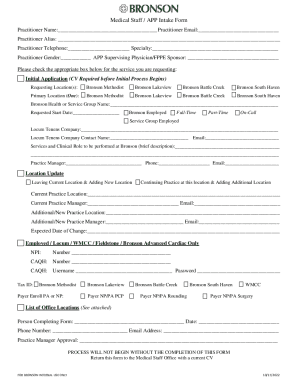
Get Bronson Health Medical Staff/app Intake Form 2022-2025
How it works
-

Open form follow the instructions
-

Easily sign the form with your finger
-

Send filled & signed form or save
How to fill out the Bronson Health Medical Staff/APP Intake Form online
The Bronson Health Medical Staff/APP Intake Form is an essential document for medical practitioners seeking to join Bronson Health. This guide will help you navigate the process of completing the form online efficiently and accurately.
Follow the steps to fill out the form correctly.
- Click ‘Get Form’ button to obtain the form and open it in the editor.
- Begin by entering your practitioner name, email, and telephone number. Ensure that your email is an active account that you regularly check.
- Fill in your practitioner alias if applicable. This helps identify you better, especially if you practice under a different name.
- Select your specialty from the provided options. This is crucial for categorizing your expertise.
- Indicate your gender as required, and list your supervising physician or FPPE sponsor’s name.
- Check the appropriate box for the service you are requesting. Ensure you understand the implications of your selection.
- Provide the requested location(s) where you intend to practice. You may choose multiple locations if applicable.
- Specify your primary location from the options available to ensure proper alignment with your practice.
- Next, indicate your employment status by selecting either 'Bronson Employed', 'Full-Time', 'Part-Time', or 'On-Call'.
- If applicable, complete the fields for the locum tenens company, including contact information.
- Briefly describe the services and clinical role you will perform at Bronson. Be concise and accurate.
- Enter your practice manager's name, phone number, and email address for further communication.
- If you are updating your location, indicate if you are leaving a current location or adding a new one. Specify details for all relevant fields.
- Fill in your NPI and CAQH numbers, and provide your CAQH username and password as necessary.
- Complete the tax ID section and select any applicable payer enrollment options.
- Finally, indicate your contact information and person completing the form, and ensure that it is signed off by the practice manager.
- Once the form is fully completed, save changes, download, print, or share it as needed.
Complete your Bronson Health Medical Staff/APP Intake Form online today to ensure a seamless application process.
Industry-leading security and compliance
US Legal Forms protects your data by complying with industry-specific security standards.
-
In businnes since 199725+ years providing professional legal documents.
-
Accredited businessGuarantees that a business meets BBB accreditation standards in the US and Canada.
-
Secured by BraintreeValidated Level 1 PCI DSS compliant payment gateway that accepts most major credit and debit card brands from across the globe.