Loading
Form preview
  • US Legal Forms
  • Other Templates
  • More Forms
  • More Multi-State Forms
  • Va Dominion Christian School Application For Employment

Get Va Dominion Christian School Application For Employment

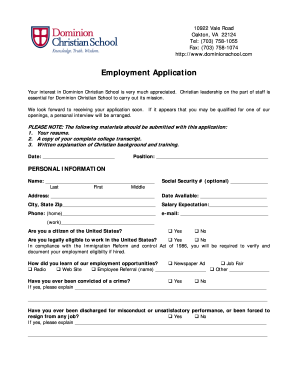
10922 Vale Road Oakton, VA 22124 Tel: (703) 758-1055 Fax: (703) 758-1074 http://www.dominionschool.com Employment Application Your interest in Dominion Christian School is very much appreciated. Christian.

How it works

  1. Open form

    Open form follow the instructions

  2. Easily sign form

    Easily sign the form with your finger

  3. Share form

    Send filled & signed form or save

How to fill out the VA Dominion Christian School Application For Employment online

Completing the VA Dominion Christian School Application For Employment is an important step in your journey to join the school community. This guide will provide you with a clear and user-friendly approach to filling out the application form online.

Follow the steps to successfully complete your application.

  1. Click ‘Get Form’ button to obtain the application form and open it in your chosen editor.
  2. Fill out the personal information section. Include your name, address, date available for work, salary expectation, and contact information. Make sure to provide accurate and up-to-date details.
  3. Indicate your eligibility to work in the United States by answering the questions regarding citizenship and previous convictions. Be honest in your responses as this information is essential for your application.
  4. Describe your employment history in detail. Start with your most recent position and provide information about your employer, job title, responsibilities, and any gaps in employment. Ensure clarity and completeness.
  5. Complete the education section by detailing your academic background, including the name and address of your schools, degrees obtained, and graduation status.
  6. Describe any professional development relevant to your teaching skills. Include your qualifications and preferred teaching grades or subjects.
  7. Address the Christian background and training section. This is an opportunity to showcase your faith journey and connection to Dominion Christian School's mission.
  8. List references who can vouch for your character and teaching abilities. Make sure to provide accurate contact information for each reference.
  9. Review your completed application for any errors or omissions. Once satisfied, save your changes, download the form, print it, or share it as needed.

Begin your application journey today and submit your employment application online.

Get form

Experience a faster way to fill out and sign forms on the web. Access the most extensive library of templates available.
Get form

Related content

School Detail for Dominion Ridge Academy
Physical Address: 80 N Lake Ave Front Royal, VA 22630-4550 ; County: Warren ; Phone: (540)...
Learn more
Old Dominion University: ODU
Old Dominion University, located in Norfolk, is Virginia's forward-focused public doctoral...
Learn more
FORM 10-K CDK Global, Inc. - AnnualReports.com
Aug 13, 2015 — Indicate by check mark whether the registrant: (1) has filed all reports...
Learn more

Related links form

Aa Slips Printable Judge Terri Ann Miller Edhara Leave Letter

Get This Form Now!

Use professional pre-built templates to fill in and sign documents online faster. Get access to thousands of forms.
Get form
If you believe that this page should be taken down, please follow our DMCA take down processhere.
Get VA Dominion Christian School Application For Employment
Get form
  • Adoption
  • Bankruptcy
  • Contractors
  • Divorce
  • Home Sales
  • Employment
  • Identity Theft
  • Incorporation
  • Landlord Tenant
  • Living Trust
  • Name Change
  • Personal Planning
  • Small Business
  • Wills & Estates
  • Packages A-Z
  • Affidavits
  • Bankruptcy
  • Bill of Sale
  • Corporate - LLC
  • Divorce
  • Employment
  • Identity Theft
  • Internet Technology
  • Landlord Tenant
  • Living Wills
  • Name Change
  • Power of Attorney
  • Real Estate
  • Small Estates
  • Wills
  • All Forms
  • Forms A-Z
  • Other Templates
  • Legal Hub
  • About Us
  • Help Portal
  • Legal Resources
  • Blog
  • Affiliates
  • Contact Us
  • Delete My Account
  • Site Map
  • Industries
  • Forms in Spanish
  • Localized Forms
  • State-specific Forms
  • Forms Kit
  • Real Estate Handbook
  • All Guides
  • Notarize
  • Incorporation services
  • For Consumers
  • For Small Business
  • For Attorneys
  • USLegal
  • FormsPass
  • pdfFiller
  • signNow
  • altaFlow
  • DocHub
  • Instapage
Form Packages
  • Adoption
  • Bankruptcy
  • Contractors
  • Divorce
  • Home Sales
  • Employment
  • Identity Theft
  • Incorporation
  • Landlord Tenant
  • Living Trust
  • Name Change
  • Personal Planning
  • Small Business
  • Wills & Estates
  • Packages A-Z
Form Categories
  • Affidavits
  • Bankruptcy
  • Bill of Sale
  • Corporate - LLC
  • Divorce
  • Employment
  • Identity Theft
  • Internet Technology
  • Landlord Tenant
  • Living Wills
  • Name Change
  • Power of Attorney
  • Real Estate
  • Small Estates
  • Wills
  • All Forms
  • Forms A-Z
  • Other Templates
Customer Service
  • Legal Hub
  • About Us
  • Help Portal
  • Legal Resources
  • Blog
  • Affiliates
  • Contact Us
  • Delete My Account
  • Site Map
  • Industries
  • Forms in Spanish
  • Localized Forms
  • State-specific Forms
  • Forms Kit
Legal Guides
  • Real Estate Handbook
  • All Guides
Prepared for you
  • Notarize
  • Incorporation services
Our Customers
  • For Consumers
  • For Small Business
  • For Attorneys
Our Sites
  • USLegal
  • FormsPass
  • pdfFiller
  • signNow
  • altaFlow
  • DocHub
  • Instapage
Social Media
Call us now toll free:
+1 833 426 79 33
As seen in:
© Copyright 1999-2026 airSlate Legal Forms, Inc. 17 Station Street, Ste. 203, Brookline, MA 02445
  • Your Privacy Choices
  • Terms of Service
  • Privacy Notice
  • Content Takedown Policy
  • Bug Bounty Program