Loading
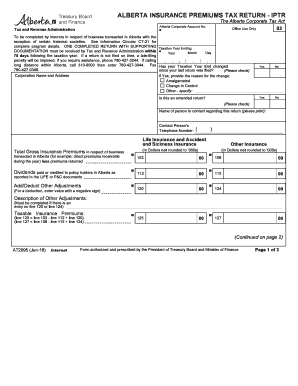
Get Canada At2095 - Alberta 2016-2026
How it works
-

Open form follow the instructions
-

Easily sign the form with your finger
-

Send filled & signed form or save
How to use or fill out the Canada AT2095 - Alberta online
Navigating the Canada AT2095 - Alberta form can seem complex, but this guide will assist you in filling it out accurately and efficiently. Whether you're a seasoned professional or a first-time filer, our step-by-step instructions aim to simplify the process for you.
Follow the steps to successfully complete your form.
- Press the ‘Get Form’ button to obtain the form and access it for completion.
- Begin by entering your Alberta Corporate Account Number at the top of the form. This number helps identify your corporation with the Tax and Revenue Administration.
- Indicate the taxation year ending by filling in the month, day, and year.
- Complete the section regarding changes to your taxation year or if this is an amended return by checking the appropriate boxes.
- Provide the corporation name and address in the designated field. Make sure this information is accurate to avoid any delays.
- In the gross insurance premiums section, clearly state the total gross insurance premiums transacted in Alberta, ensuring amounts are not rounded to thousands.
- List dividends paid or credited to policyholders in Alberta as required.
- For any adjustments, provide additional information in the 'Add/Deduct Other Adjustments' field.
- Calculate the taxable insurance premiums based on provided formulas and enter the results in the correct lines.
- Fill in the tax calculation sections as outlined, making sure to apply the correct rates and prorate factors.
- Total your tax payable amounts and report any prior payments made for the taxation year.
- In the remittance section, specify the amount enclosed if applicable and indicate how you would like to handle any overpayment.
- Ensure to attach any required supporting documents, such as copies of relevant pages from your financial documents.
- Sign and date the return, certifying that the information is true and correct.
- Finally, review the entire form for accuracy, then save your changes, download, or print the completed form for submission.
Take action today by completing your Canada AT2095 - Alberta form online.
If you make $70,000 a year living in the region of Alberta, Canada, you will be taxed $21,735. That means that your net pay will be $48,265 per year, or $4,022 per month.