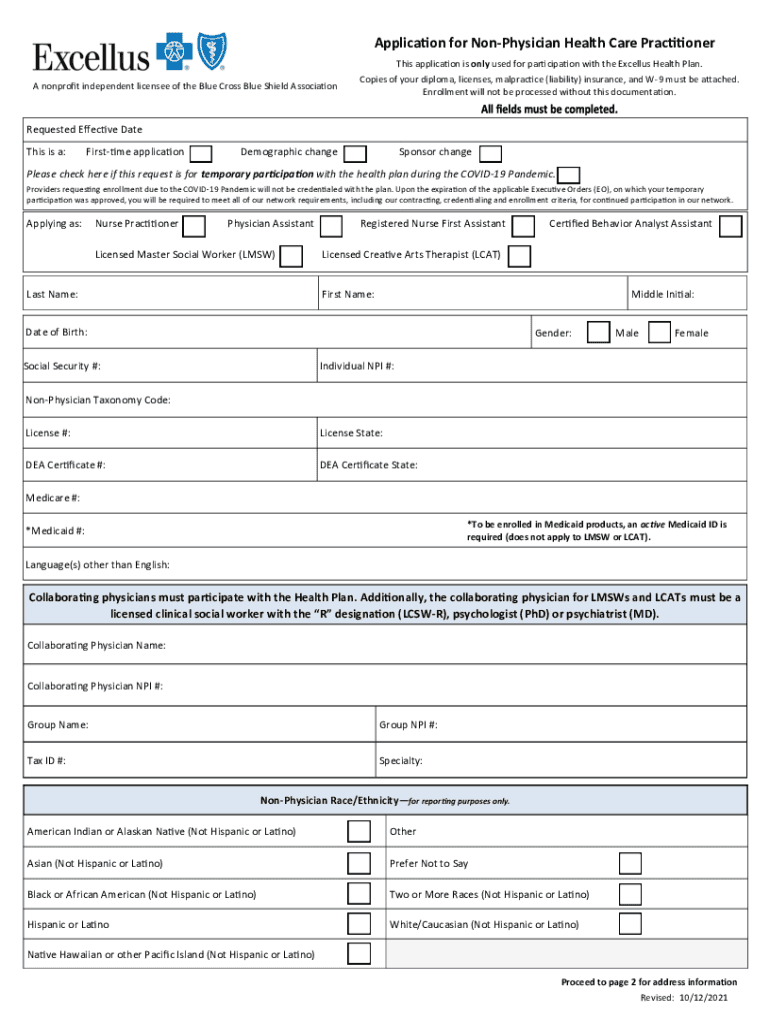
Application for Nonphysical Health Care Practitioner A nonprofit independent licensee of the Blue Cross Blue Shield Associations application is only used for participation with the Excelled Health.
Loading

Open form follow the instructions

Easily sign the form with your finger

Send filled & signed form or save
How to fill out the Excellus BCBS Application For Non-Physician Health Care Practitioner online
Navigating the Excellus BCBS Application for Non-Physician Health Care Practitioner can be straightforward if you follow a structured approach. This guide will assist you in filling out the application online with clarity and confidence.
Follow the steps to complete the application accurately.
- Click ‘Get Form’ button to obtain the form and open it in the editor.
- Begin by selecting the type of application you are submitting. Indicate if this is a first-time application, demographic change, or sponsor change. If applicable, check the box for temporary participation during the COVID-19 Pandemic.
- Next, identify your professional role by selecting one of the options provided: Nurse Practitioner, Physician Assistant, Licensed Master Social Worker (LMSW), Registered Nurse First Assistant, Certified Behavior Analyst Assistant, or Licensed Creative Arts Therapist (LCAT).
- Fill in your personal details including your last name, first name, middle initial, date of birth, gender, and Social Security number. Then, provide your Individual NPI number and Non-Physician Taxonomy Code.
- Input your license number, license state, and DEA certificate number along with the state where the DEA is issued. Include your Medicare number if applicable and also your active Medicaid ID if enrolling in Medicaid products.
- Specify any additional languages you speak other than English, followed by details for your collaborating physician. This includes their name and NPI number.
- Provide your group name, group NPI number, and Tax ID number. You will also need to indicate your specialty and provide demographics about your race/ethnicity for reporting purposes.
- Proceed to enter your office addresses. Ensure each address is formatted correctly with street level information, city, state, and ZIP code. Identify if each address is used for telehealth services and if they are handicap accessible.
- Complete the applicant and collaborating physician attestation sections, where necessary signatures and dates must be filled in.
- Finally, submit the completed application along with the necessary documents like your diploma and licenses through provided email, fax, or mail methods.
Start your application process online and ensure all required documents are ready for submission.
Experience a faster way to fill out and sign forms on the web. Access the most extensive library of templates available.
Related content
Oct 18, 2017 — Questions: Call 1-800-499-1275 or visit us at excellusbcbs.com...
Aug 11, 2017 — Why are we changing medical benefit administrators to Excellus...
Registered trademark of the Blue Cross and Blue Shield Association. ®' Registered...
Use professional pre-built templates to fill in and sign documents online faster. Get access to thousands of forms.
If you believe that this page should be taken down, please follow our DMCA take down process here.