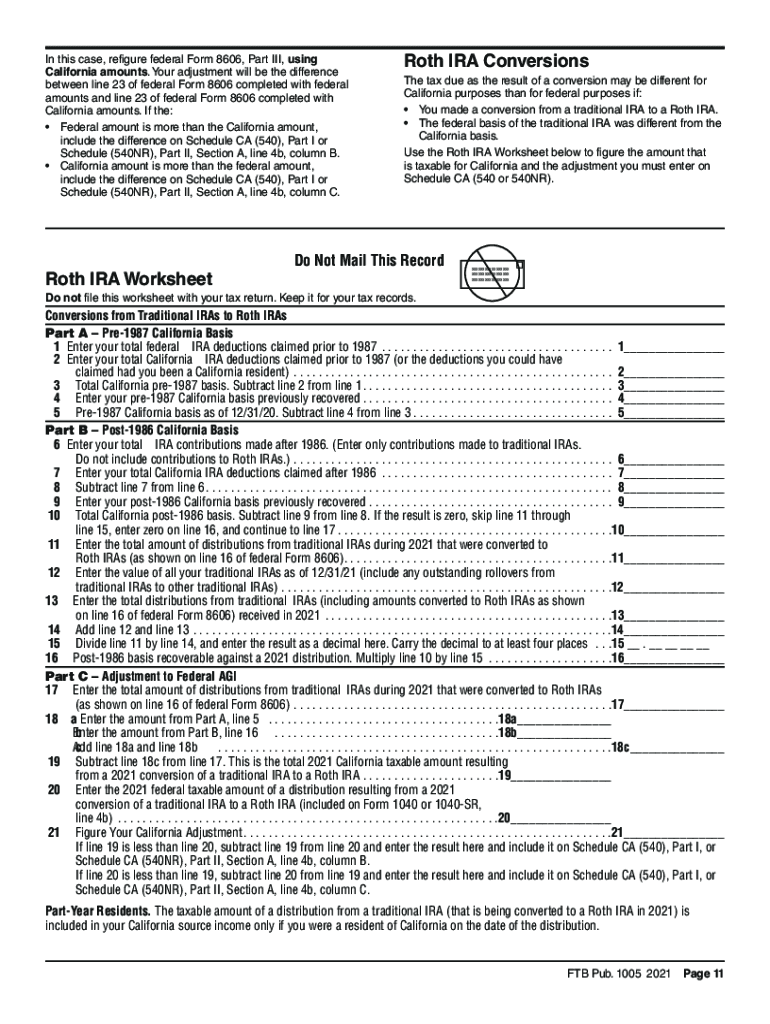
1005FTB Publication2021 Pension and Annuity GuidelinesTable of Contents What's New. . . . . . . . . . . . . . . . . . . . . . . . . . . . . . . . . . . . . . . . . . . . . . . . . . . . . . . . .
Loading

Open form follow the instructions

Easily sign the form with your finger

Send filled & signed form or save
How to fill out the CA FTB Publication 1005 online
This guide provides clear and detailed instructions on completing the CA FTB Publication 1005. It aims to help users accurately fill out the form to ensure compliance with California tax regulations related to pensions and annuities.
Follow the steps to complete the CA FTB Publication 1005 effectively.
- Click ‘Get Form’ button to obtain the form and open it in the editor.
- Review the general information provided in the document carefully, focusing on any updates or changes that apply to the tax year for which you are filing.
- Begin filling out your identification information in the specified fields. This may include your name, address, and social security number.
- Navigate to the section for pensions, annuities, and IRA amounts. Carefully input the amounts you received, ensuring they align with your federal tax return.
- Look for any differences between your federal and California amounts. Note these differences as California adjustments required in the designated fields.
- Complete any additional calculations as needed for pensions received from out-of-state sources or any tax implications involved.
- Double-check all entered information for accuracy to avoid errors that could delay processing.
- Once all fields are filled, you can save changes, download a copy of the completed form, print it, or share it as needed.
Complete your CA FTB Publication 1005 online today for a smoother tax filing experience.
Experience a faster way to fill out and sign forms on the web. Access the most extensive library of templates available.
Related content
This publication provides information on the California tax treatment of the distributions...
Pension and Annuity Income, and the California Franchise Tax Board. Publication 1005...
In Canada contact us at: 800-461-3007 or visit www.assaabloydss.ca ... Step 3: Complete...
Get answers to your most pressing questions about US Legal Forms API.
Does California tax out of state retirement income?
California is not tax-friendly toward retirees. Social Security income is not taxed. Withdrawals from retirement accounts are fully taxed. Wages are taxed at normal rates, and your marginal state tax rate is 2.00%.
Can California tax my pension if I move out of state?
Can California Tax My Pension if I Move out of State? Thankfully, no. A Federal law (PL 104-95) passed in 1996 supersedes the state's tax interests and prohibits any state from taxing pension income of non-residents, even if the pension was earned within the state.
Are California pensions taxable to non residents?
None of the pension received while you were a nonresident of California is taxable by California. However, the pension received during the period that you are a California resident (May 1 through December 31) is taxable by California.
Why did CalPERS retirees flee California?
“It's obvious that California's taxes and the cost of living drive some people out of the state,” said Mark Beach, AARP's Sacramento-based communications director, when told about Nevada's popularity among CalPERS retirees.
Can California tax my CalPERS pension if I move out of state?
If you receive a CalPERS benefit payment, have California state taxes withheld, and are moving out of state, you'll need to submit a new signed Tax Withholding Election (PDF) form if you wish to stop California state taxes from being withheld.
Does California tax pensions for non residents?
None of the pension received while you were a nonresident of California is taxable by California. However, the pension received during the period that you are a California resident (May 1 through December 31) is taxable by California.
What interest income is not taxable in California?
Non-California bonds: 1) United States Federal law requires the interest earned on federal bonds (U.S. obligations) to be included in gross income. California does not tax this interest income.
How much can a 74 year old contribute to an IRA?
For 2022, 2021, 2020 and 2019, the total contributions you make each year to all of your traditional IRAs and Roth IRAs can't be more than: $6,000 ($7,000 if you're age 50 or older), or. If less, your taxable compensation for the year.
Use professional pre-built templates to fill in and sign documents online faster. Get access to thousands of forms.
If you believe that this page should be taken down, please follow our DMCA take down process here.