Loading
Get Irs 1096 2022
How it works
-

Open form follow the instructions
-

Easily sign the form with your finger
-

Send filled & signed form or save
How to fill out the IRS 1096 online
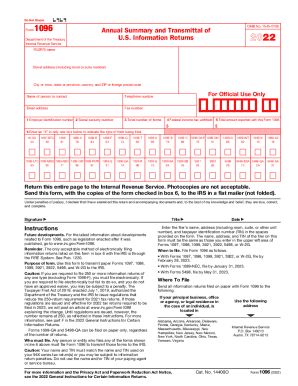
Filing Form 1096 is essential for anyone transmitting paper Forms 1097, 1098, 1099, 3921, 3922, 5498, or W-2G to the IRS. This guide provides a clear, step-by-step process to help you navigate the online completion of this form efficiently.
Follow the steps to complete your IRS 1096 online.
- Click ‘Get Form’ button to obtain the form and open it in the editor.
- Enter your name, address (including room, suite, or other unit number), and taxpayer identification number (TIN) in the designated spaces. It is important that this information matches what you used on the associated forms you are submitting.
- In box 1 or 2, enter your TIN. If you are an individual not engaged in a business, use your social security number (SSN) in box 2. Others should enter their employer identification number (EIN) in box 1.
- In box 3, specify the total number of forms you are transmitting with Form 1096. Only include correctly completed forms, excluding any blank or voided forms.
- Complete box 4 by entering the total federal income tax withheld that is indicated on the forms you are submitting.
- For box 5, input the total amounts reported for the forms listed if applicable, as some forms do not require an entry here.
- In box 6, mark an 'X' to indicate the type of forms you are submitting. Choose only one type.
- After confirming all entries are accurate, proceed to save your changes. You can then download, print, or share the completed form as required.
Ensure you complete your IRS filing documents online today.
Get form
Experience a faster way to fill out and sign forms on the web. Access the most extensive library of templates available.
If you file more than one type of information return on paper -- for example, 1099-NEC, 1099-MISC, 1099-K, etc. -- you must prepare a separate Form 1096 for each type of information return.
Get This Form Now!
Use professional pre-built templates to fill in and sign documents online faster. Get access to thousands of forms.