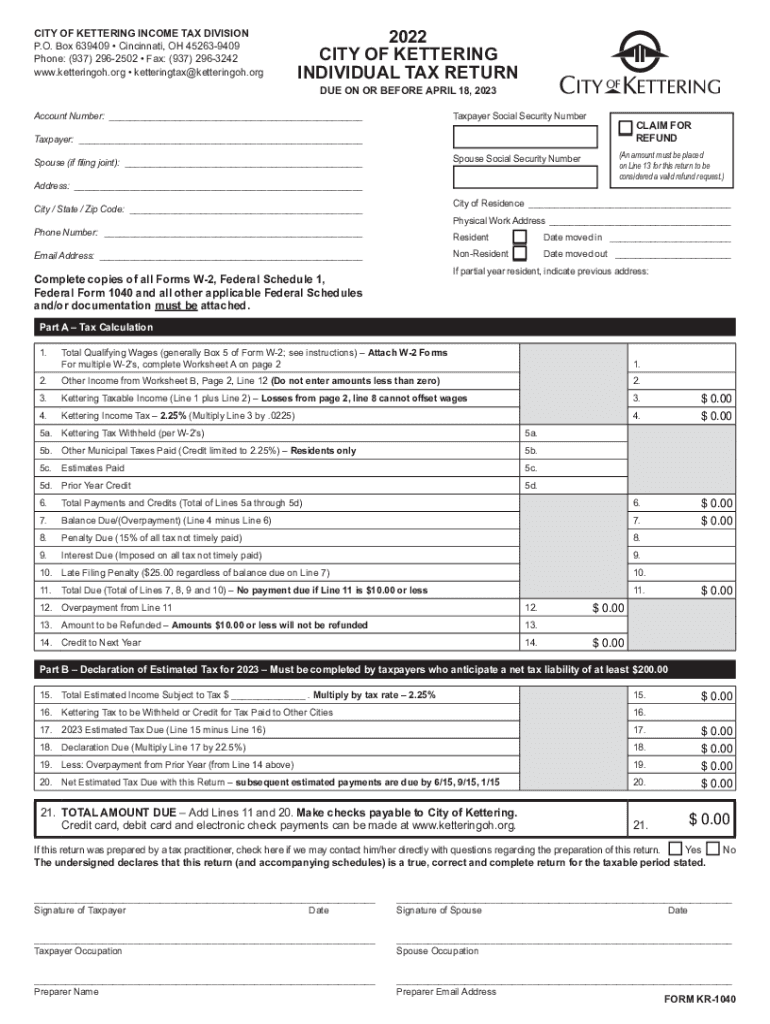
CITY OF KETTERING INCOME TAX DIVISION P.O. Box 639409 Cincinnati, OH 452639409 Phone: (937) 2962502 Fax: (937) 2963242 www.ketteringoh.org ketteringtax ketteringoh.org2022 CITY OF KETTERING INDIVIDUAL.
Loading

Open form follow the instructions

Easily sign the form with your finger

Send filled & signed form or save
How to fill out the OH KR-1040 - Kettering City online
Filling out the OH KR-1040 - Kettering City form correctly is essential for ensuring accurate tax reporting and any potential refunds. This guide provides a step-by-step breakdown of how to complete the form online, ensuring ease and clarity for all users.
Follow the steps to successfully complete the OH KR-1040 form online.
- Click the ‘Get Form’ button to access the form and open it for filling out.
- Enter your taxpayer Social Security Number and account number in the designated fields at the top of the form.
- Fill out the taxpayer and spouse information, including names and Social Security Numbers, if applicable. Ensure that the address field is complete, including the city, state, and zip code.
- Indicate your city of residence and provide your physical work address, if different. Include your phone number and email address for correspondence.
- In Part A, begin calculating your tax. Enter your total qualifying wages as indicated, including the submission of your W-2 Forms.
- Complete all applicable lines for your income calculation by adding other income as necessary, following the instructions for losses and municipal tax credits.
- Review the total payments and credits to determine any balance due or refund amount. The figures will auto-calculate based on your previous entries.
- In Part B, if applicable, enter your estimated tax for 2023, especially if your net tax liability is projected to be at least $200.
- Ensure all required schedules and documentation are attached if necessary, as incomplete submissions may lead to delays.
- Sign and date the form in the appropriate sections, ensuring to include the spouse’s signature if filing jointly.
- Finally, save your changes, download the completed form, and prepare to print or share it as needed for submission.
Complete your OH KR-1040 - Kettering City form online efficiently today!
Experience a faster way to fill out and sign forms on the web. Access the most extensive library of templates available.
Related content
... 425 BUSINESS ADDRESS: STREET 1: 1400 KETTERING TWR CITY: DAYTON STATE: OH ZIP:...
Commun., (1978), 23, 1038-1040. ... Charles F. Kettering Research Laboratory, Yellow...
2 Feb 2010 — O.Sin. 1.5 mils. 101h in. (0.27 m). 2400ft. 861 Power Controller ... o o o...
Get answers to your most pressing questions about US Legal Forms API.
What is the city of Kettering income tax rate?
Calendar Year 2023: 7% per year or 0.58% per month. Forms may be obtained by calling our office at (937) 296-2502 or go directly to the forms page. The City of Kettering Income Tax Division now accepts credit card and debit card payments.
Does Kettering Ohio have a city income tax?
Residents. All residents of the City of Kettering (18 years of age and older) are required to file a city income tax return with the Tax Division on an annual basis.
How do I pay my Kettering taxes?
Income Tax Payments In Person: City of Kettering Income Tax Division. 3600 Shroyer Rd., North Building. By Mail: City of Kettering Income Tax Division. P.O. Box 293100. Kettering, OH 45429. By Phone: Call 937.296. 2502 and a member of our staff will process your credit or debit card payment.
Where do I mail my tax return in City of Dayton?
Returns must be filed on or before April 15, or within 4 months after the fiscal year end with the City of Dayton Income Tax Department. Send returns with payment to PO Box 643700, Cincinnati, OH 45264-3700. Any tax due must be paid when filed.
Where do I mail my Kettering taxes?
Fiscal year taxpayers or taxpayers filing for any period other than a calendar year must file the return within four (4) months from the end of such fiscal year or other period. Returns must be filed with the CITY OF KETTERING - TAX DIVISION, P.O. BOX 293100, KETTERING, OH 45429-9100.
How to file Dayton Ohio City taxes?
Taxpayers may use the secure dropbox located on the west side of City Hall on Third Street, between the Municipal Garage and City Hall, to submit tax documents 24 hours a day, seven days a week. Also, a dropbox is located inside City Hall during regular hours. Please include a dropbox form with your information.
Where do I mail my Ohio State tax refund?
return, then mail this voucher and payment to Ohio Department of Taxation, P.O. Box 182131, Columbus, OH 43218-2131.
Where do I pay my Kettering city taxes?
Income Tax Payments In Person: City of Kettering Income Tax Division. 3600 Shroyer Rd., North Building. By Mail: City of Kettering Income Tax Division. P.O. Box 293100. Kettering, OH 45429. By Phone: Call 937.296. 2502 and a member of our staff will process your credit or debit card payment.
Use professional pre-built templates to fill in and sign documents online faster. Get access to thousands of forms.
If you believe that this page should be taken down, please follow our DMCA take down process here.
This form is available in several versions. Select the version you need from the drop-down list below.