CareFirst BlueCross BlueShield is the shared business name of CareFirst of Maryland, Inc. and Group Hospitalization and Medical Services, Inc. CareFirst BlueCross BlueShield and CareFirst BlueChoice,.

How it works
  • Open form

    Open form follow the instructions

  • Easily sign form

    Easily sign the form with your finger

  • Share form

    Send filled & signed form or save

How to fill out the Davis Vision Direct Reimbursement Claim Form online

Filling out the Davis Vision Direct Reimbursement Claim Form online is an important step in receiving reimbursement for your vision care expenses. This guide provides clear, step-by-step instructions to help you accurately complete the form, ensuring a smooth submission process.

Follow the steps to successfully complete the form online.

  1. Press the ‘Get Form’ button to obtain the Davis Vision Direct Reimbursement Claim Form and open it in your online document editor.
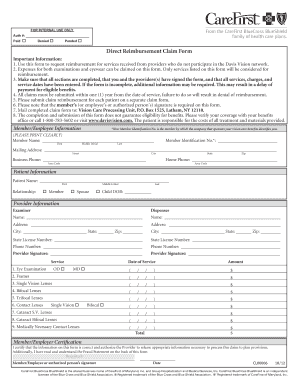
  2. Begin by entering your member information, including your full name, member identification number, mailing address, and contact phone numbers. Make sure to print clearly to avoid any issues.
  3. Provide the patient information by filling in the patient's name, relationship to the member, and date of birth. Ensure all sections are accurately completed.
  4. Fill out the provider information section, which includes the names, addresses, state license numbers, and contact numbers of both the examiner and dispenser.
  5. In the service section, indicate the services performed by checking the appropriate boxes and entering the date of service and the amount charged for each item. Be thorough, as only the listed services will be considered for reimbursement.
  6. Read through the member certification statement carefully. Your signature and the date are required to validate the information provided and authorize the release of any necessary information for processing the claim.
  7. Once you have filled out all sections, review the form for completeness to prevent any delays. Save your changes and take note of any additional documents you may need to include.
  8. Finally, download and print the completed claim form. Mail the claim form to the Vision Care Processing Unit at the provided address to ensure your claim is processed.

Complete your claims process by filling out your documents online today.

Get form

Experience a faster way to fill out and sign forms on the web. Access the most extensive library of templates available.

Related content

Davis Vision Direct Reimbursement Claim Form

Direct Reimbursement Claim Form. Important Information: 1. Use this form to request...

Learn more
Direct Reimbursement Claim Form

Use this form to request reimbursement for services received from providers who do not...

Learn more
Welcome to our Arizona 2021 Network.

Davis Vision. 4000000027. Vision Care Processing. P.O. Box 1525 Lat ham,. NY 12110. Visit...

Learn more
Questions & Answers

Get answers to your most pressing questions about US Legal Forms API.

Contact support

What are the steps for reimbursement?

The steps for reimbursement typically begin with completing the Davis Vision Direct Reimbursement Claim Form. Start by entering your personal details and listing all eligible expenses along with their receipts. After ensuring everything is accurate, submit the claim via mail or online, as directed, to receive your reimbursement promptly.

To fill a reimbursement claim form online, visit the Davis Vision website where you can access the Davis Vision Direct Reimbursement Claim Form. Complete the online fields with your personal and expense information accurately. Once filled, follow the instructions provided to submit your claim digitally, if available.

Filling out a reimbursement form, such as the Davis Vision Direct Reimbursement Claim Form, involves providing your personal information and details about your expenses. Make sure to include all relevant expenses, dates, and amounts clearly. Finally, ensure you sign the form to confirm that all the information is correct before submitting.

To submit a reimbursement, complete the Davis Vision Direct Reimbursement Claim Form diligently. Once you have filled in all necessary information, gather any required receipts and documents. After reviewing everything for accuracy, send the form and documents to the designated address indicated on the form or your benefits guide.

Filling out an expense reimbursement form is straightforward. Begin by providing your personal details at the top of the Davis Vision Direct Reimbursement Claim Form. Next, accurately detail each expense you are claiming, including the date and purpose of the expense. Conclude by signing the form to validate your submission.

You should mail your Davis Vision claim, including the completed Davis Vision Direct Reimbursement Claim Form, to the address specified on the form or your benefits documentation. If you're unsure, you can visit the Davis Vision website for the correct mailing address. It's essential to ensure that your claim is sent to the right location to avoid any delays.

A direct member reimbursement form is a document that allows members to claim back expenses incurred for services covered by their vision plan. Specifically, the Davis Vision Direct Reimbursement Claim Form enables members to submit costs directly for reimbursement. This form streamlines the process of getting your expenses compensated more efficiently.

To fill out a reimbursement claim form such as the Davis Vision Direct Reimbursement Claim Form, start by entering your personal information, including your name, member ID, and contact details. Next, list the expenses you wish to claim, ensuring you input the correct dates and amounts. Finally, sign and date the form before submitting it as instructed.

Submitting a reimbursement claim is straightforward. Start by filling out the Davis Vision Direct Reimbursement Claim Form with the necessary details regarding your vision services. Attach any relevant receipts and documents, and then send the entire package to the designated address or upload it through an online portal. Remember to keep copies of everything you submit for your records.

To file for reimbursement from VSP, you first need to gather your receipts and any necessary documentation related to your vision care. Next, complete the Davis Vision Direct Reimbursement Claim Form, ensuring that you provide accurate information regarding your expenses. After filling out the form, submit it along with your receipts either by mail or electronically, following the submission guidelines provided by VSP.

Get This Form Now!

Use professional pre-built templates to fill in and sign documents online faster. Get access to thousands of forms.

If you believe that this page should be taken down, please follow our DMCA take down process here.

Get Davis Vision Direct Reimbursement Claim Form