Loading
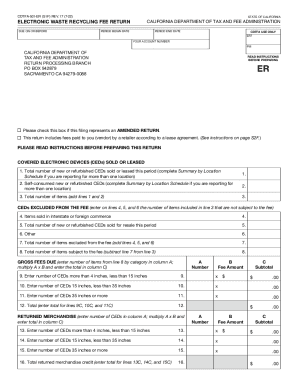
Get Ca Cdtfa-501-er (former Boe-501-er) 2022-2026
How it works
-

Open form follow the instructions
-

Easily sign the form with your finger
-

Send filled & signed form or save
How to fill out the CA CDTFA-501-ER (former BOE-501-ER) online
This guide provides clear and detailed instructions on how to fill out the CA CDTFA-501-ER, an important document for reporting the electronic waste recycling fee in California. Follow the steps outlined to ensure proper completion of the form online.
Follow the steps to fill out the CA CDTFA-501-ER form effectively.
- Click ‘Get Form’ button to access the CA CDTFA-501-ER form and open it in the online editor.
- Enter your account number in the designated field on the form. This number is crucial for identifying your account within the California Department of Tax and Fee Administration.
- Fill in the period begin date and period end date to specify the reporting timeframe for the fees being filed.
- Check the box if you are filing an amended return. This indicates that this submission corrects a previous filing.
- For lines 1 and 2, enter the total number of covered electronic devices sold or leased and the number of self-consumed devices, respectively. If reporting for multiple locations, ensure to complete the Summary by Location Schedule.
- Complete lines 4 through 6 to identify any items sold that are excluded from the fee, including those sold in interstate commerce or for resale, and total these on line 7.
- Calculate the number of items subject to the fee by subtracting total excluded items on line 7 from the total reported on line 3, and enter this value on line 8.
- Enter the category-specific details for fees due in lines 9 through 11, multiplying the quantity by the respective fee amount outlined in column B, and total the fees on line 12.
- For returned merchandise, report the number of items returned and calculate the credits on lines 13 through 16.
- Input any adjustments for fee credits on line 17 and compute the net fees due on line 18.
- Follow up with fee collection reimbursement calculation on line 19 and determine the total fees due by entering it on line 20.
- Calculate any late penalties on lines 23 and 24 if applicable, and finalize the total amount due on line 25.
- Once all fields are completed, save your changes. You may then choose to download, print, or share the completed form as needed.
Ensure accurate filing by completing your CA CDTFA-501-ER form online today.
Related links form
(2) Five dollars ($5) for each covered electronic device with a screen size greater than or equal to 15 inches but less than 35 inches measured diagonally. (3) Six dollars ($6) for each covered electronic device with a screen size greater than or equal to 35 inches measured diagonally.