Loading
Form preview
  • US Legal Forms
  • Other Templates
  • More Forms
  • More Multi-State Forms
  • About Form 8915-f, Qualified Disaster Retirement Plan Distributions And ...

Get About Form 8915-f, Qualified Disaster Retirement Plan Distributions And ...

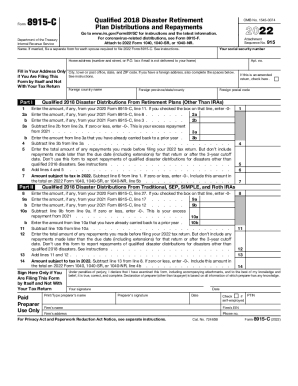
Form8915CDepartment of the Treasury Internal Revenue ServiceQualified 2018 Disaster Retirement Plan Distributions and RepaymentsOMB No. 154500742022Go to www.irs.gov/Form8915C for instructions and.

How it works

  1. Open form

    Open form follow the instructions

  2. Easily sign form

    Easily sign the form with your finger

  3. Share form

    Send filled & signed form or save

How to fill out the About Form 8915-F, Qualified Disaster Retirement Plan Distributions online

This guide provides a clear and supportive approach to filling out the About Form 8915-F, which is used for reporting qualified disaster retirement plan distributions. Whether you are familiar with tax forms or new to the process, this step-by-step guide will assist you in completing the form accurately and efficiently.

Follow the steps to successfully complete the About Form 8915-F online.

  1. Click ‘Get Form’ button to obtain the form and access it in the editor.
  2. Enter your social security number in the designated field on the form.
  3. Provide your name accurately. If you are married and both spouses are required to file Form 8915-F, ensure each spouse submits a separate form.
  4. Fill in your home address, including number and street or P.O. box. This should be followed by your city, state, and ZIP code. If you have a foreign address, complete the relevant fields.
  5. Complete Part I, starting with line 1. Enter the amount from your previous Form 8915-C where indicated. If you checked a specific box on that form, input -0-.
  6. Continue filling out lines 2a and 2b. For line 2a, input the amount from your 2021 Form 8915-C, and for line 2b, subtract it as instructed.
  7. For line 3, enter any amounts you have already carried back to prior tax years from line 3a. Ensure to complete line 3b accordingly.
  8. On line 4 and line 5, add the total amounts of repayments made. Follow the prompts closely regarding the timing of these repayments.
  9. Calculate the amount subject to tax in 2022 on line 6 by subtracting line 6 from line 1. If the result is zero or less, enter -0-.
  10. Move to Part II and repeat the process for lines 8, 9a, 9b, and 10a, ensuring all amounts are accurate and reflect previous years' distributions and repayments.
  11. Finally, review all entries for accuracy. Once completed, you can save your changes, download, print, or share the form as needed.

Start filling out your Form 8915-F online to ensure compliance and stay updated on your retirement plan distributions.

Get form

Experience a faster way to fill out and sign forms on the web. Access the most extensive library of templates available.
Get form

Related content

About Form 8915-F, Qualified Disaster Retirement...
Sep 26, 2022 — Information about Form 8915-F, Qualified Disaster Retirement Plan...
Learn more
Publication 4492-A (July 2008) - IRS
8915 Qualified Hurricane Retirement Plan. Distributions and Repayments. See How To Get Tax...
Learn more
2016 Instruction 1040 - IRS
Dec 15, 2016 — Patronage dividends and other distributions from a cooperative (boxes 1...
Learn more

Related links form

Animal Production Module Grade 7 Pdf Post Box Application Form.pdf - Bpo.bm Factoring Quadratics Worksheet Crt 61

Questions & Answers

Get answers to your most pressing questions about US Legal Forms API.

Contact support

Form 8915-F is a forever form. The same Form 8915-F will be used for distributions for qualified 2020 disasters (and qualified 2021 and later disasters, if enacted) and for each year of reporting of income and repayments of those distributions.

If you filed Form 8915-E in 2020 because you took a retirement distribution due to Coronavirus hardship, then the IRS will require you to file a 8915-F for 2021 and 2022. If you filed an 8915-F for a different qualifying disaster distribution you will need to complete this entry as well.

In 2023, use eFile.com to generate Form 8915-F to report repayment information about your 2020 distribution as applicable. This information is found on the 2020 Form 8915-E and the 2021 Form 8915-F if you repaid some of this last year.

Form 8915-F is used to report the following: Qualified 2020 non-COVID disaster distributions made in 2021 or 2022, including the Washington state disaster designated 8593-DR-WA on January 1, 2021. Repayments of current and prior year qualified disaster distributions.

Use Form 8915-F if you were adversely impacted by the coronavirus or affected by a qualified 2020 or later disaster. It replaces Form 8915-E beginning in 2021.

The form is already available for TurboTax Online.

Form 8915-F is used to report the following: Qualified 2020 non-COVID disaster distributions made in 2021 or 2022, including the Washington state disaster designated 8593-DR-WA on January 1, 2021. Repayments of current and prior year qualified disaster distributions.

Get This Form Now!

Use professional pre-built templates to fill in and sign documents online faster. Get access to thousands of forms.
Get form
If you believe that this page should be taken down, please follow our DMCA take down processhere.
Get About Form 8915-F, Qualified Disaster Retirement Plan Distributions And ...
Get form
  • Adoption
  • Bankruptcy
  • Contractors
  • Divorce
  • Home Sales
  • Employment
  • Identity Theft
  • Incorporation
  • Landlord Tenant
  • Living Trust
  • Name Change
  • Personal Planning
  • Small Business
  • Wills & Estates
  • Packages A-Z
  • Affidavits
  • Bankruptcy
  • Bill of Sale
  • Corporate - LLC
  • Divorce
  • Employment
  • Identity Theft
  • Internet Technology
  • Landlord Tenant
  • Living Wills
  • Name Change
  • Power of Attorney
  • Real Estate
  • Small Estates
  • Wills
  • All Forms
  • Forms A-Z
  • Other Templates
  • Legal Hub
  • About Us
  • Help Portal
  • Legal Resources
  • Blog
  • Affiliates
  • Contact Us
  • Delete My Account
  • Site Map
  • Industries
  • Forms in Spanish
  • Localized Forms
  • State-specific Forms
  • Forms Kit
  • Real Estate Handbook
  • All Guides
  • Notarize
  • Incorporation services
  • For Consumers
  • For Small Business
  • For Attorneys
  • USLegal
  • FormsPass
  • pdfFiller
  • signNow
  • altaFlow
  • DocHub
  • Instapage
Form Packages
  • Adoption
  • Bankruptcy
  • Contractors
  • Divorce
  • Home Sales
  • Employment
  • Identity Theft
  • Incorporation
  • Landlord Tenant
  • Living Trust
  • Name Change
  • Personal Planning
  • Small Business
  • Wills & Estates
  • Packages A-Z
Form Categories
  • Affidavits
  • Bankruptcy
  • Bill of Sale
  • Corporate - LLC
  • Divorce
  • Employment
  • Identity Theft
  • Internet Technology
  • Landlord Tenant
  • Living Wills
  • Name Change
  • Power of Attorney
  • Real Estate
  • Small Estates
  • Wills
  • All Forms
  • Forms A-Z
  • Other Templates
Customer Service
  • Legal Hub
  • About Us
  • Help Portal
  • Legal Resources
  • Blog
  • Affiliates
  • Contact Us
  • Delete My Account
  • Site Map
  • Industries
  • Forms in Spanish
  • Localized Forms
  • State-specific Forms
  • Forms Kit
Legal Guides
  • Real Estate Handbook
  • All Guides
Prepared for you
  • Notarize
  • Incorporation services
Our Customers
  • For Consumers
  • For Small Business
  • For Attorneys
Our Sites
  • USLegal
  • FormsPass
  • pdfFiller
  • signNow
  • altaFlow
  • DocHub
  • Instapage
Social Media
Call us now toll free:
+1 833 426 79 33
As seen in:
© Copyright 1999-2026 airSlate Legal Forms, Inc. 17 Station Street, Ste. 203, Brookline, MA 02445
  • Your Privacy Choices
  • Terms of Service
  • Privacy Notice
  • Content Takedown Policy
  • Bug Bounty Program