Loading
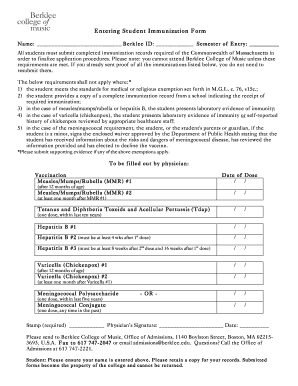
Get Berklee College Of Music Immunization Forms
How it works
-

Open form follow the instructions
-

Easily sign the form with your finger
-

Send filled & signed form or save
How to fill out the Berklee College Of Music Immunization Forms online
Completing the Berklee College Of Music immunization forms is an essential step for all students. This guide is designed to help you navigate the online filling process with clarity and ease.
Follow the steps to successfully complete the immunization forms.
- Click ‘Get Form’ button to obtain the immunization form and open it in the document editor.
- Enter your name in the designated field to ensure proper identification on the form.
- Provide your Berklee ID number in the specified area to link your immunization records with your student profile.
- Indicate your semester of entry, ensuring that this information aligns with your admission details.
- Review the immunization requirements listed, ensuring you are aware of the vaccinations needed as mandated by the Commonwealth of Massachusetts.
- If applicable, complete the exemption section by providing supporting evidence or verifying your eligibility for medical or religious exemptions.
- Have a licensed physician complete the required vaccination sections, filling in the dates for each dose received. Ensure their signature and stamp are included.
- Once all sections are completed, review the form for accuracy and make any necessary corrections.
- Save your changes, then choose to download, print, or share the completed form as required for submission.
Complete your immunization forms online today to ensure your admission to Berklee College Of Music!
To submit your immunization form to the University of Maryland (UMD), start by filling out the Berklee College of Music Immunization Forms that UMD requires. Carefully follow the instructions provided on their health center's website. You can submit the forms online, by fax, or through traditional mail. Make sure to check deadlines and ensure your records are complete to avoid any issues with enrollment.