Loading
Form preview
  • US Legal Forms
  • Other Templates
  • More Forms
  • More Multi-State Forms
  • Clemson University Petty Cash Voucher Form 2011

Get Clemson University Petty Cash Voucher Form 2011-2026

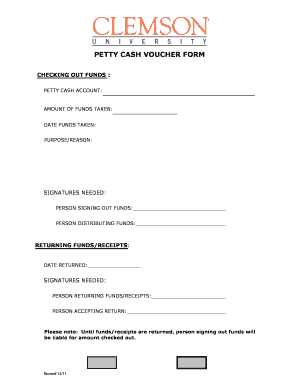
PETTY CASH VOUCHER FORM CHECKING OUT FUNDS : PETTY CASH ACCOUNT: AMOUNT OF FUNDS TAKEN: DATE FUNDS TAKEN: PURPOSE/REASON: SIGNATURES NEEDED: PERSON SIGNING OUT FUNDS: PERSON DISTRIBUTING FUNDS: RETURNING.

How it works

  1. Open form

    Open form follow the instructions

  2. Easily sign form

    Easily sign the form with your finger

  3. Share form

    Send filled & signed form or save

How to fill out the Clemson University Petty Cash Voucher Form online

Filling out the Clemson University Petty Cash Voucher Form online is a straightforward process that allows users to request and manage petty cash funds efficiently. This guide will provide you with detailed instructions on completing each section of the form to ensure proper documentation and accountability.

Follow the steps to complete the petty cash voucher form online

  1. Click the ‘Get Form’ button to access the petty cash voucher form and open it in your preferred editor.
  2. In the 'Petty Cash Account' field, enter the specific petty cash account you are using for this transaction.
  3. Input the 'Amount of Funds Taken,' clearly stating the total amount you are checking out for this transaction.
  4. Provide the 'Date Funds Taken' by entering the date you are requesting the funds, formatted as MM/DD/YYYY.
  5. Explain the 'Purpose/Reason' for taking the funds. This section should include a brief description of why the funds are needed.
  6. In the 'Signatures Needed' section, fill in the name of the 'Person Signing Out Funds,' confirming their responsibility for the cash taken.
  7. Also, complete the line for the 'Person Distributing Funds,' identifying the individual who will be providing the petty cash.
  8. After utilizing the funds, when returning the receipts, enter the 'Date Returned' to indicate when the funds or receipts were returned.
  9. In the next section, again provide signatures: fill in the name of the 'Person Returning Funds/Receipts' and the 'Person Accepting Return' to document the return process.
  10. Remember that until the funds or receipts are returned, the person signing out the funds will be liable for the amount checked out.
  11. Once all sections are completed, save your changes, download a copy of the form, print it for records, or share it as required.

Start filling out the Clemson University Petty Cash Voucher Form online today to effectively manage your petty cash needs.

Get form

Experience a faster way to fill out and sign forms on the web. Access the most extensive library of templates available.
Get form

Related content

s.C. STATE LIBRARY
by R Wilson · 2000 — Clemson University is built on what was once the Fort Hill...
Learn more
Policies, Procedures and Forms - Clemson...
Temporary Petty Cash Advance ... Petty Cash/Change Fund Action Form · Petty Cash Voucher...
Learn more
CG030601 Revenue General Ledger Account...
Fees charged by Clemson University Public Service Activities for ... OF PRIOR YEAR...
Learn more

Related links form

Vns Referral Form Cp09 Rhinoplasty Worksheet Applied Pathophysiology - Fall 2012 - Arkansas Tech University - Atu

Questions & Answers

Get answers to your most pressing questions about US Legal Forms API.

Contact support

All vouchers are kept with the petty cash fund until the fund is replenished, so the total amount of the vouchers and the remaining cash in the fund should always equal the amount assigned to the fund.

An accounting staff person reviews and approves the form and sends a copy to the accounts payable staff, along with all vouchers referenced on the form. The petty cash custodian retains a copy.

What information should a petty cash voucher include? Date. Amount requested. Name of the receiver. Reason for the cash request. Name of the petty cashier (the person who controls the petty cash fund)

A member of your team requests petty cash. They'll fill out the voucher with information including its purpose and how much they required. The petty cashier approves or denies the request. Upon approval, the team member is granted the cash from the petty cash fund and spends the money.

Petty cash box procedures That keyholder is the only one who can remove and disburse cash, and is also held accountable for the balance in the box at all times. The keyholder is often a supervisor and should not be the bookkeeper responsible for recording the transactions at the end of the month.

The completed “Petty Cash Replenishment Request” should be signed by the Petty Cashier and approved by the Department Head, who also ensures that the expenditures have a valid business purpose. vii.

The custodian is required to prepare a voucher for each disbursement and attach any source documents for expenses to the voucher, such as invoices and receipts. The custodian must also ensure at all times that the cash available and the petty cash vouchers are equal to the fund's original total amount.

Designate a reasonable amount Choose a dollar amount that will cover small expenses for a month or so. Typically, a petty cash fund between $100 and $500 is suitable for many small businesses.

Get This Form Now!

Use professional pre-built templates to fill in and sign documents online faster. Get access to thousands of forms.
Get form
If you believe that this page should be taken down, please follow our DMCA take down processhere.
Get Clemson University Petty Cash Voucher Form
Get form
  • Adoption
  • Bankruptcy
  • Contractors
  • Divorce
  • Home Sales
  • Employment
  • Identity Theft
  • Incorporation
  • Landlord Tenant
  • Living Trust
  • Name Change
  • Personal Planning
  • Small Business
  • Wills & Estates
  • Packages A-Z
  • Affidavits
  • Bankruptcy
  • Bill of Sale
  • Corporate - LLC
  • Divorce
  • Employment
  • Identity Theft
  • Internet Technology
  • Landlord Tenant
  • Living Wills
  • Name Change
  • Power of Attorney
  • Real Estate
  • Small Estates
  • Wills
  • All Forms
  • Forms A-Z
  • Other Templates
  • Legal Hub
  • About Us
  • Help Portal
  • Legal Resources
  • Blog
  • Affiliates
  • Contact Us
  • Delete My Account
  • Site Map
  • Industries
  • Forms in Spanish
  • Localized Forms
  • State-specific Forms
  • Forms Kit
  • Real Estate Handbook
  • All Guides
  • Notarize
  • Incorporation services
  • For Consumers
  • For Small Business
  • For Attorneys
  • USLegal
  • FormsPass
  • pdfFiller
  • signNow
  • altaFlow
  • DocHub
  • Instapage
Form Packages
  • Adoption
  • Bankruptcy
  • Contractors
  • Divorce
  • Home Sales
  • Employment
  • Identity Theft
  • Incorporation
  • Landlord Tenant
  • Living Trust
  • Name Change
  • Personal Planning
  • Small Business
  • Wills & Estates
  • Packages A-Z
Form Categories
  • Affidavits
  • Bankruptcy
  • Bill of Sale
  • Corporate - LLC
  • Divorce
  • Employment
  • Identity Theft
  • Internet Technology
  • Landlord Tenant
  • Living Wills
  • Name Change
  • Power of Attorney
  • Real Estate
  • Small Estates
  • Wills
  • All Forms
  • Forms A-Z
  • Other Templates
Customer Service
  • Legal Hub
  • About Us
  • Help Portal
  • Legal Resources
  • Blog
  • Affiliates
  • Contact Us
  • Delete My Account
  • Site Map
  • Industries
  • Forms in Spanish
  • Localized Forms
  • State-specific Forms
  • Forms Kit
Legal Guides
  • Real Estate Handbook
  • All Guides
Prepared for you
  • Notarize
  • Incorporation services
Our Customers
  • For Consumers
  • For Small Business
  • For Attorneys
Our Sites
  • USLegal
  • FormsPass
  • pdfFiller
  • signNow
  • altaFlow
  • DocHub
  • Instapage
Social Media
Call us now toll free:
+1 833 426 79 33
As seen in:
© Copyright 1999-2026 airSlate Legal Forms, Inc. 17 Station Street, Ste. 203, Brookline, MA 02445
  • Your Privacy Choices
  • Terms of Service
  • Privacy Notice
  • Content Takedown Policy
  • Bug Bounty Program