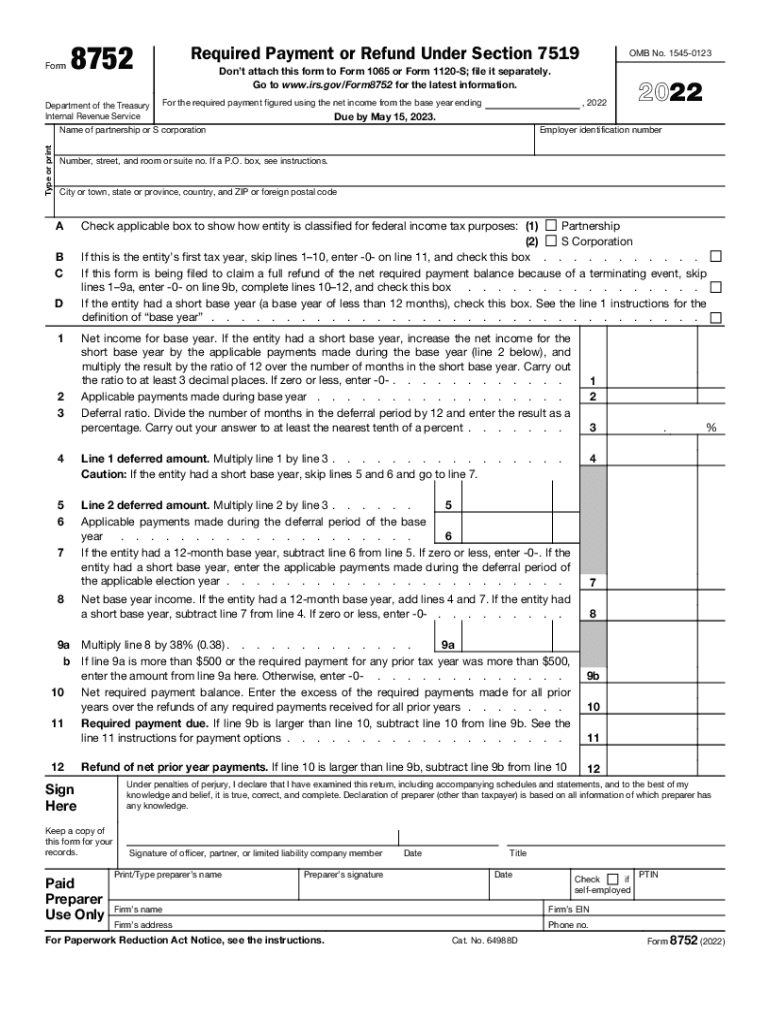
Form8752Department of the Treasury Internal Revenue ServiceRequired Payment or Refund Under Section 7519 Don't attach this form to Form 1065 or Form 1120S; file it separately. Go to www.irs.gov/Form8752.

Open form follow the instructions

Easily sign the form with your finger

Send filled & signed form or save
How to fill out the IRS 8752 online
Filling out the IRS 8752 form accurately is essential for partnerships and S corporations that have made a section 444 election. This guide will provide clear, step-by-step instructions to assist users in completing the form online with confidence.
Follow the steps to complete the IRS 8752 online.
- Click ‘Get Form’ button to obtain the form and open it in the editor.
- Provide the necessary identification information at the top of the form. This includes the name of the partnership or S corporation, employer identification number, and the address details.
- Select the applicable classification of the entity for federal income tax purposes by checking the appropriate box for either 'Partnership' or 'S Corporation'.
- If this is the entity's first tax year, check the box provided. If applicable, check the box if you are filing due to a terminating event or if the entity had a short base year.
- In line 1, enter the net income for the base year, ensuring that if there is a short base year, you adjust it by applicable payments and multiply by the ratio of 12 over the number of months in the base year.
- For line 2, list any applicable payments made during the base year which are not guaranteed payments.
- Calculate the deferral ratio in line 3, dividing the number of months in the deferral period by 12, and enter it as a percentage.
- Complete lines 4 to 12, following the instructions for each line, ensuring calculations for deferred amounts and required payment are accurate.
- Sign the form in the indicated area, certifying that the information provided is true and complete.
- After ensuring all fields are complete, save your changes, and you can then download, print, or share the form as needed.
Ensure compliance by completing and filing your IRS 8752 form online today.
Experience a faster way to fill out and sign forms on the web. Access the most extensive library of templates available.
Related content
Partnerships and S corporations use Form 8752 to figure and report the payment required...
26 U.S. Code § 7519 - Required payments for entities electing not to have required...
Aug 10, 2020 — 8,752. 19,063. 17,045. Amortization of intangibles ... The IRS began an...
Get answers to your most pressing questions about US Legal Forms API.
How to do an IRS payment trace?
If you lost your refund check, you should initiate a refund trace: Use Where's My Refund, call us at 800-829-1954 and use the automated system, or speak with an agent by calling 800-829-1040 (see telephone assistance for hours of operation).
Can Form 966 be filed electronically?
An authorized person must sign and date the bottom of the form, which can be submitted electronically, in the mail, or at an IRS service center.
How can I get my w2 from the IRS?
The only way to get an actual copy of your Form W-2 from us is to order a copy of the entire return by using Form 4506, Request for Copy of Tax Return and paying a $43 fee for each return requested. We will waive the fee for taxpayers impacted by a federally declared disaster or a significant fire.
Who files 8752?
Partnerships and S corporations use Form 8752 to figure and report the payment required under section 7519 or to obtain a refund of net prior year payments. Section 7519 payments are required of any partnership or S corporation that has elected under section 444 to have a tax year other than a required tax year.
Can form 8752 be filed electronically?
Payment Procedure Form 8752 is used to calculate the Section 7519 payment (or refund). The payment can be made electronically or by filing the Form 8752 “Required Payment or Refund Under Section 7519.” If a Form 8752 is filed, it should be file separately.
What is tax form 8752 for?
Partnerships and S corporations use Form 8752 to figure and report the payment required under section 7519 or to obtain a refund of net prior year payments. Section 7519 payments are required of any partnership or S corporation that has elected under section 444 to have a tax year other than a required tax year.
What is 1040?
Form 1040 is used by U.S. taxpayers to file an annual income tax return.
What form is IRS payment tracing?
Form 3911 is completed by the taxpayer to provide the Service with information needed to trace the nonreceipt or loss of the already issued refund check.
Use professional pre-built templates to fill in and sign documents online faster. Get access to thousands of forms.
If you believe that this page should be taken down, please follow our DMCA take down process here.
This form is available in several versions. Select the version you need from the drop-down list below.