Loading
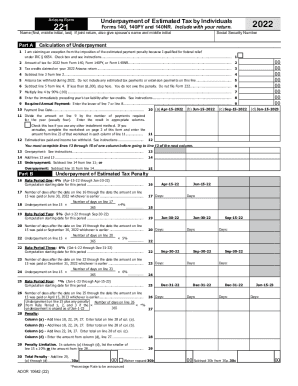
Get Az Dor Form 221 2022-2026
How it works
-

Open form follow the instructions
-

Easily sign the form with your finger
-

Send filled & signed form or save
How to fill out the AZ DoR Form 221 online
The AZ DoR Form 221 is designed for individuals who need to report and calculate any underpayment of estimated tax. This guide provides a clear, step-by-step approach to filling out the form online, ensuring users can complete it accurately and efficiently.
Follow the steps to complete the AZ DoR Form 221 online.
- Click ‘Get Form’ button to access the form and open it in your preferred editor.
- In the first section, enter your name, including your first name, middle initial, and last name. If filing jointly, include your spouse’s name and middle initial.
- Provide your Social Security Number to ensure proper identification and processing.
- Proceed to Part A to calculate your underpayment, starting with checking if you qualify for an exception from the penalty. If so, check the appropriate box.
- Enter the amount of tax from your 2022 return, as reported on Forms 140, 140PY, or 140NR.
- List any tax credits claimed on your 2022 Arizona return in the next field.
- Subtract the amount of tax credits from your total tax to determine your taxable amount.
- Record the total Arizona tax withheld during 2022, ensuring you exclude any estimated tax payments.
- Complete the calculations as instructed, ensuring that if the result is less than $1,000, you do not owe a penalty.
- For the payment due dates, mark the corresponding boxes for each due date.
- Proceed to complete the estimated tax paid and any overpayments in the designated sections.
- Continue filling out the penalty calculations for the underpayment, including the respective rates for different time periods.
- Review all entered information for accuracy and completeness, ensuring all fields have been filled as required.
- Once satisfied with the information provided, you can save your changes, download a copy of the form, print it for your records, or share it as needed.
Get started with completing your AZ DoR Form 221 online today.
Purpose. The Demobilization Check-Out (ICS 221) ensures that resources checking out of the incident have completed all appropriate incident business, and provides the Planning Section information on resources released from the incident. Demobilization is a planned process and this form assists with that planning.