Loading
Get Ky 42a741 2013-2026
How it works
-

Open form follow the instructions
-

Easily sign the form with your finger
-

Send filled & signed form or save
How to fill out the KY 42A741 online
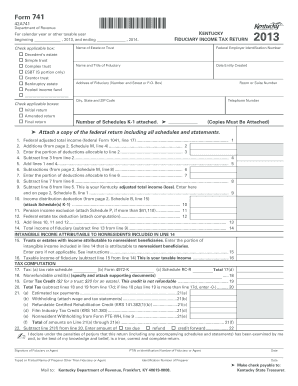
Filling out the KY 42A741 form is essential for reporting fiduciary income tax in Kentucky. This guide provides step-by-step instructions to help users complete the form accurately and efficiently online.
Follow the steps to fill out the KY 42A741 form with ease.
- Click the ‘Get Form’ button to access the KY 42A741 form and open it for editing.
- Begin by entering the calendar year or other taxable year in the designated fields for the period starting and ending in 2013 and 2014 respectively.
- Check the applicable box to indicate the type of fiduciary income tax return you are submitting, such as a decedent's estate, simple trust, or complex trust.
- Provide the Federal Employer Identification Number (FEIN) in the designated field.
- Fill in the name and title of the fiduciary responsible for the form, along with the entity creation date.
- Complete the address section for the fiduciary, including street number, P.O. Box, city, state, ZIP code, and telephone number.
- Indicate the number of Schedules K-1 attached, ensuring all copies are included when submitting the form.
- Proceed to calculate federal adjusted total income as indicated, filling in the appropriate lines for additions, deductions, and subtractions.
- Enter any deductions related to income distribution, pension income exclusion, and federal estate tax deduction as required.
- Follow the tax computation section to determine total tax, including any nonrefundable credits and tax credits based on fiduciary status.
- Complete the additional information section, answering all required questions regarding previous years and any relevant changes.
- Finally, review the completed form for accuracy, then save changes, download a copy, or print the document as needed.
Complete your KY 42A741 form online today for efficient and accurate filing.
It is used to calculate and pay taxes for the year. To fill out Form 740, you will need to provide information on your income, deductions, and credits. You will need to enter your name, address, and Social Security Number. You will also need to provide details on your income, deductions, and credits.