Loading
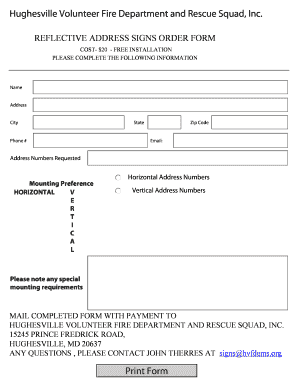
Get Md Reflective Address Signs Order Form 2009-2026
How it works
-

Open form follow the instructions
-

Easily sign the form with your finger
-

Send filled & signed form or save
How to fill out the MD Reflective Address Signs Order Form online
Filling out the MD Reflective Address Signs Order Form online is a straightforward process that ensures you receive high-quality reflective address signs for your home or business. This guide will provide step-by-step instructions to help you navigate the form with ease.
Follow the steps to complete the order form effectively.
- Click the ‘Get Form’ button to access the document in your preferred editor.
- Enter your personal information in the designated fields including your name, address, city, state, zip code, and phone number. Ensure that all details are accurate to facilitate the order process.
- Provide your email address. This is essential for any communication regarding your order.
- Specify the address numbers you want on the sign by filling in the 'Address Numbers Requested' field.
- Choose your mounting preference by selecting either 'Horizontal' or 'Vertical' for the address numbers.
- If you have any special mounting requirements, please note them in the designated area.
- Once you have completed all required fields, save your changes. You will have the option to download, print, or share the form.
- Mail the completed form along with your payment of $20 to Hughesville Volunteer Fire Department and Rescue Squad, Inc. at the provided address.
- For any queries, feel free to contact John Therres at signs@hvfdems.org.
Complete and submit your MD Reflective Address Signs Order Form online today to ensure prompt delivery.