Loading
Get Wa Dshs 13-678 2016
How it works
-

Open form follow the instructions
-

Easily sign the form with your finger
-

Send filled & signed form or save
How to fill out the WA DSHS 13-678 online
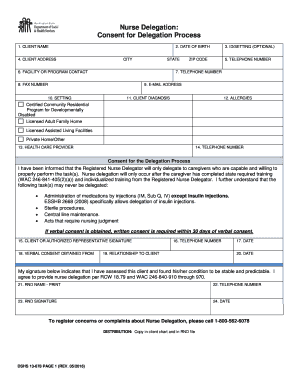
Filling out the WA DSHS 13-678 form is an essential step in the nurse delegation process. This guide will assist you in navigating each section of the form to ensure accurate and complete submissions.
Follow the steps to effectively fill out the WA DSHS 13-678 online.
- Press the ‘Get Form’ button to access the WA DSHS 13-678 form and open it in your chosen online editing tool.
- In the first section, 'Client Name', enter the client's last name followed by their first name. This information is crucial for identifying the individual in the delegation process.
- For 'Date of Birth', input the client's date of birth in the format of month, day, and year. This helps verify the identity of the client.
- In the 'ID/Setting' field, you may choose to enter the client’s identification number if it is applicable, or specify the setting type, which could include options like 'AFH', 'ALF', or 'DDD Program'. This field is optional.
- Complete the 'Client Address' section by entering the complete address including street address, city, state, and zip code where the client resides.
- In the 'Telephone Number' field, include the phone number where the client can be reached, ensuring to include the area code.
- For the 'Facility or Program Contact', enter the name of the relevant facility or the individual contact at that facility. If the client lives in their own home, you may write 'N/A'.
- If different, provide the additional 'Telephone Number' for the facility, including the area code.
- If applicable, enter the fax number of the facility in the 'Fax Number' section.
- In the 'E-mail Address' field, provide the email address of the client or the facility for communication purposes.
- Check the appropriate box under 'Setting' to indicate the type of facility or program that applies.
- In 'Client Diagnosis', document any diagnoses that may affect the care provided through delegation.
- List any known allergies in the 'Allergies' section or state 'N/A' if there are none.
- Fill in the 'Health Care Provider' with the name of the client’s healthcare provider.
- Provide the 'Telephone Number' of the healthcare provider mentioned earlier, including the area code.
- In the 'Client or Authorized Representative Signature' area, ensure the client or their authorized representative understands the process and signs to consent.
- Request that they enter their telephone number in the corresponding section if it differs from the earlier input.
- Document the date of the signature in the specified field.
- For the 'Verbal Consent Obtained From', ensure you read the process to the client/authorized representative and obtain their verbal consent, then write their name.
- Record the relationship of the individual providing verbal consent to the client in the appropriate section.
- Enter the date verbal consent was obtained.
- The 'RND Name - Print' field requires you to print your name as the Registered Nurse Delegator.
- Provide your telephone number for further communication.
- Finally, sign and date your signature in the 'RND Signature' area, thus verifying the consent provided.
- Once you fill out the form, you can save your changes, download it, print, or share it as required.
Complete your documentation online today to ensure timely and efficient communication in the nurse delegation process.
Get form
Experience a faster way to fill out and sign forms on the web. Access the most extensive library of templates available.
Get This Form Now!
Use professional pre-built templates to fill in and sign documents online faster. Get access to thousands of forms.