Loading
Get Ct Mcs-150ct 2013-2026
How it works
-

Open form follow the instructions
-

Easily sign the form with your finger
-

Send filled & signed form or save
How to fill out the CT MCS-150CT online
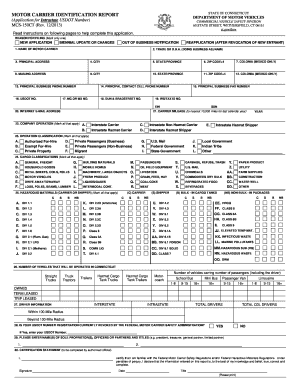
Filling out the CT MCS-150CT online is an essential step for motor carriers operating within Connecticut. This guide provides a clear and structured approach to ensure users complete the form accurately and efficiently.
Follow the steps to successfully complete the CT MCS-150CT online.
- Click ‘Get Form’ button to obtain the CT MCS-150CT form and open it in the online editor.
- Select the reason for filing by marking one option: 'New Application,' 'Biennial Update or Changes,' or 'Out of Business Notification.'
- Enter the legal name of the motor carrier in the 'Name of Motor Carrier' field as registered with the Secretary of the State's Office.
- If applicable, provide the trade or D.B.A. (Doing Business As) name in the corresponding field.
- Fill in the principal address where the safety records are maintained, including city, state, and ZIP code.
- Enter the mailing address for correspondence, ensuring to include the city, state, and ZIP code.
- Provide the principal business phone number and the contact cell phone number, including area codes.
- Include the principal business fax number, USDOT number (if applicable), MC or MX number, and Dun & Bradstreet number, if available.
- Fill out the IRS/TAX ID number, entering either the EIN assigned or the owner's Social Security Number.
- Enter the email address for the company’s official point of contact.
- Input the total carrier mileage for the last calendar year, rounding to the nearest 10,000 miles.
- Mark all applicable options under 'Company Operation' to indicate the type of transport the company engages in.
- Select the appropriate operation classification, marking all that apply based on the company's business model.
- Complete the 'Cargo Classifications' section by marking all relevant cargo types transported by the company.
- If applicable, detail any hazardous materials transported or shipped, selecting the appropriate options provided.
- Provide the total number of vehicles operated in Connecticut, broken down by type and ownership status.
- Fill in the total number of drivers and the number of drivers with a valid Commercial Driver's License.
- Indicate whether the USDOT number is currently revoked and enter the USDOT number if it is.
- Enter the names of sole proprietors, officers, or partners, and their titles in the designated fields.
- Complete the certification statement by printing or typing the name of the authorized individual along with their signature and title.
- Once all fields are completed, save changes, and proceed to download, print, or share the CT MCS-150CT form as needed.
Complete your CT MCS-150CT online now for a streamlined process!
To obtain your MC certificate online, start by logging into your account on the FMCSA's website. Once you're logged in, you can locate the option to download your MC certificate linked to your CT MCS-150CT. If you find this process challenging, USLegalForms offers a range of resources to help you navigate and acquire your documents efficiently.