Loading
Get Canada Rtb-44 - British Columbia 2021-2026
How it works
-

Open form follow the instructions
-

Easily sign the form with your finger
-

Send filled & signed form or save
How to fill out the Canada RTB-44 - British Columbia online
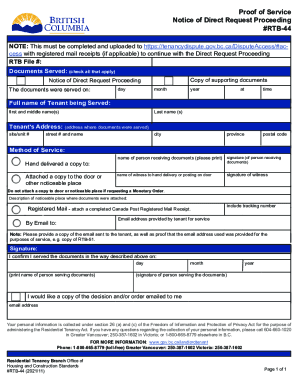
The Canada RTB-44 form is essential for documenting the service of a Notice of Direct Request Proceeding in British Columbia. This guide will walk you through each section of the form, ensuring that you fill it out correctly and efficiently.
Follow the steps to successfully complete the form.
- Press the ‘Get Form’ button to obtain the RTB-44 form and open it in your preferred document editor.
- Enter the RTB file number in the designated field at the top of the form.
- Mark all applicable boxes under 'Documents Served' to indicate the documents you are submitting.
- Fill in the details of when and where the documents were served, including the day, month, year, and time.
- Provide the full name of the tenant being served by writing their first, middle (if applicable), and last names.
- Input the tenant's address where the documents were served, including site/unit number, street address, city, province, and postal code.
- Select the method of service. If hand delivered, record the name and signature of the person receiving the documents. Include the name and signature of a witness if applicable.
- If using registered mail, attach your Canada Post Registered Mail Receipt and include the tracking number.
- If serving by email, input the tenant's provided email address and remember to include a copy of the email sent as well as proof that the email address was given for the purposes of service.
- At the bottom of the form, confirm that you served the documents by providing the date and signing your name.
- If you would like a copy of the decision or order emailed to you, include your email address in the appropriate field.
- Review all entered information for accuracy and clarity. Once complete, you can save your changes, download, print, or share the form.
Complete your documents online today to ensure a smooth filing process.
How to send a complaint Email: complaintresolution@bchousing.org. Fax: 604-439-4722, Attention Complaint Resolution. Mail: Manager, Complaint Resolution. Suite 1705-4555 Kingsway. Burnaby, BC V5H 4V8.