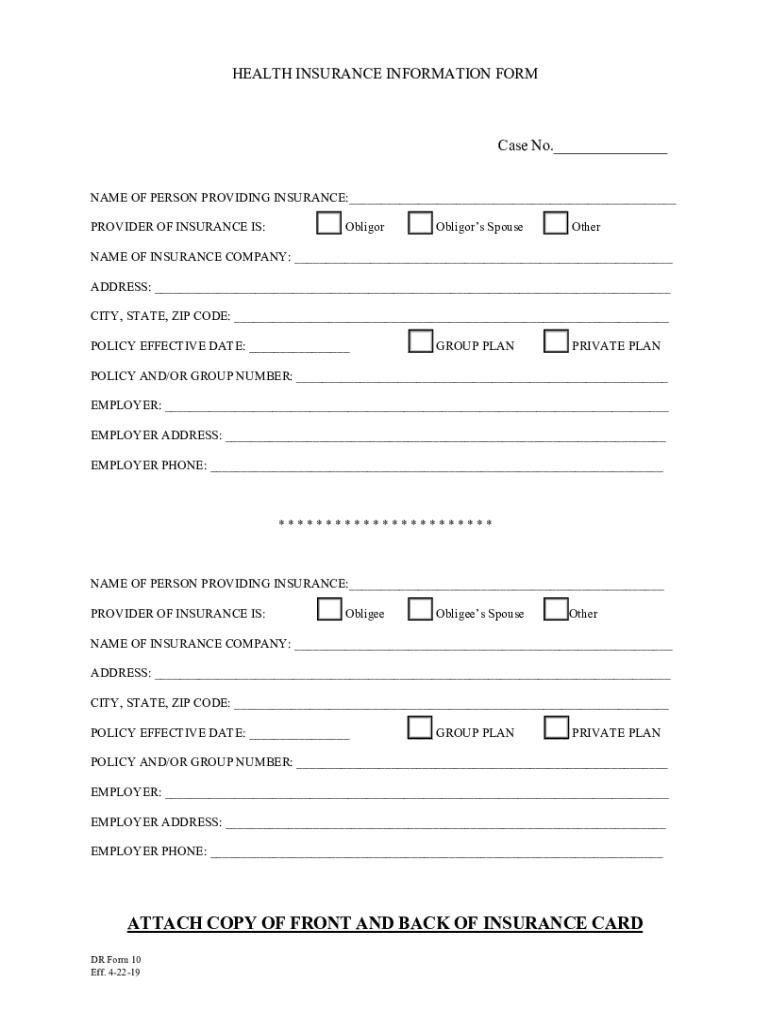
Or s Spouse Other NAME OF INSURANCE COMPANY: ADDRESS: CITY, STATE, ZIP CODE: POLICY EFFECTIVE DATE: GROUP PLAN PRIVATE PLAN POLICY AND/OR GROUP NUMBER: EMPLOYER:.
Loading

Open form follow the instructions

Easily sign the form with your finger

Send filled & signed form or save
How to fill out the DR Form 10 online
Filling out the DR Form 10 online is a straightforward process that allows you to provide crucial health insurance information. This guide will help you navigate each section of the form smoothly.
Follow the steps to complete the DR Form 10 efficiently.
- Click ‘Get Form’ button to access the form and open it in the online editor.
- Begin by entering the case number in the provided space.
- Input the name of the person providing insurance at the designated line.
- Indicate the provider of insurance by selecting one of the following options: Obligor, Obligor’s spouse, or Other.
- Fill in the name of the insurance company in the respective field.
- Provide the insurance company’s address, ensuring that all components, such as city, state, and ZIP code, are filled in accurately.
- Enter the policy effective date in the indicated space.
- Choose whether the plan is a group plan or a private plan by marking the appropriate box.
- Include the policy and/or group number on the designated line.
- Fill in the employer's name associated with the insurance.
- Provide the employer's address in the respective space.
- Enter the employer's phone number for contact purposes.
- Repeat the necessary steps 3 through 12 for the obligee section, ensuring that all details are correctly recorded.
- Attach a copy of the front and back of the insurance card as indicated in the instructions.
- Once all fields are thoroughly completed, you can choose to save changes, download a copy of the form, print it, or share it as required.
Begin your form-filling process online today for a seamless experience.
Experience a faster way to fill out and sign forms on the web. Access the most extensive library of templates available.
Related content
This Annual Report on Form 10-K contains forward-looking statements including, in...
NOTE – Physician's signature must accompany each entry and including standing orders...
Form CMS-2552-10, which contains instructions for the completion of the new cost report...
Get answers to your most pressing questions about US Legal Forms API.
What is 10ic and 10id?
The companies that are filing tax u/s 115BAA of the income Act eligible for filing Form 10-IC for adopting a new corporate tax rate and for the manufacturing units that are filing tax u/s 115BAB of the Income Tax Act eligible of filing Form 10-ID for adopting the reduced tax rates.
What is 10id?
Form 10-ID is required to filed only if a domestic company chooses to opt for concessional tax rate of 15% (plus applicable surcharge and cess) under Section 115BAB of the Income Tax Act, 1961.
Who is required to file Form 10?
This is optional. Form 10-IC is required to filed only if a Domestic Company chooses to pay tax at concessional rate of 22% under Section 115BAA of the Income Tax Act,1961.
What happens if 10-IC is not filed?
Failure to Furnish Form 10-IC Failure to furnish such option in the prescribed form on or before the due date specified under section 139(I) of the Act results in denial of concessional rate of tax of twenty-two percent to such person.
What is 10ic?
Form 10-IC is required to filed only if a Domestic Company chooses to pay tax at concessional rate of 22% under Section 115BAA of the Income Tax Act,1961. 2. How can I file the Form 10-IC? You can file Form 10-IC only in online mode after logging into the e-Filing portal. 3.
What is 10 ib of income tax?
10-IB. It is an application under Section 115BA(4) of the Income-tax Act, 1961 (ITA) that provides the option to pay income tax at 25% on the total income. This is provided if the assessee satisfies certain specified conditions.
What is the use of Form 10?
Rule as to Use of Form 10. Form 10 shall be used for registration pursuant to Section 12(b) or (g) of the Securities Exchange Act of 1934 of classes of securities of issuers for which no other form is prescribed. B. Application of General Rules and Regulations.
Is Form 10 I mandatory?
Certificate in Form 10I is no longer required. If the patient is receiving the treatment in a Government hospital, it should also have name and address of the Government hospital.
Use professional pre-built templates to fill in and sign documents online faster. Get access to thousands of forms.
If you believe that this page should be taken down, please follow our DMCA take down process here.