Loading
Get Canada Form S2 - Ontario 2022-2026
How it works
-

Open form follow the instructions
-

Easily sign the form with your finger
-

Send filled & signed form or save
How to fill out the Canada Form S2 - Ontario online
Filling out the Canada Form S2 - Ontario online can be a straightforward process if you follow the correct steps. This guide will assist you in completing the form accurately and efficiently, ensuring that you meet all necessary requirements.
Follow the steps to complete the Canada Form S2 - Ontario online.
- Use the ‘Get Form’ button to access the form and open it in the editor.
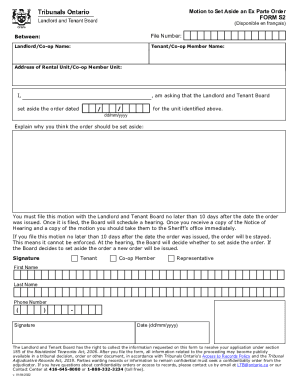
- Begin by entering the file number in the designated field. This number is essential for identifying your case within the system.
- Next, input the name of the landlord or co-op in the appropriate section. Ensure the spelling is accurate to avoid any potential delays.
- Provide the name of the tenant or co-op member. Double-check the entered name for correctness.
- Input the address of the rental unit or co-op member unit. This details the location relevant to the motion you are requesting.
- In the statement section, write your request to have the Landlord and Tenant Board set aside the order dated. Make sure to include the date format as dd/mm/yyyy.
- Describe the reasons why you believe the order should be set aside in the provided field. Be clear and concise in your explanation.
- You must file this motion with the Landlord and Tenant Board within 10 days after the order was issued to ensure the order is stayed.
- Once completed, review all information for accuracy and completeness. Save your changes to ensure your progress is not lost.
- Finally, you can download the form, print it, or share it as needed to submit your motion.
Start filling out your documents online today for a smoother application process.