Loading
Get Uk Hmrc Vat1614j 2018
How it works
-

Open form follow the instructions
-

Easily sign the form with your finger
-

Send filled & signed form or save
How to fill out the UK HMRC VAT1614J online
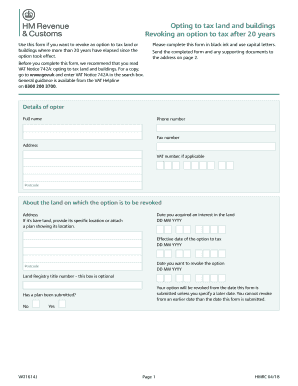
This guide provides a clear and comprehensive overview of filling out the UK HMRC VAT1614J form for revoking an option to tax land and buildings. Designed for users of all experience levels, this resource will walk you through each section of the form step by step, ensuring that your submission is complete and accurate.
Follow the steps to complete the VAT1614J form accurately and efficiently.
- Press the ‘Get Form’ button to download and access the VAT1614J online form in your chosen editing application.
- Begin by entering your full name in the designated field at the top of the form. Ensure it is written clearly and accurately.
- Provide your phone number and fax number, if applicable, in the specified sections.
- Fill out the address section completely, including your VAT number if you possess one, followed by the corresponding postcode.
- Input the date you acquired an interest in the land using the format DD MM YYYY.
- Indicate the address of the land, making sure to specify the exact location if it is bare land. Attach a plan if necessary.
- Enter the effective date of the option to tax in the format DD MM YYYY.
- State the date you wish to revoke the option using the format DD MM YYYY.
- Complete the optional field about the Land Registry title number, if applicable.
- Review the conditions for revocation and check the appropriate boxes indicating your compliance with conditions 1 through 5.
- If condition 1 is met with a 'Yes', skip to the declaration section at the bottom of the form.
- If you answered 'No' to any of the conditions, indicate which of conditions 2 to 5 are met and consider seeking permission to revoke.
- In the declaration section, confirm whether condition 1 and conditions 2 to 5 are met by marking the relevant checkboxes.
- Sign the form, include your name, and specify the date of notification in the format DD MM YYYY.
- List your status (e.g., director, company secretary) in the designated area.
- If someone other than you is signing, attach a letter of authority to the form.
- Finally, review your completed form for any errors, save changes, and prepare to send it to the address provided.
Complete your VAT1614J form online today to ensure your revocation request is processed efficiently.
Get form
Experience a faster way to fill out and sign forms on the web. Access the most extensive library of templates available.
When leaving the UK, you should notify HMRC and any other relevant authorities or organizations regarding your residency and tax status. Consider informing your employer and any tax-related institutions to ensure all records are accurate. Following UK HMRC VAT1614J regulations will help simplify the process.
Get This Form Now!
Use professional pre-built templates to fill in and sign documents online faster. Get access to thousands of forms.