Loading
Get Nvcc 105-193 2020-2026
How it works
-

Open form follow the instructions
-

Easily sign the form with your finger
-

Send filled & signed form or save
How to fill out the NVCC 105-193 online
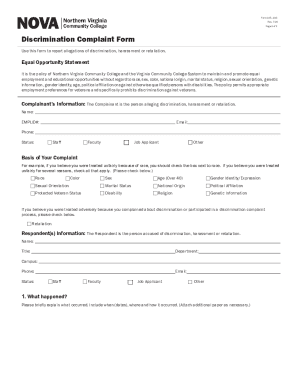
The NVCC 105-193 is a crucial form used to report allegations of discrimination, harassment, or retaliation at Northern Virginia Community College. This guide provides a step-by-step approach to filling out this form online, ensuring clarity and ease of use for all individuals, regardless of legal experience.
Follow the steps to complete the NVCC 105-193 online.
- Select the ‘Get Form’ button to access the NVCC 105-193 form and open it in your preferred editing software.
- Fill in the Complainant’s information section with your name, EMPLID number, email, phone number, and status (choose from staff, faculty, job applicant, or other).
- Indicate the basis of your complaint by checking all relevant boxes that apply, such as race, sex, age, gender identity, or other specified categories.
- Provide the Respondent(s) information, including their name, title, department, campus, phone number, email, and status.
- Describe the incidents in the section titled 'What happened?' Include specific details such as dates, locations, and any relevant context. If necessary, attach additional pages.
- Respond to the question about whether you have attempted to resolve this complaint with anyone else at the College by selecting 'yes' or 'no', and if applicable, provide the name and results of the discussion.
- Indicate if anyone else has knowledge of what occurred by checking 'yes' or 'no', and if 'yes', provide their names, titles, and contact information.
- State the resolution or remedy you are seeking for your complaint.
- Certify that the information provided is true and accurate by providing your signature and the date.
- Once your form is complete, save your changes. You may then download or print the form. Finally, submit your completed form to the designated email or the office address provided.
Complete your NVCC 105-193 form online to ensure your complaint is processed efficiently.