Loading
Form preview
  • US Legal Forms
  • Other Templates
  • More Forms
  • More Multi-State Forms
  • Umkc Declaration Of Major (dom) 2022

Get Umkc Declaration Of Major (dom) 2022-2026

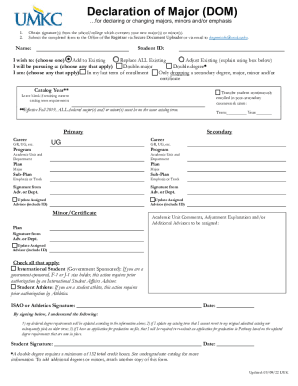
Declaration of Major (DOM) for declaring or changing majors, minors and/or emphasis 1. 2. Obtain signature(s) from the school/college which oversees your new major(s) or minor(s). Submit the completed.

How it works

  1. Open form

    Open form follow the instructions

  2. Easily sign form

    Easily sign the form with your finger

  3. Share form

    Send filled & signed form or save

How to fill out the UMKC Declaration Of Major (DOM) online

The UMKC Declaration Of Major (DOM) is an essential document for students wishing to declare or change their majors, minors, or emphasis areas. This guide provides a comprehensive step-by-step process to help users fill out the DOM effectively and efficiently online.

Follow the steps to complete your DOM with ease.

  1. Click the ‘Get Form’ button to access the document and open it in your preferred online editor.
  2. Enter your name and student ID in the designated fields at the top of the form.
  3. Indicate your intention by selecting one of the options: 'Add to Existing', 'Replace ALL Existing', or 'Adjust Existing', and provide any necessary explanations in the box provided.
  4. Choose whether you will be pursuing a double-major or double-degree by checking the appropriate options.
  5. Specify if you are in your last term of enrollment or if you plan to drop a secondary degree, major, minor, or certificate.
  6. Fill in the catalog year according to your current academic requirements, leaving it blank if you wish to retain your current catalog term.
  7. Indicate your primary and secondary career by selecting from the options available (GR, UG, etc.).
  8. In the major sections, fill out the required academic unit, department, program plan, and sub-plan for both primary and secondary majors.
  9. Obtain the necessary signatures from your advisor or department representatives as needed.
  10. If applicable, check the boxes for any additional categories such as international student or student athlete, and ensure to have the required signatures.
  11. Review the declaration statement you will sign, acknowledging the updates to your degree requirements.
  12. Finally, sign and date the form before submitting it.
  13. After completing the form, you can save your changes, download or print a copy, and share it via email to include with your submission to the Office of the Registrar.

Start filling out your UMKC Declaration of Major online today!

Get form

Experience a faster way to fill out and sign forms on the web. Access the most extensive library of templates available.
Get form

Related content

Missouri-Kansas City Department of Communication...
by JE Aitken · 1993 · Cited by 18 — There is a place on the major declaration form and...
Learn more
Declaration of Major < University of...
Students may declare a plan of study (major and/or minor) and degree(s) at the time of...
Learn more
Untitled
Major Ian Thomas citatos iš dūmų. studijų įpročiai kolegijos studentams PPT....
Learn more

Related links form

Bsmfc Loan Application Form Community Service Verification Form Travel Voucher Form 73 174 Gordon Conwell Theological Seminary Schorlaship

Questions & Answers

Get answers to your most pressing questions about US Legal Forms API.

Contact support

“Proposing” a major is simply indicating an interest in a major. “Declaring” a major is a more formal process that you go through with your department or major advisor.

Students interested in two fields of study can pursue a double major or earn dual degrees, depending on their academic and professional goals.

Multiple undergraduate degrees may be earned when a student completes all requirements for each degree and at least 12 credit hours of work beyond that required for the first degree for each additional degree. Students who earn multiple degrees will receive diplomas simultaneously.

Once you go to college, you might discover you're interested in two fields of study. A double major allows you to pursue and complete two different majors at the same time. Keep in mind, you'll have to complete the specific academic requirements for each major if you choose to double major.

Not hard at all. You just need to plan ahead to make sure you can finish up in the normal four years. Most degrees require about 120 credit hours to finish in four years, or 30 credits (10 classes) each year. Of those 60 are typically Gen Ed courses, so they count toward both majors.

Depends who you ask. In some fields, having a double major on your resume can give you a leg up on the competition and offer the potential to earn a higher salary. But this isn't true for all fields — some employers may not notice or care that you took the time to double major.

1. Obtain signature(s) from the school/college which oversees your new major(s) or minor(s). 2. Submit the completed form to the Office of the Registrar via Secure Document Uploader or via email to degreeinfo@umkc.edu.

Get This Form Now!

Use professional pre-built templates to fill in and sign documents online faster. Get access to thousands of forms.
Get form
If you believe that this page should be taken down, please follow our DMCA take down processhere.
Get UMKC Declaration Of Major (DOM)
Get form
  • Adoption
  • Bankruptcy
  • Contractors
  • Divorce
  • Home Sales
  • Employment
  • Identity Theft
  • Incorporation
  • Landlord Tenant
  • Living Trust
  • Name Change
  • Personal Planning
  • Small Business
  • Wills & Estates
  • Packages A-Z
  • Affidavits
  • Bankruptcy
  • Bill of Sale
  • Corporate - LLC
  • Divorce
  • Employment
  • Identity Theft
  • Internet Technology
  • Landlord Tenant
  • Living Wills
  • Name Change
  • Power of Attorney
  • Real Estate
  • Small Estates
  • Wills
  • All Forms
  • Forms A-Z
  • Other Templates
  • Legal Hub
  • About Us
  • Help Portal
  • Legal Resources
  • Blog
  • Affiliates
  • Contact Us
  • Delete My Account
  • Site Map
  • Industries
  • Forms in Spanish
  • Localized Forms
  • State-specific Forms
  • Forms Kit
  • Real Estate Handbook
  • All Guides
  • Notarize
  • Incorporation services
  • For Consumers
  • For Small Business
  • For Attorneys
  • USLegal
  • FormsPass
  • pdfFiller
  • signNow
  • altaFlow
  • DocHub
  • Instapage
Form Packages
  • Adoption
  • Bankruptcy
  • Contractors
  • Divorce
  • Home Sales
  • Employment
  • Identity Theft
  • Incorporation
  • Landlord Tenant
  • Living Trust
  • Name Change
  • Personal Planning
  • Small Business
  • Wills & Estates
  • Packages A-Z
Form Categories
  • Affidavits
  • Bankruptcy
  • Bill of Sale
  • Corporate - LLC
  • Divorce
  • Employment
  • Identity Theft
  • Internet Technology
  • Landlord Tenant
  • Living Wills
  • Name Change
  • Power of Attorney
  • Real Estate
  • Small Estates
  • Wills
  • All Forms
  • Forms A-Z
  • Other Templates
Customer Service
  • Legal Hub
  • About Us
  • Help Portal
  • Legal Resources
  • Blog
  • Affiliates
  • Contact Us
  • Delete My Account
  • Site Map
  • Industries
  • Forms in Spanish
  • Localized Forms
  • State-specific Forms
  • Forms Kit
Legal Guides
  • Real Estate Handbook
  • All Guides
Prepared for you
  • Notarize
  • Incorporation services
Our Customers
  • For Consumers
  • For Small Business
  • For Attorneys
Our Sites
  • USLegal
  • FormsPass
  • pdfFiller
  • signNow
  • altaFlow
  • DocHub
  • Instapage
Social Media
Call us now toll free:
+1 833 426 79 33
As seen in:
© Copyright 1999-2026 airSlate Legal Forms, Inc. 17 Station Street, Ste. 203, Brookline, MA 02445
  • Your Privacy Choices
  • Terms of Service
  • Privacy Notice
  • Content Takedown Policy
  • Bug Bounty Program