Loading
Get Ct Youth Program Registration - Town Of Stonington 2015-2025
How it works
-

Open form follow the instructions
-

Easily sign the form with your finger
-

Send filled & signed form or save
How to fill out the CT Youth Program Registration - Town Of Stonington online
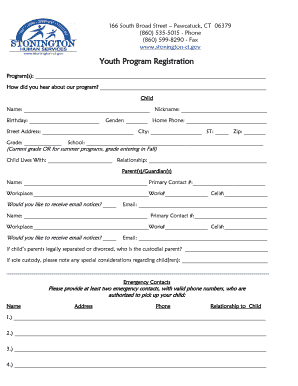
The CT Youth Program Registration form for the Town of Stonington allows parents and guardians to enroll their children in various youth programs. This guide offers a clear, step-by-step approach on how to complete the online registration effectively.
Follow the steps to complete your registration form.
- Press the ‘Get Form’ button to access the registration form and open it in your selected editor.
- In the 'Program(s)' section, list the names of the programs you wish to enroll your child in. This helps the department understand your interest and plan accordingly.
- Indicate how you heard about the program in the designated field. This feedback is valuable for outreach and marketing purposes.
- Provide your child's details in the 'Child' section including their full name, nickname, and date of birth. This information is crucial for accurate record-keeping.
- Fill in additional information such as gender, home phone, street address, city, state, zip code, grade, and school. Ensure all details are correct to avoid any misunderstandings.
- Next, provide information regarding the child's living situation and the names and contact details of parents or guardians. Note if you would like to receive email notices.
- List at least two emergency contacts with valid phone numbers who are authorized to pick up your child. Provide their names, addresses, phone numbers, and relationship to the child.
- Complete the health section by indicating if your child has health insurance and providing relevant details such as the child's physician, allergies, medications, physical limitations, and any special considerations.
- If applicable, note whether your child has an Individualized Education Program (IEP) and ensure to follow up with the provided phone number for arrangements.
- Read the important notices regarding data reporting, consent for photographs, and the HEADS UP initiative concerning youth sports.
- Sign and date the form indicating your consent and understanding of the terms related to liability and agreement.
- Finally, save your changes or download the completed form. You may also print it out for your records, or share it with the relevant authorities as needed.
Complete your document registration online for a smooth enrollment process.
Industry-leading security and compliance
US Legal Forms protects your data by complying with industry-specific security standards.
-
In businnes since 199725+ years providing professional legal documents.
-
Accredited businessGuarantees that a business meets BBB accreditation standards in the US and Canada.
-
Secured by BraintreeValidated Level 1 PCI DSS compliant payment gateway that accepts most major credit and debit card brands from across the globe.