Loading
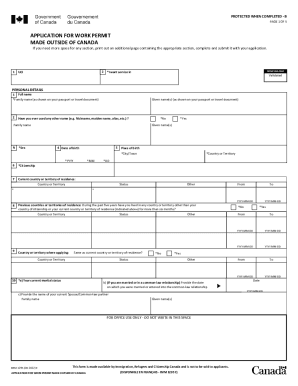
Get Imm 1295 E: Application For Work Permit Made Outside Of Canada
How it works
-

Open form follow the instructions
-

Easily sign the form with your finger
-

Send filled & signed form or save
How to fill out the IMM 1295 E: Application For Work Permit Made Outside Of Canada online
Filling out the IMM 1295 E form is an essential step in applying for a work permit if you are looking to work in Canada from outside the country. This guide will provide you with a clear, step-by-step process to complete this application accurately and efficiently.
Follow the steps to fill out the IMM 1295 E form online.
- Click ‘Get Form’ button to obtain the form and open it in the editor.
- Personal details section: Fill in your full name, including family name and given names as they appear on your passport or travel document. Indicate whether you have ever used any other name and provide the details if applicable.
- Complete your date of birth and place of birth entries. Ensure that the format is correct, using 'YYYY-MM-DD' for precise date entry.
- Indicate your current country or territory of citizenship and your current residence status.
- If you have lived in any other country for more than six months within the past five years, list those countries along with your status.
- Detail your marital status and provide information about your current or previous spouse/common-law partner if applicable.
- In the language section, indicate your native language and whether you can communicate in English or French. Mention any language tests you have taken, if relevant.
- Provide passport information, including the passport number, country of issue, issue date, and expiry date.
- If applicable, indicate whether you have a national identity document or a U.S. permanent resident card.
- In the contact information section, provide your current mailing address, including any alternate contact numbers or emails.
- Detail the intended work in Canada, including the type of work permit you are applying for, employer information, job title, duration of employment, and a brief description of duties.
- Complete your education and employment history sections, ensuring to include all relevant experiences over the past ten years.
- Fill out the background information section if you are 18 years or older, addressing any health or legal questions.
- Ensure all information is accurate and complete before signing the declaration and including the date.
- At the final step, save your changes, download the completed form, and print it if necessary. Ensure to include all required documents, photos, and fees prior to mailing your application.
Start filling out your IMM 1295 E form online today to take the next step towards your work opportunity in Canada.
Get form
Experience a faster way to fill out and sign forms on the web. Access the most extensive library of templates available.
The following are the forms that must be filled out and submitted: Application For Study Permit Made Outside of Canada (IMM 1294) ( PDF , 462.79 KB ) Family Information (IMM 5707) Document Checklist (IMM 5483) ( PDF , 297.34 KB ) Statutory Declaration of Common-law Union (IMM 5409) ( PDF , 636.51 KB ), if applicable.
Get This Form Now!
Use professional pre-built templates to fill in and sign documents online faster. Get access to thousands of forms.