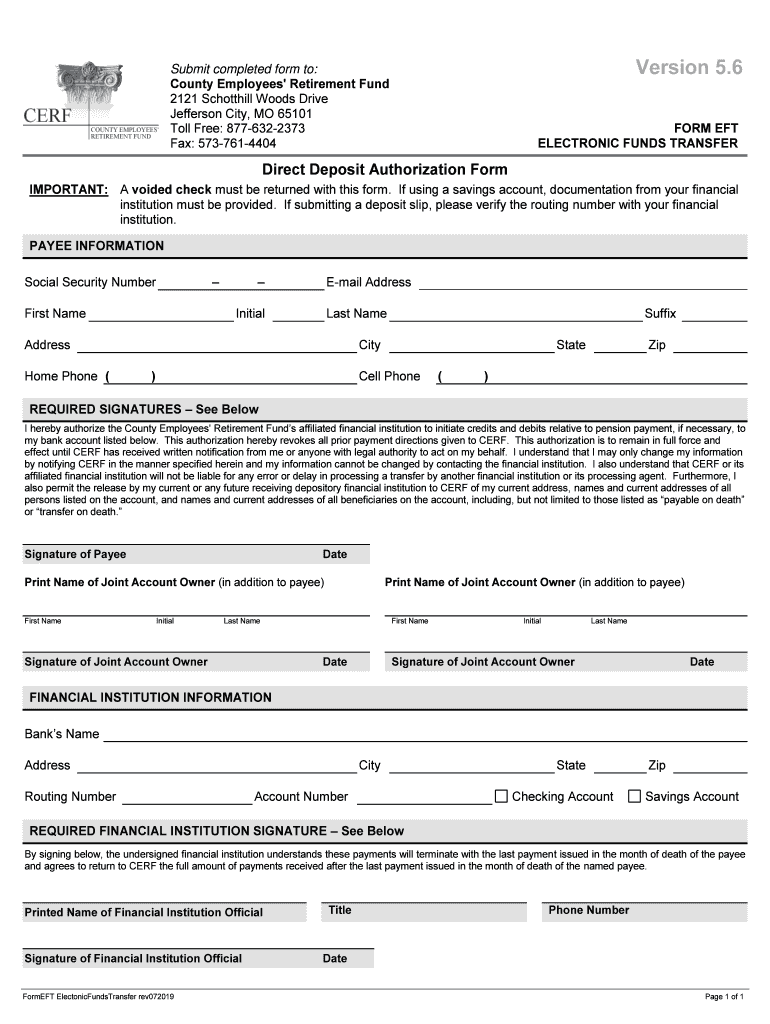
Version 5.6Submit completed form to: County Employees ' Retirement Fund 2121 Schotthill Woods Drive Jefferson City, MO 65101 Toll Free: 8776322373 Fax: 5737614404FORM EFT ELECTRONIC FUNDS TRANSFERDirect.

Open form follow the instructions

Easily sign the form with your finger

Send filled & signed form or save
How to fill out the MO CERF Form EFT Electronic Funds Transfer online
Completing the MO CERF Form EFT Electronic Funds Transfer is an essential step in setting up direct deposit for your pension payments. This guide will provide you with a clear, step-by-step approach to filling out the form online, ensuring that you include all necessary information for a smooth process.
Follow the steps to complete the form accurately.
- Click ‘Get Form’ button to obtain the form and open it for editing.
- Fill in the payee information section. Include your Social Security number, first name, initial, last name, address, home phone, cell phone, and email address. Ensure that all details are accurate.
- In the required signatures section, review the authorization statement carefully. This section allows you to authorize the County Employees' Retirement Fund to manage direct deposits and any necessary debits. Sign and date this section.
- If applicable, complete the information for joint account owners. Ensure that all required signatures are provided along with the printed names and initials.
- Enter the financial institution information accurately. This includes the bank’s name, address, routing number, account number, and specifying whether it's a checking or savings account.
- The financial institution must also sign. This step confirms their understanding that payments will cease upon the payee's death. Ensure this is completed as necessary.
- Once you have filled out all sections accurately, save your changes. You may then download, print, or share the completed form as required for submission.
Complete your form online today to set up your electronic funds transfer seamlessly.
Experience a faster way to fill out and sign forms on the web. Access the most extensive library of templates available.
Related content
1 Jul 2021 — modification is a transfer among existing budget lines within the grant...
by S Chan · 1995 · Cited by 2 — The format in EDI is governed by a predetermined set...
Foro Post Message Form ASP FID- ը վերցրեք. Java Timestamp Format- ը MillIseconds...
Get answers to your most pressing questions about US Legal Forms API.
How to fill an EFT form?
4:12 5:30 Application complete the person's. Name phone number title and email address now have the agreementMoreApplication complete the person's. Name phone number title and email address now have the agreement signed and dated by the person. You've now completed the form so mail it to your mac. Wps.
Is EFT the same as direct deposit?
EFT (Electronic Funds Transfer) - is a general banking system in which transactions, such as deposits and bill payments, are made through computer databases and electronic files. This is often referred to as a direct deposit.
How do you get an EFT?
If you are using your bank, you will need to have your customers or vendors fill out a form detailing their contact and account information, which they will need to send back to you. Using this information, you can set up the EFT payment through your online banking system.
What is an EFT payment?
An electronic funds transfer (EFT) is a digital transfer of cash through an online payment system.
What is EFT payment form?
Electronic Funds Transfer Form. Providers must complete the authorized-signature (and date) field on the EFT form. An original signature of the individual provider or authorized signature of the business is required.
What is an EFT document?
Electronic funds transfer (EFT) is a transfer of funds is initiated through an electronic terminal, telephone, computer (including on-line banking) or magnetic tape for the purpose of ordering, instructing, or authorizing a financial institution to debit or credit a consumer's account.
What is an EFT form?
Electronic Funds Transfer (EFT) is a system which electronically deposits your net benefit payment into your personal checking or statement savings account.
What is considered an electronic funds transfer?
Electronic funds transfer (EFT) is a transfer of funds is initiated through an electronic terminal, telephone, computer (including on-line banking) or magnetic tape for the purpose of ordering, instructing, or authorizing a financial institution to debit or credit a consumer's account.
Use professional pre-built templates to fill in and sign documents online faster. Get access to thousands of forms.
If you believe that this page should be taken down, please follow our DMCA take down process here.