Loading
Form preview
  • US Legal Forms
  • Form Library
  • More Forms
  • More Multi-State Forms
  • Ct Conn Uc-5a 2018

Get Ct Conn Uc-5a 2018-2026

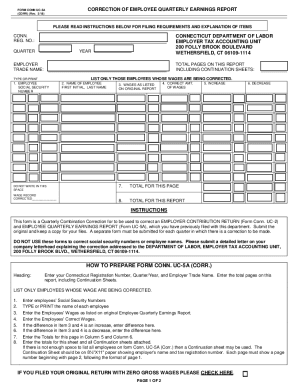
CORRECTION OF EMPLOYEE QUARTERLY EARNINGS REPORTFORM CONN UC5A (CORR) (Rev. 3/18)PLEASE READ INSTRUCTIONS BELOW FOR FILING REQUIREMENTS AND EXPLANATION OF ITEMSCONN. REG. NO.: QUARTERCONNECTICUT DEPARTMENT.

How it works

  1. Open form

    Open form follow the instructions

  2. Easily sign form

    Easily sign the form with your finger

  3. Share form

    Send filled & signed form or save

How to fill out the CT CONN UC-5A online

The CT CONN UC-5A form is used to correct employee quarterly earnings reports previously filed with the Connecticut Department of Labor. This guide will provide step-by-step instructions on how to accurately complete the form online, ensuring that all necessary corrections are processed efficiently.

Follow the steps to accurately complete the CT CONN UC-5A.

  1. Press the ‘Get Form’ button to access the CT CONN UC-5A form and open it in your editor.
  2. In the heading section, enter your Connecticut Registration Number, indicate the Quarter and Year, and provide your Employer Trade Name. Also, specify the total pages you are submitting, including any continuation sheets.
  3. List only those employees whose wages are being corrected. For each employee, provide their Social Security Number, type or print their name, enter the wages as listed on the original report, and the correct amount of wages.
  4. In the section for wage adjustments, calculate and enter the increase or decrease in wages based on the difference between the original report and the corrected amounts.
  5. Total the amounts for each column on the form. Ensure to enter the subtotal for this page and the total for the entire report, including any continuation sheets.
  6. If necessary, use a continuation sheet to list additional employees. The continuation sheet should include the employer’s name and tax registration number, and each page must be numbered consecutively.
  7. Once completed, review the form for accuracy. Save your changes, and then download or print a copy for your records before sharing or submitting the form according to the guidelines provided.

Start filling out the CT CONN UC-5A online to ensure accurate corrections of your employee wage reports.

Get form

Experience a faster way to fill out and sign forms on the web. Access the most extensive library of templates available.
Get form

Related content

Federal State Employment Taxes - CT.gov
Connecticut's partnership with the Internal Revenue Service (IRS), Connecticut Department...
Learn more
“Unemployment Insurance: A Guide to Collecting...
The Unemployment Insurance CT Direct Benefits online system will allow you to complete new...
Learn more
Series 10 Inverter Control Installation and...
The circuit must be completed by connection at terminals NO or NC and returned to. RCM...
Learn more

Related links form

Oregon 30 Day Move Notice Alf Form Dance Contact Rules School Record Request Form VOLUNTEER APPLICATION FORM - BC SPCA - Spca Bc

Questions & Answers

Get answers to your most pressing questions about US Legal Forms API.

Contact support

The 2022 SUI tax-rate factors remained the same as for 2021, with experience rates continuing to range from 1.9% to 6.8% (including the 1.4% solvency tax rate). Current UI law caps the solvency tax rate at 1.4%, with a decrease to 1.0% scheduled for 2024 under HB 6633.

Form CT-1040 Connecticut Resident Income Tax Return.

To download a copy of your Form 1099-G, you will need to create a username and password and log into myconneCT. From the Summary page, click More, then Letters to view and print your Form 1099-G.

Visit their site the Official Payments.com Help Page or call 1-800-487-4567.

Locate your seven-digit (XX--) registration number on any previously filed quarterly report (Form UC-5A / UC-2R) or correspondence from the Department of Labor. If you can't find your locate your Department of Labor Employer Registration Number, you may fax a request to the Employer Status Unit at (860) 263-6567.

Connecticut Tax Registration Number Locate your twelve-digit ( ) registration number on any previously filed state tax return (Form CT-941) or correspondence from CT Department of Revenue Services.

Employers can register their business online by using our ReEmployCT system. If you have any questions regarding the registration, please call the Employer Status Unit at (860) 263-6550.

Unemployment benefits are reported to the IRS via 1099G when they were paid to you. Therefore, if the shutdown was at the end of 2021 and benefits were paid in January 2022, those earnings are reported with your 1099G information for 2022.

Get This Form Now!

Use professional pre-built templates to fill in and sign documents online faster. Get access to thousands of forms.
Get form
If you believe that this page should be taken down, please follow our DMCA take down processhere.

Industry-leading security and compliance

US Legal Forms protects your data by complying with industry-specific security standards.
  • In businnes since 1997
    25+ years providing professional legal documents.
  • Accredited business
    Guarantees that a business meets BBB accreditation standards in the US and Canada.
  • Secured by Braintree
    Validated Level 1 PCI DSS compliant payment gateway that accepts most major credit and debit card brands from across the globe.
Get CT CONN UC-5A
Get form
  • Adoption
  • Bankruptcy
  • Contractors
  • Divorce
  • Home Sales
  • Employment
  • Identity Theft
  • Incorporation
  • Landlord Tenant
  • Living Trust
  • Name Change
  • Personal Planning
  • Small Business
  • Wills & Estates
  • Packages A-Z
  • Affidavits
  • Bankruptcy
  • Bill of Sale
  • Corporate - LLC
  • Divorce
  • Employment
  • Identity Theft
  • Internet Technology
  • Landlord Tenant
  • Living Wills
  • Name Change
  • Power of Attorney
  • Real Estate
  • Small Estates
  • Wills
  • All Forms
  • Forms A-Z
  • Form Library
  • Legal Hub
  • About Us
  • Help Portal
  • Legal Resources
  • Blog
  • Affiliates
  • Contact Us
  • Delete My Account
  • Site Map
  • Industries
  • Forms in Spanish
  • Localized Forms
  • State-specific Forms
  • Forms Kit
  • Real Estate Handbook
  • All Guides
  • Notarize
  • Incorporation services
  • For Consumers
  • For Small Business
  • For Attorneys
  • USLegal
  • FormsPass
  • pdfFiller
  • signNow
  • altaFlow
  • DocHub
  • Instapage
Form Packages
  • Adoption
  • Bankruptcy
  • Contractors
  • Divorce
  • Home Sales
  • Employment
  • Identity Theft
  • Incorporation
  • Landlord Tenant
  • Living Trust
  • Name Change
  • Personal Planning
  • Small Business
  • Wills & Estates
  • Packages A-Z
Form Categories
  • Affidavits
  • Bankruptcy
  • Bill of Sale
  • Corporate - LLC
  • Divorce
  • Employment
  • Identity Theft
  • Internet Technology
  • Landlord Tenant
  • Living Wills
  • Name Change
  • Power of Attorney
  • Real Estate
  • Small Estates
  • Wills
  • All Forms
  • Forms A-Z
  • Form Library
Customer Service
  • Legal Hub
  • About Us
  • Help Portal
  • Legal Resources
  • Blog
  • Affiliates
  • Contact Us
  • Delete My Account
  • Site Map
  • Industries
  • Forms in Spanish
  • Localized Forms
  • State-specific Forms
  • Forms Kit
Legal Guides
  • Real Estate Handbook
  • All Guides
Prepared for you
  • Notarize
  • Incorporation services
Our Customers
  • For Consumers
  • For Small Business
  • For Attorneys
Our Sites
  • USLegal
  • FormsPass
  • pdfFiller
  • signNow
  • altaFlow
  • DocHub
  • Instapage
Social Media
Call us now toll free:
+1 833 426 79 33
As seen in:
© Copyright 1999-2026 airSlate Legal Forms, Inc. 3720 Flowood Dr, Flowood, Mississippi 39232
  • Your Privacy Choices
  • Terms of Service
  • Privacy Notice
  • Content Takedown Policy
  • Bug Bounty Program