Loading
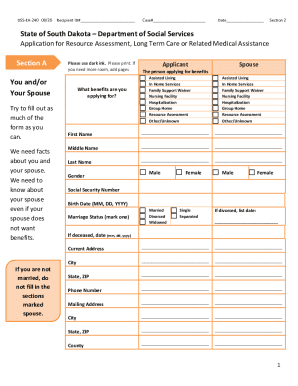
Get Sd Dss-ea-240 2020-2026
How it works
-

Open form follow the instructions
-

Easily sign the form with your finger
-

Send filled & signed form or save
How to fill out the SD DSS-EA-240 online
This guide provides users with clear, step-by-step instructions for completing the SD DSS-EA-240 form online. Whether you are applying for long-term care or related medical assistance, this guide will support you throughout the process.
Follow the steps to successfully fill out the SD DSS-EA-240 form.
- Press the ‘Get Form’ button to access the SD DSS-EA-240 form and open it in the editing interface.
- Complete the Recipient ID# and Case# fields at the top of the form. These identifiers are crucial for processing your application.
- Enter the current date in the designated field.
- In Section 2, indicate the benefits you are applying for by selecting from the options provided. Include information about both yourself and your spouse, if applicable.
- Fill out the personal details for both the applicant and the spouse, including names, gender, social security numbers, birth dates, and contact information.
- Indicate your citizenship status in Section B. Provide documentation if you are not a U.S. citizen.
- In Section C, detail any individuals assisting you with legal or financial matters. This includes guardians or individuals helping you with the application process.
- Section D pertains to your living situation. Specify whether you reside in a home, assisted living center, or another type of facility.
- In Section E, provide accurate details about your assets and resources, including bank accounts, properties, and any other relevant financial information.
- Fill out Section F regarding housing costs, if applicable. Attach any required proof of these costs.
- In Section G, indicate if you or your spouse have Medicare or long-term care insurance. Provide the relevant details.
- In Section H, disclose any transfers of money or property that occurred within the last 60 months. Be thorough in your responses.
- Detail your income sources in Section I, covering all forms of income for both you and your spouse.
- In Section J, list any other social programs you have applied for and their statuses.
- Once all sections are completed, review your entries for accuracy before submitting the form electronically. Save changes, download a copy, or print it out as needed.
Complete the SD DSS-EA-240 online today to ensure your application is processed efficiently.