Loading
Get Co Cdot 540 2018-2026
How it works
-

Open form follow the instructions
-

Easily sign the form with your finger
-

Send filled & signed form or save
How to fill out the CO CDOT 540 online
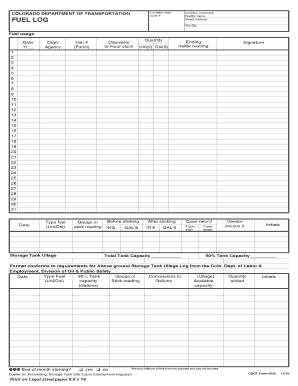
The CO CDOT 540 is a vital document used for tracking fuel usage by various facilities within the Colorado Department of Transportation. This guide provides clear, step-by-step instructions for filling out the form online, ensuring users can accurately complete their submissions with ease.
Follow the steps to complete the CO CDOT 540 online
- Click the ‘Get Form’ button to access the CO CDOT 540 form. This allows you to download and open the document in your preferred editor.
- In the 'Location' section, provide the required facility name, street address, city, and zip code. Ensure accuracy to facilitate proper record-keeping.
- Fill in the fuel usage details, including the date and year. Enter the organization or agency name associated with the facility.
- Enter the vehicle number and the odometer or hour clock reading that corresponds to the current mileage or usage time.
- Select the type of fuel used, either unleaded (Unl) or diesel (Dsl), based on your records.
- Record the gauge or stick reading for both inches and gallons, ensuring these measurements reflect the correct quantities.
- Indicate the quantity of fuel used, specifying the applicable values for unleaded or diesel fuel.
- Complete the 'Ending meter reading' section with the final measurements post fuel use.
- Sign the document in the signature field to affirm the accuracy of the data provided.
- If applicable, fill in the storage tank ullage information, including the total tank capacity and quantity received from stick and ticket readings.
- Review the 'End of month sticking' question, and mark 'yes' or 'no' as necessary.
- Conclude by ensuring that all entries on the form are complete, double-checking for any errors or omissions.
- Lastly, save your changes, and download or print the completed form for your records or sharing purposes.
Complete your CO CDOT 540 form online today to streamline your fuel usage tracking!