Loading
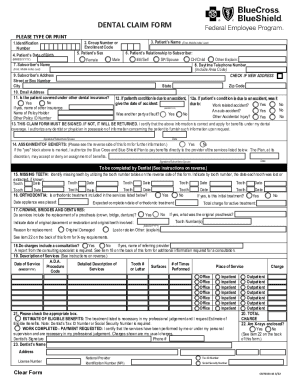
Get Blue Cross Blue Shield Cut0131-1s 2022-2026
How it works
-

Open form follow the instructions
-

Easily sign the form with your finger
-

Send filled & signed form or save
How to fill out the Blue Cross Blue Shield CUT0131-1S online
Filling out the Blue Cross Blue Shield CUT0131-1S dental claim form online is an important step in ensuring you receive the benefits you deserve. This guide provides a step-by-step approach to completing the form accurately and efficiently.
Follow the steps to fill out the form correctly.
- Click ‘Get Form’ button to obtain the form and open it in the editor.
- Identify the patient by filling in their identification number in section 1, followed by the group number or enrollment code in section 2. This information helps in processing the claim under the correct account.
- Input the patient's name in section 3. Ensure you include the first name, middle initial, and last name as requested.
- Fill out the patient’s date of birth in section 4 using the format MM/DD/YYYY. This is vital for verifying the patient’s age.
- Indicate the patient’s sex in section 5 by selecting either male or female.
- In section 6, indicate the patient’s relationship to the subscriber by choosing from options such as self, spouse, child, or other. If selecting 'other', provide a brief explanation.
- Provide a daytime telephone number in section 8, including the area code, and check the box if you have a new address.
- Complete the subscriber’s address in section 9, including the street or box number, city, state, and zip code.
- Enter an email address in section 10 for further communication regarding the claim.
- In section 11, specify whether the patient is covered under other dental insurance by selecting yes or no. If yes, follow up with the required details.
- Section 12 requires information about any accidents related to the patient's condition, including dates and whether it was work-related or an auto accident.
- Be sure to sign the claim form in section 13, certifying that the information provided is correct and that you apply for benefits. Include the date of signing.
- In section 14, indicate whether you authorize the assignment of benefits directly to the dental provider by selecting yes or no. If yes, make sure to fill in the dentist's tax ID number.
- Sections 15 to 19 require detailed information from the dentist regarding services rendered. Ensure that the dentist completes these sections accurately, especially regarding missing teeth, orthodontia, and detailed service descriptions.
- In sections 20 through 23, enter total charges, confirm the inclusion of X-rays if necessary, and fill in the dentist's name, address, and identification number.
- Once all sections are filled out, review the form for accuracy before saving changes, printing, or sharing it as necessary.
Complete your dental claims online today to ensure a smooth and efficient process.