Loading
Form preview
  • US Legal Forms
  • Other Templates
  • More Forms
  • More Multi-State Forms
  • Mo First Steps Provider Daily Mileage Log

Get Mo First Steps Provider Daily Mileage Log

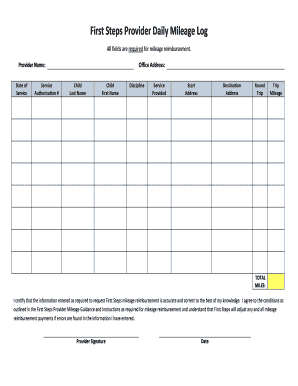
First Steps Provider Daily Mileage Log. All fields are required for mileage reimbursement. Provider Name: Office Address: Date of. Service. Service.

How it works

  1. Open form

    Open form follow the instructions

  2. Easily sign form

    Easily sign the form with your finger

  3. Share form

    Send filled & signed form or save

How to fill out the MO First Steps Provider Daily Mileage Log online

Filling out the MO First Steps Provider Daily Mileage Log is an essential step for obtaining mileage reimbursement. This guide will provide clear instructions on how to accurately complete the form online, ensuring that you meet all necessary requirements.

Follow the steps to efficiently complete your mileage log.

  1. Press the ‘Get Form’ button to access the mileage log and open it for editing.
  2. Enter your provider name in the designated field at the top of the form to identify who is submitting the information.
  3. Fill in the date of service in the corresponding field to specify when the services were provided.
  4. Complete the service authorization number section to ensure that the reimbursement request is linked to the correct service.
  5. Input your office address accurately so that it corresponds with your records.
  6. Provide the last name of the child receiving services in the next field.
  7. Enter the first name of the child in the following section to complete their identification.
  8. Select the discipline under which you are providing services from the available options to clarify the nature of the support.
  9. Outline the services provided in the indicated field to accurately describe the assistance rendered.
  10. Enter the start address where the trip originated in the next input area.
  11. Provide the destination address to indicate where the services were provided.
  12. Select whether the trip was a round trip or not, ensuring clarity in your travel logs.
  13. Calculate and enter the total trip mileage for the journey undertaken, making sure all measurements are accurate.
  14. Input the total miles traveled in the designated section at the end of the mileage record.
  15. Review the certification statement and confirm the accuracy of all entered information.
  16. Provide your signature in the required area to validate the information and agree to the reimbursement conditions.
  17. Finally, enter the date of signing the form to complete the administrative process.
  18. Once you have filled out all fields, you can save changes, download, print, or share the completed form as needed.

Complete your MO First Steps Provider Daily Mileage Log online today to ensure timely reimbursement for your services.

Get form

Experience a faster way to fill out and sign forms on the web. Access the most extensive library of templates available.
Get form

Related content

First Steps Provider Daily Mileage Log
First Steps Provider Daily Mileage Log | Missouri Department of Elementary and Secondary...
Learn more
Missouri Health Care Availability and Outcomes...
Oct 8, 2021 — Access to primary care improves life expectancy and serves as the first...
Learn more
Missouri Motor Carrier Safety Compliance...
Finally, we want you to be successful. Safety is key to success. We hope that you find...
Learn more

Related links form

Form Oa Real Estate Alabama State Income Tax Form 40x Alabama Commercial Pesticide Form Etaps Training

Questions & Answers

Get answers to your most pressing questions about US Legal Forms API.

Contact support

There are no state laws governing how much an employer must pay for mileage. Most employers will pay at a rate at or near the federal standard. In order to be reimbursed there are usually set guidelines which need to be followed. These guidelines are also up to the individual employer and are not governed by the state.

Early Intervention Services are special services for infants and toddlers at risk for developmental delays. These services are designed to identify and meet children's needs in five developmental areas. These are physical, cognitive, communication, social or emotional development, sensory and adaptive development.

First Steps is Missouri's Early Intervention system for infants and toddlers, birth to age three, who have delayed development or diagnosed conditions that are associated with developmental disabilities. The federal law governing First Steps is Part C of the Individuals with Disabilities Education Act (IDEA).

Early help teams often include a range of professionals such as mental health nurses, health visitors, therapists, psychologists, social workers and family support workers/practitioners.

Why are early help and early intervention important? Providing timely support is vital. Identifying and addressing a child or family's needs early on can increase protective factors that positively influence a child's wellbeing, and decrease risk factors that may be impacting a child's life negatively.

Prevention is defined as 'providing a protective layer of support to stop problems from arising in the first place or from getting worse'; early intervention is defined as 'providing support at the earliest possible stages when problems occur'.

Get This Form Now!

Use professional pre-built templates to fill in and sign documents online faster. Get access to thousands of forms.
Get form
If you believe that this page should be taken down, please follow our DMCA take down processhere.
Get MO First Steps Provider Daily Mileage Log
Get form
  • Adoption
  • Bankruptcy
  • Contractors
  • Divorce
  • Home Sales
  • Employment
  • Identity Theft
  • Incorporation
  • Landlord Tenant
  • Living Trust
  • Name Change
  • Personal Planning
  • Small Business
  • Wills & Estates
  • Packages A-Z
  • Affidavits
  • Bankruptcy
  • Bill of Sale
  • Corporate - LLC
  • Divorce
  • Employment
  • Identity Theft
  • Internet Technology
  • Landlord Tenant
  • Living Wills
  • Name Change
  • Power of Attorney
  • Real Estate
  • Small Estates
  • Wills
  • All Forms
  • Forms A-Z
  • Other Templates
  • Legal Hub
  • About Us
  • Help Portal
  • Legal Resources
  • Blog
  • Affiliates
  • Contact Us
  • Delete My Account
  • Site Map
  • Industries
  • Forms in Spanish
  • Localized Forms
  • State-specific Forms
  • Forms Kit
  • Real Estate Handbook
  • All Guides
  • Notarize
  • Incorporation services
  • For Consumers
  • For Small Business
  • For Attorneys
  • USLegal
  • FormsPass
  • pdfFiller
  • signNow
  • altaFlow
  • DocHub
  • Instapage
Form Packages
  • Adoption
  • Bankruptcy
  • Contractors
  • Divorce
  • Home Sales
  • Employment
  • Identity Theft
  • Incorporation
  • Landlord Tenant
  • Living Trust
  • Name Change
  • Personal Planning
  • Small Business
  • Wills & Estates
  • Packages A-Z
Form Categories
  • Affidavits
  • Bankruptcy
  • Bill of Sale
  • Corporate - LLC
  • Divorce
  • Employment
  • Identity Theft
  • Internet Technology
  • Landlord Tenant
  • Living Wills
  • Name Change
  • Power of Attorney
  • Real Estate
  • Small Estates
  • Wills
  • All Forms
  • Forms A-Z
  • Other Templates
Customer Service
  • Legal Hub
  • About Us
  • Help Portal
  • Legal Resources
  • Blog
  • Affiliates
  • Contact Us
  • Delete My Account
  • Site Map
  • Industries
  • Forms in Spanish
  • Localized Forms
  • State-specific Forms
  • Forms Kit
Legal Guides
  • Real Estate Handbook
  • All Guides
Prepared for you
  • Notarize
  • Incorporation services
Our Customers
  • For Consumers
  • For Small Business
  • For Attorneys
Our Sites
  • USLegal
  • FormsPass
  • pdfFiller
  • signNow
  • altaFlow
  • DocHub
  • Instapage
Social Media
Call us now toll free:
+1 833 426 79 33
As seen in:
© Copyright 1999-2026 airSlate Legal Forms, Inc. 17 Station Street, Suite 303, Brookline, MA 02445
  • Your Privacy Choices
  • Terms of Service
  • Privacy Notice
  • Content Takedown Policy
  • Bug Bounty Program