Loading
Get Ca Rancho Adobe Fire Protection District Application For Employment 2021-2026
How it works
-

Open form follow the instructions
-

Easily sign the form with your finger
-

Send filled & signed form or save
How to fill out the CA Rancho Adobe Fire Protection District Application For Employment online
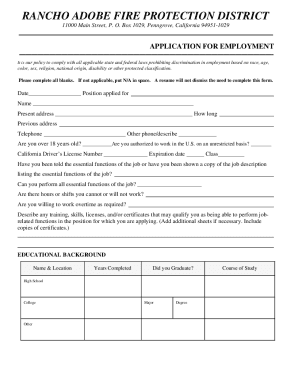
The CA Rancho Adobe Fire Protection District Application for Employment is a key document for individuals seeking to join this esteemed organization. This guide will provide clear instructions on how to complete this form online, ensuring that you can accurately present your qualifications and background.
Follow the steps to successfully complete the application form.
- Click the ‘Get Form’ button to obtain the application and open it in your preferred editor.
- Enter the date and the position you are applying for at the top of the form. This is essential for documenting your application.
- Fill in your full name and current address. Ensure to include how long you have lived at this address.
- Provide your previous address if applicable, along with at least one telephone number and any additional contact details required.
- Answer the questions regarding your age and authorization to work in the U.S. Be honest, as this information is a critical part of your application.
- Input your California Driver’s License number, expiration date, and class. This information is crucial for verification.
- Indicate whether you have been informed of the essential job functions and if you can perform them.
- Answer questions about your availability, including any hours or shifts that you cannot or will not work and your willingness to work overtime.
- Describe your relevant training, skills, licenses, and certificates. You may add additional sheets if necessary to ensure all pertinent information is included.
- Complete the educational background section, documenting your schools, years completed, graduation status, major, degree, and areas of study.
- Detail your work history for the past ten years. Include information about your previous employers, job titles, responsibilities, attendance, and reasons for leaving.
- Provide personal references including their names, telephone numbers, and the nature of the references.
- Review the applicant’s certification section. Acknowledge your understanding and acceptance of the terms by signing and dating the form.
- Ensure you attach any required documentation, such as copies of your Driver’s License and certifications. Applications lacking these documents will be considered incomplete.
- Finally, save any changes made, and download or print a copy for your records. You may also share the form as needed.
Complete your application online today to take the next step in your career with the Rancho Adobe Fire Protection District.