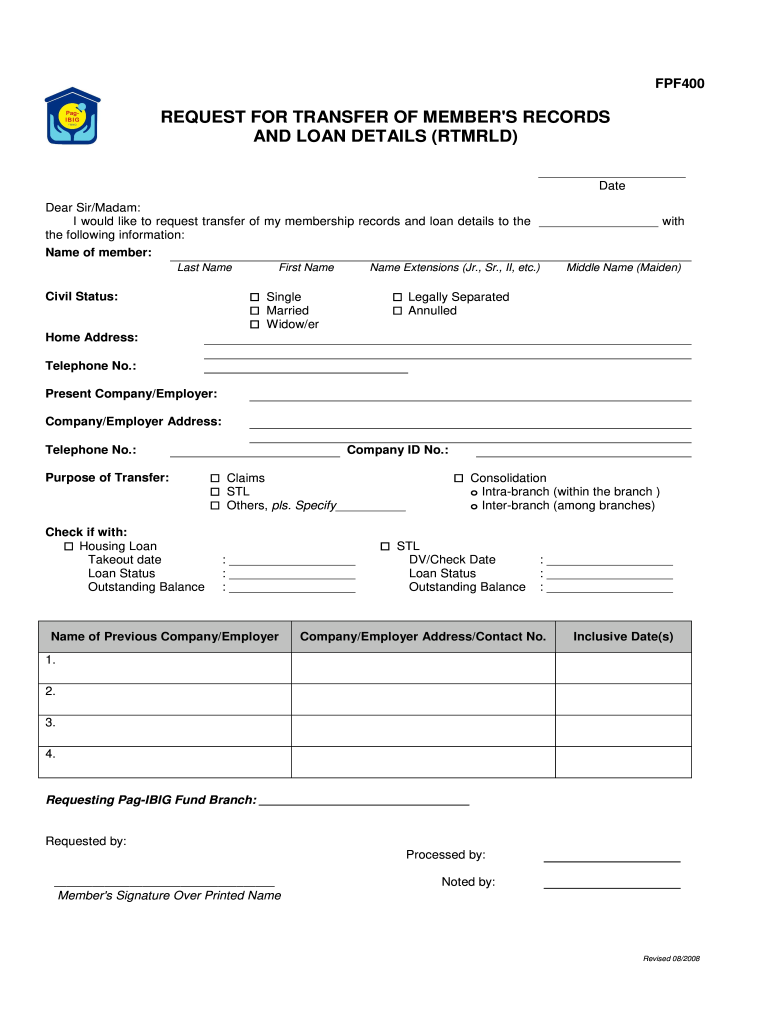
FPF400 REQUEST FOR TRANSFER OF MEMBER S RECORDS AND LOAN DETAILS RTMRLD Date Dear Sir/Madam I would like to request transfer of my membership records and loan details to the with the following information Name of member Last Name Civil Status First Name Name Extensions Jr. Sr. II etc* Single Married Widow/er Middle Name Maiden Legally Separated Annulled Home Address Telephone No* Present Company/Employer Company/Employer Address Purpose of Transfer Check if with Housing Loan Takeout date Loan Status Outstanding Balance Company ID No* Claims STL Others pls. Specify Name of Previous Company/Employer Consolidation o Intra-branch within the branch o Inter-branch among branches DV/Check Date Inclusive Date s Requesting Pag-IBIG Fund Branch Requested by Processed by Member s Signature Over Printed Name Noted by Revised 08/2008. Sr. II etc* Single Married Widow/er Middle Name Maiden Legally Separated Annulled Home Address Telephone No* Present Company/Employer Company/Employer Address Purpose....

Open form follow the instructions

Easily sign the form with your finger

Send filled & signed form or save
How to fill out the PH Pagibig FPF400 online
The PH Pagibig FPF400 form is essential for requesting the transfer of a member's records and loan details. This guide will help you understand the form's components and provide step-by-step instructions for completing it online.
Follow the steps to fill out the PH Pagibig FPF400 correctly.
- Click ‘Get Form’ button to obtain the form and open it in the editor.
- Fill in the date at the top of the form to indicate when the request is being made.
- In the 'Name of member' section, provide your last name, first name, middle name (maiden), and any name extensions like Jr. or Sr.
- Select your civil status by checking the appropriate box: Single, Married, Widow/er, Legally Separated, or Annulled.
- Enter your home address and telephone number to facilitate proper communication.
- Input the name of your current company or employer and their address, along with the company's telephone number.
- Clarify the purpose of the transfer at the designated section, including details about your housing loan, if applicable.
- Fill out the company ID number if applicable, and specify any related claims or other requests in the provided section.
- Under the 'Name of Previous Company/Employer,' indicate your former employer’s details, if required.
- Check whether the transfer is intra-branch or inter-branch, and include any relevant outstanding balance information.
- In the 'Inclusive Date(s)' section, list any necessary dates that pertain to your request.
- Specify the requesting Pag-IBIG Fund branch for the record transfer.
- Sign the form in the designated area for the requesting member, ensuring to include your printed name.
- Review all entered information for accuracy before you finalize the form.
- Save changes, download, print, or share the completed form as needed.
Complete your PH Pagibig FPF400 online now to ensure a smooth transfer of your records and loan details.
Experience a faster way to fill out and sign forms on the web. Access the most extensive library of templates available.
Related content
PAGEBREAK --> ... 30, 2007 Endo End of PHIII Mtg US PH III Endo QT Interval Anemia...
... club 2008 2009 found 2011 general public if river march system september church...
Get answers to your most pressing questions about US Legal Forms API.
How to fill out Pag-IBIG MDF form?
To fill out the Pag-IBIG Membership Data Form (MDF), visit the Pag-IBIG official site and download the form. Complete the required fields with accurate information, and then submit the form at the nearest Pag-IBIG office or online for your convenience. The PH Pagibig FPF400 will ensure you are well on your way to maximizing your contributions.
How can I fill up my Pag-IBIG form online?
You can fill out your Pag-IBIG form online by accessing the online registration portal on the Pag-IBIG website. After inputting your personal information and verifying your details, you will submit the form electronically. If you encounter any issues, consider using uslegalforms for added support with the PH Pagibig FPF400 process.
How much Pag-IBIG monthly contribution for OFW?
The monthly Pag-IBIG contribution for Overseas Filipino Workers (OFWs) typically starts at a minimum of PHP 200. However, OFWs can opt to contribute more based on their capacity, allowing greater savings over time. For personalized guidance, uslegalforms can assist in determining your suitable contribution under the PH Pagibig FPF400.
How to fill up Pag-IBIG membership form online?
Filling out the Pag-IBIG membership form online is straightforward. Visit the official Pag-IBIG website and locate the online registration section. You can easily follow the prompts to input your details, ensuring your eligibility for the PH Pagibig FPF400.
Can I voluntarily contribute to Pag-IBIG?
Yes, you can voluntarily contribute to the Pag-IBIG Fund, even if you are not employed. This option allows you to build savings for future housing or investment projects. The PH Pagibig FPF400 offers flexibility for self-employed individuals and OFWs, helping you secure your finances.
How can I contribute to Pag-IBIG Fund?
You can contribute to the Pag-IBIG Fund through various methods, including salary deductions, online payments, and direct contributions at Pag-IBIG branches. If your employer is registered, they can facilitate your contributions seamlessly. Utilize platforms like uslegalforms to simplify the process of registration and contribution for the PH Pagibig FPF400.
Who is eligible for Pag-IBIG contribution?
Eligibility for Pag-IBIG contributions includes all employees in the private sector, members of the armed forces, and voluntary members, such as overseas Filipino workers (OFWs). If you are working in the Philippines or abroad, you can participate in the Pag-IBIG program. It's a great opportunity to secure savings and benefits for your future through the PH Pagibig FPF400 contributions.
How to claim Pag-IBIG Provident Fund?
To claim the Pag-IBIG Provident Fund, start by reviewing your eligibility through the Pag-IBIG website. Prepare the required forms, identification, and contribution records necessary for your claim. Engaging with US Legal Forms can provide guidance on how to gather your documentation and navigate the claiming process effectively.
How to upload Pag-IBIG contribution online?
Uploading your Pag-IBIG contribution online involves accessing your Pag-IBIG account. Once logged in, locate the upload section for contributions and follow the prompts to submit your files. Ensure all documents are correctly formatted and complete. If you need help organizing your submissions, US Legal Forms can offer tools and insights for a successful upload.
How can I file my Pag-IBIG contribution online?
Filing your Pag-IBIG contribution online is a simple process. Log into your Pag-IBIG account and navigate to the contribution filing section. Complete the required fields with accurate information, ensuring you upload any necessary documents. To make this process even smoother, consider utilizing US Legal Forms for assistance with documentation and filing requirements.
Use professional pre-built templates to fill in and sign documents online faster. Get access to thousands of forms.
If you believe that this page should be taken down, please follow our DMCA take down process here.