Loading
Get Ar Application For Business License - City Of Little Rock 2020-2025
How it works
-

Open form follow the instructions
-

Easily sign the form with your finger
-

Send filled & signed form or save
How to fill out the AR Application For Business License - City Of Little Rock online
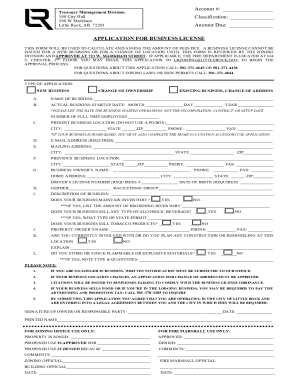
Filling out the AR Application For Business License online can streamline the process of obtaining the necessary permits to operate your business in Little Rock. This guide provides step-by-step instructions tailored to assist users in completing the form accurately and efficiently.
Follow the steps to fill out the AR Application for Business License online.
- Click ‘Get Form’ button to obtain the form and open it in the editor.
- Begin by entering your account number in the designated field. If you do not have an account number, you may leave this field blank.
- Specify the classification of your application. Options include new business, change of ownership, or existing business change of address.
- In section A, provide the name of your business. Ensure the name reflects the name under which you will operate.
- In section B, record the actual business startup date. Note that this refers to when operations began, not the date of incorporation.
- Indicate the number of full-time employees your business will have in the field provided.
- Section C requires your present business location, including the city, state, zip code, phone number, and fax number. A physical address is mandatory; do not use a P.O. Box.
- In section D, enter your required email address. This is essential for communication regarding your application.
- Fill in your mailing address in section E, ensuring accuracy in the city, state, and zip code fields.
- Section F asks for the previous business location if applicable. Include the relevant details like the city and zip code.
- Provide the business owner's name in section G, followed by their contact information including phone, fax, and home address.
- You must enter the driver's license number and date of birth in the specified fields, as they are required for the application.
- Section H asks for demographic information, including gender and race/ethnic group. These may not be required but are crucial for data collection.
- In section I, describe your business. Include details that showcase what your business will offer and any necessary permits you may need.
- Respond to inventory and sales inquiries and if you deal with alcoholic beverages or tobacco products.
- In section J, include the property owner's name and contact details if your business operates in a leased space.
- Indicate any planned construction or remodeling in section K, and provide details if applicable.
- Answer the final questions about the storage of flammable or explosive materials in section L, adding any necessary explanations.
- Review the application for any necessary signatures and dates, ensuring everything is filled out correctly.
- Once all sections are complete, save your changes, and proceed to download, print, or share the completed form as needed.
Complete your documents online to facilitate a smooth application process.
For example, the city of Little Rock requires a general business operating license for all businesses in the city. To find your local government office, head to Arkansas' Local Government Portal website.
Industry-leading security and compliance
US Legal Forms protects your data by complying with industry-specific security standards.
-
In businnes since 199725+ years providing professional legal documents.
-
Accredited businessGuarantees that a business meets BBB accreditation standards in the US and Canada.
-
Secured by BraintreeValidated Level 1 PCI DSS compliant payment gateway that accepts most major credit and debit card brands from across the globe.