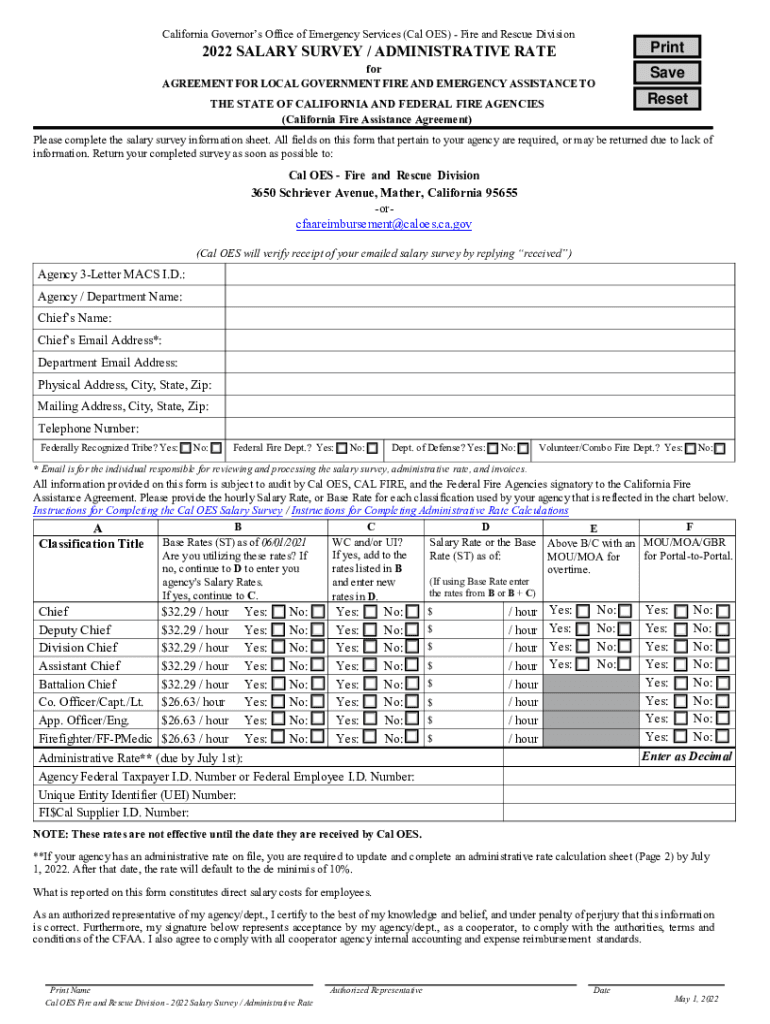
California Governors Office of Emergency Services (Cal YES) Fire and Rescue Division2022 SALARY SURVEY / ADMINISTRATIVE RATEPrintfor AGREEMENT FOR LOCAL GOVERNMENT FIRE AND EMERGENCY ASSISTANCE TOSaveResetTHE.
Loading

Open form follow the instructions

Easily sign the form with your finger

Send filled & signed form or save
How to fill out the CA Salary Survey/Administrative Rate online
Completing the California Salary Survey/Administrative Rate efficiently is vital for local government fire and emergency assistance agreements. This guide provides clear and detailed instructions to assist users in filling out the form online accurately.
Follow the steps to complete your salary survey and administrative rate.
- Click 'Get Form' button to obtain the form and open it in the online editor.
- Begin by entering your agency's 3-Letter MACS I.D. in the designated field. Ensure that this identifier is accurate, as it is crucial for processing.
- Fill in the 'Agency/Department Name' field with the full name of your agency or department. This must reflect the official title used in agency documentation.
- Provide the name and email address of the chief in the respective fields. This information is necessary for communication regarding the salary survey.
- Complete the physical address section with your agency's location details, including the city, state, and zip code.
- Fill out the mailing address fields similarly, ensuring you provide the correct information for correspondence.
- Enter the telephone number for your agency. This contact information may be used for follow-up inquiries.
- Indicate whether your agency is a federally recognized tribe, federal fire department, or department of defense by selecting 'Yes' or 'No' in the relevant fields.
- In the salary rate section, enter the hourly salary rate or base rate for each classification used by your agency, following the chart provided.
- Complete the administrative rate section due by July 1st, entering allowable costs and ensuring all calculations are correct.
- Review all entered information for accuracy. After confirming that all sections are complete, save your changes.
- Download, print, or share the completed form as needed. Ensure that the form is returned to the Cal OES - Fire and Rescue Division promptly.
Complete your CA Salary Survey/Administrative Rate online today to ensure your agency's information is accurately submitted.
Experience a faster way to fill out and sign forms on the web. Access the most extensive library of templates available.
Related content
Salary Survey / Administrative Rate. The salary survey can be updated any time...
19 Jan 2021 — That is a 10% reduction. 2. In Fiscal Year 2019-2020, salaries were...
This is a guide to help you understand your Leave and Earnings Statement (LES)....
Use professional pre-built templates to fill in and sign documents online faster. Get access to thousands of forms.
If you believe that this page should be taken down, please follow our DMCA take down process here.